

Introduction
Modern cars have become increasingly dependent on large infotainment displays, smartphone connectivity and integrated navigation. Features such as Apple CarPlay and Android Auto are now almost expected, but that doesn’t mean everyone wants to replace a perfectly good vehicle just to enjoy them.
Fortunately, upgrading an older car doesn’t necessarily involve replacing the factory stereo, dismantling the dashboard or spending hundreds of pounds on a complicated installation.
Portable CarPlay displays offer a considerably simpler solution.
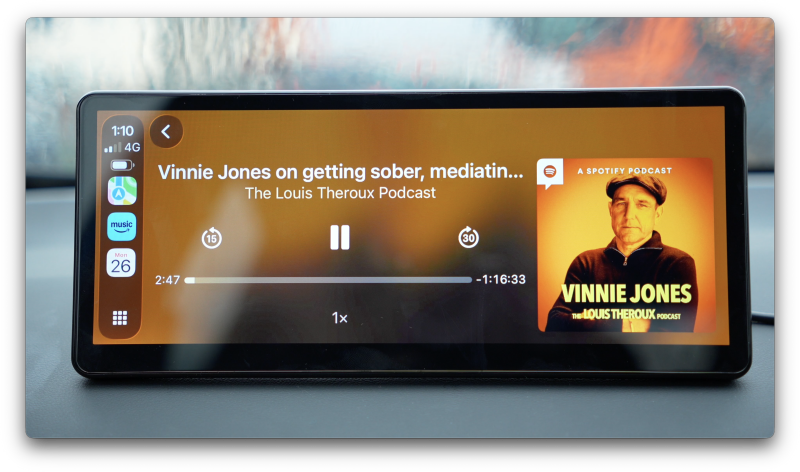
Mount a screen on the dashboard, connect your smartphone and suddenly you’ve got access to navigation, music, messages and hands-free calling through a modern touchscreen interface.
The concept is excellent. The execution, however, varies enormously.
Spend a few minutes browsing Amazon and you’ll find countless inexpensive portable CarPlay screens promising almost identical features. While many deliver the basics, compromises often become apparent through disappointing display quality, sluggish interfaces, unreliable wireless connections and mounting systems that feel like an afterthought.
The CarpodGo T4 Plus aims to offer something more refined.
Rather than trying to become another Android-powered entertainment tablet, the T4 Plus concentrates on delivering a premium Apple CarPlay and Android Auto experience.
It features a large 10.9-inch fully laminated IPS display, a sharp 1920 × 720 resolution, claimed 1000-nit brightness, 60fps wireless CarPlay support and a magnetic quick-release mounting system.
There’s also an interesting audio feature that allows the display to work alongside your vehicle’s existing Bluetooth system, potentially making it particularly attractive for older cars that already have decent factory audio.
But these improvements come at a price.
The T4 Plus sits above many of the budget alternatives, raising an important question: is it genuinely worth paying extra for a better portable CarPlay experience?
After spending time with the larger 10.9-inch model, there are several things that stand out — and a few compromises worth understanding before buying.
Quick Summary
The CarpodGo T4 Plus is a premium portable wireless CarPlay and Android Auto display designed to modernise older vehicles without replacing their existing infotainment systems.
Its biggest strengths are its excellent screen quality, impressive daylight visibility, smooth interface performance and thoughtful magnetic mounting system.
During testing, wireless CarPlay generally connected quickly and performed reliably. The touchscreen felt responsive, navigation was easy to follow and the large display made everyday interactions particularly comfortable.
The Display Only Bluetooth Mode is another standout feature, allowing compatible vehicles to retain their original Bluetooth audio connection while using the CarpodGo for navigation and smartphone controls.
However, the larger screen won’t suit every dashboard, reflections remain noticeable in certain lighting conditions and the power cable requires some consideration if you want a particularly tidy installation.
There’s also the question of value. The smaller 8.9-inch CarpodGo T4 offers essentially the same technology in a more compact package.
Overall, the T4 Plus is an impressive portable CarPlay display, but its larger screen makes the most sense in vehicles with enough dashboard space to accommodate it comfortably.
What’s in the Box?
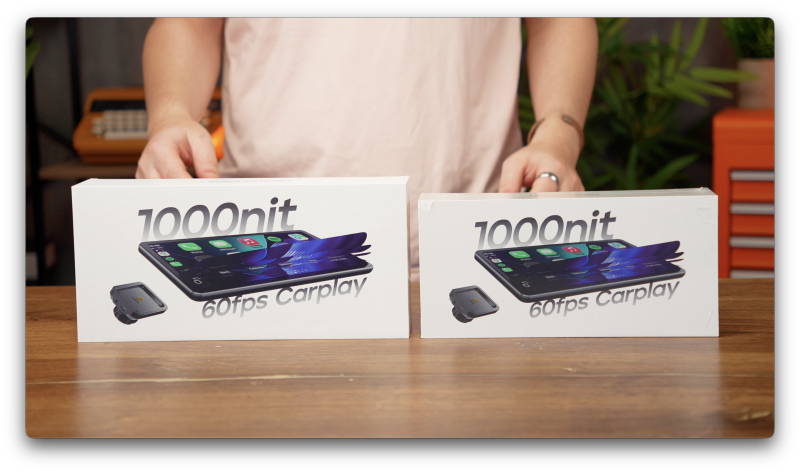
CarpodGo keeps the packaging relatively straightforward, with the essential accessories needed to install and start using the display.
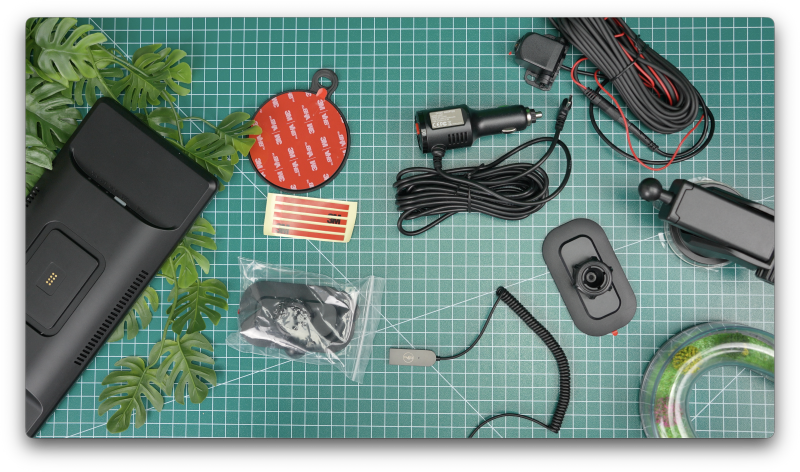
Inside the standard T4 Plus package, you’ll find:
- CarpodGo T4 Plus 10.9-inch display
- Fixed dashboard mounting bracket
- Suction cup mounting accessory
- Dedicated 9V power cable
- User manual and setup documentation
The inclusion of two mounting options is particularly welcome.
Different vehicles have very different dashboard layouts, so having some flexibility when positioning a large display makes the installation process considerably easier.
The dedicated power cable is also worth highlighting.
Unlike certain inexpensive portable CarPlay screens that can operate from a basic USB connection, the T4 Plus requires an appropriate 9V power supply.
CarpodGo recommends using the supplied cable or a compatible USB-C Power Delivery source capable of supplying 9V.
That means you shouldn’t automatically assume that a standard USB socket in your vehicle will provide sufficient power.
It’s a small detail, but an important one to understand before installation.
An optional 1080p reversing camera is also supported, although this is a separate accessory rather than something included with the standard package.
Design & Build Quality
A More Refined Approach to Portable CarPlay
One of the first things you’ll notice about the CarpodGo T4 Plus is just how substantial the display feels.
At 10.9 inches, it’s considerably wider than many traditional portable CarPlay units, giving it an appearance closer to a modern factory-installed widescreen infotainment system.
Despite its size, the overall design remains relatively understated.
The front is dominated by the display, surrounded by slim bezels and a clean black finish. There aren’t unnecessary decorative elements, oversized buttons or exaggerated styling details.
That simplicity works in its favour.
After all, the ideal portable CarPlay display should complement the interior rather than look like an unrelated gadget attached to the dashboard.
The fully laminated screen also contributes to the premium appearance.
When switched off, the front has a cleaner, more unified black finish than the recessed displays commonly found on cheaper alternatives.
Dimensions and Weight
The T4 Plus measures approximately:
261 × 112.5 × 21mm
The display itself weighs approximately 450g, excluding the mounting base.
Those figures help explain why positioning matters.
Although the screen maintains a relatively slim profile, it’s still a sizeable piece of hardware to mount above an existing dashboard.
The width is particularly noticeable.
In a larger vehicle, this can look surprisingly natural. In a compact hatchback, however, it may dominate the interior.
Build quality is reassuring overall, and the screen doesn’t give the impression of being a cheap tablet attached to a generic stand.
It’s clearly designed around its primary purpose: providing a dedicated smartphone interface inside a vehicle.

Setup & First Impressions
Installation Without Replacing Your Factory Stereo
One of the biggest attractions of the CarpodGo T4 Plus is how little work is required to get started.
There’s no need to remove the original radio, install a replacement head unit or modify the vehicle’s existing wiring.
Instead, the installation process revolves around finding a suitable position, attaching the mounting system and connecting power.
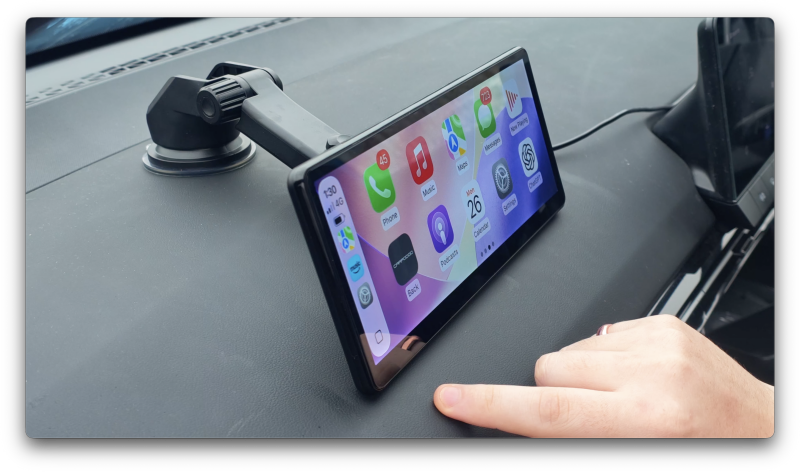
The adjustable ball-joint mount allows the screen angle to be changed once installed, helping you position it for comfortable viewing.
The physical installation is straightforward.
However, there’s an important recommendation that shouldn’t be overlooked.
Supporting the Screen Properly
CarpodGo recommends positioning the T4 Plus so that the bottom edge of the display rests against the dashboard.
This provides additional support rather than leaving the entire screen suspended from the mounting bracket.
Given the size and weight of the 10.9-inch display, that advice makes sense.
During use, supporting the lower edge helps improve stability when interacting with the touchscreen and reduces some of the movement that can occur when driving over uneven roads.
The challenge is finding the right location.
Ideally, the screen should be:
- Easily visible without requiring excessive head movement
- Within comfortable reach
- Clear of important dashboard controls
- Positioned away from air vents where possible
- Installed without obstructing the driver’s view of the road
It’s also important to consider airbags and other safety equipment when choosing a mounting location.
This is where the T4 Plus requires slightly more planning than its smaller sibling.
The installation itself isn’t difficult, but finding a position that looks tidy, remains stable and doesn’t interfere with the vehicle’s interior may take some experimentation.
CarpodGo T4 vs T4 Plus: What’s Actually Different?
Before getting into display quality and performance, it’s worth addressing something that could influence your buying decision.
CarpodGo offers two versions of its T4 display.
The standard CarpodGo T4 features an 8.9-inch screen, while the T4 Plus increases that to 10.9 inches.
Initially, you might assume the larger model also includes more powerful hardware or additional functionality.
Surprisingly, that isn’t really the case.
Both models share essentially the same core features.
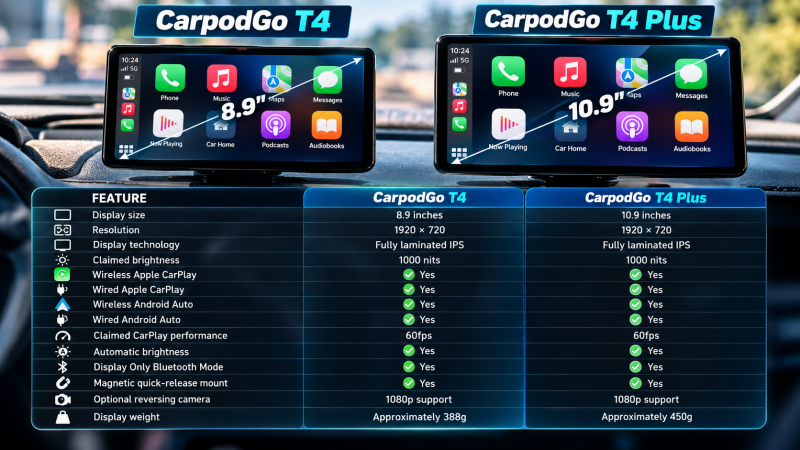
The most important takeaway is that the T4 Plus isn’t necessarily the better-performing model. It’s simply the larger one.
Both displays have exactly the same 1920 × 720 resolution.
Consequently, the smaller T4 actually offers a higher pixel density because those pixels are concentrated into a smaller area.
The larger T4 Plus doesn’t provide additional resolution or fundamentally more detail.
Instead, it presents the same interface across a larger physical screen.
That distinction matters.
For smaller cars, the standard 8.9-inch T4 is arguably the more practical choice. It occupies less dashboard space, is easier to position and offers the same essential functionality.
However, the T4 Plus becomes more appealing in larger vehicles.
SUVs, vans, pickups and cars with deeper dashboards can benefit from the additional screen size, particularly when the display sits farther away from the driver.
In my setup, the larger display has been particularly enjoyable for navigation, with maps and controls remaining exceptionally easy to see at a glance.
Nevertheless, bigger isn’t automatically better.
It’s worth measuring your available dashboard space before deciding which version to buy.
Display Quality: One of the T4 Plus’s Biggest Strengths
A Sharp 1920 × 720 Fully Laminated IPS Panel
If there’s one area where the CarpodGo T4 Plus makes a particularly strong impression, it’s the display.
The 10.9-inch panel features a native resolution of 1920 × 720 pixels, giving it a wide aspect ratio that works naturally with modern CarPlay interfaces.
Compared with many inexpensive portable displays, the improvement in clarity is noticeable.
Text appears sharp, navigation labels remain easy to read and smaller interface elements retain good definition.
This becomes particularly useful when running navigation alongside music controls.
Rather than feeling cramped or visually cluttered, the interface has enough physical space to present information clearly.
The screen also uses full lamination.
Essentially, this reduces the visible gap between the outer glass and the display underneath.
On cheaper screens, that gap can make the image appear recessed, almost as though you’re looking through a separate layer of plastic.
With the T4 Plus, icons and interface elements appear closer to the surface.
The result is a more immediate, modern-looking display that feels closer to the screens found in newer vehicles.
Colour Reproduction
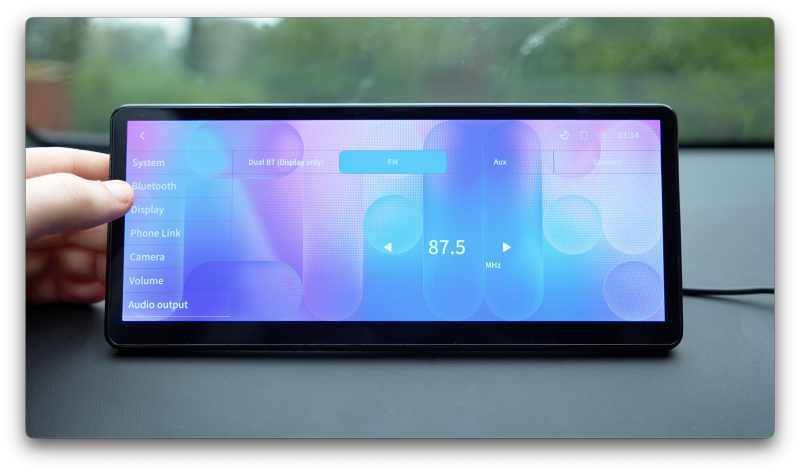
CarpodGo advertises 100% sRGB colour coverage.
That’s a promising specification, although it’s important to distinguish between the manufacturer’s claim and independently verified performance.
I haven’t measured the display using a colourimeter, so I can’t confirm its exact colour accuracy or calibration.
Visually, however, the results are impressive.
Colours appear rich without looking excessively exaggerated, while app icons, album artwork and navigation interfaces have a pleasing amount of contrast.
The display avoids the noticeably washed-out appearance that can affect cheaper portable CarPlay units.
Of course, this isn’t a screen intended for professional colour work.
What matters is whether navigation, media controls and other information look clear and attractive during everyday driving.
In that respect, the T4 Plus performs very well.
Brightness and Daylight Visibility
Does the Claimed 1000-Nit Display Make a Difference?
Brightness is arguably more important than colour accuracy when choosing a screen for your car.
Unlike a smartphone or tablet, an in-car display must remain readable in constantly changing lighting conditions.
Direct sunlight, reflections from windows and bright skies can quickly expose the limitations of a dim panel.
CarpodGo rates the T4 Plus at 1000 nits.
Again, I haven’t independently measured that figure, so it should be treated as the manufacturer’s specification.
What I can say is that the screen is genuinely bright in everyday use.
During daylight driving, maps, album artwork and navigation information have remained easy to see.
This is a meaningful improvement over portable screens that become difficult to read whenever sunlight enters the cabin.
The combination of strong brightness and a relatively sharp display makes the T4 Plus particularly effective for navigation.
Automatic Brightness and Night Driving
Another useful feature is automatic brightness adjustment.
The display can adapt its brightness to changing ambient conditions, while its day and night appearance helps make the interface more comfortable after dark.
This is especially important with such a large screen.
A bright white navigation interface might look excellent during the afternoon, but the same display can become distracting when driving along an unlit road at night.
During testing, the automatic brightness system generally handled these transitions well.
The screen remained bright enough during the day without feeling unnecessarily harsh once conditions became darker.

The One Display Weakness: Reflections
Despite the impressive brightness, the T4 Plus isn’t completely free from glare.
The screen has a fairly glossy finish, meaning reflections from windows and interior surfaces can still appear at certain angles.
The high brightness helps overcome those reflections, but it doesn’t eliminate them.
This is one area where stronger anti-reflective treatment would be welcome.
It’s not a major problem during normal use, but it’s worth considering if your dashboard receives a lot of direct sunlight.
Features & Performance
60fps Wireless CarPlay: Smoothness You Can Actually Notice
CarpodGo makes a significant point of advertising 60fps wireless Apple CarPlay.
At first glance, that might seem like an unnecessary specification for something primarily used to display maps and music controls.
However, anyone who has used a particularly sluggish portable CarPlay screen will understand why it matters.
Some budget units technically deliver all the expected features but feel noticeably slow when navigating the interface.
Swiping between menus can appear jerky, animations lack fluidity and moving around maps doesn’t feel particularly responsive.
The T4 Plus delivers a noticeably more polished experience.
During testing, CarPlay animations appeared smooth, menus responded quickly and navigating around Apple Maps felt natural.
Touch responsiveness was another positive.
Buttons reacted promptly, interface interactions felt immediate and there wasn’t the obvious input delay that can make cheaper touchscreens frustrating.
I haven’t independently verified the exact frame rate using specialised testing equipment, so I can’t confirm that the display maintains precisely 60fps in every situation.
Nevertheless, the experience is convincingly fluid.
And ultimately, that’s what matters most.
A specification is only valuable when it translates into something you can appreciate during everyday use.
Here, the smoothness contributes significantly to the impression that you’re using a modern infotainment system rather than an inexpensive aftermarket accessory.
Wireless Apple CarPlay
Connecting an iPhone is relatively simple.
With Bluetooth enabled, you pair the phone with the CarpodGo display and approve the CarPlay connection.
Once the initial setup is complete, the system can reconnect automatically when the display starts.
You don’t need to manually join the CarpodGo’s Wi-Fi network every time you enter the vehicle.
In my experience, reconnection has generally been quick and reliable.
That’s particularly important for a device like this.
The appeal of wireless CarPlay is convenience. If you’re constantly navigating connection menus or waiting for the system to recognise your phone, that convenience quickly disappears.
Fortunately, the T4 Plus has behaved well during testing.
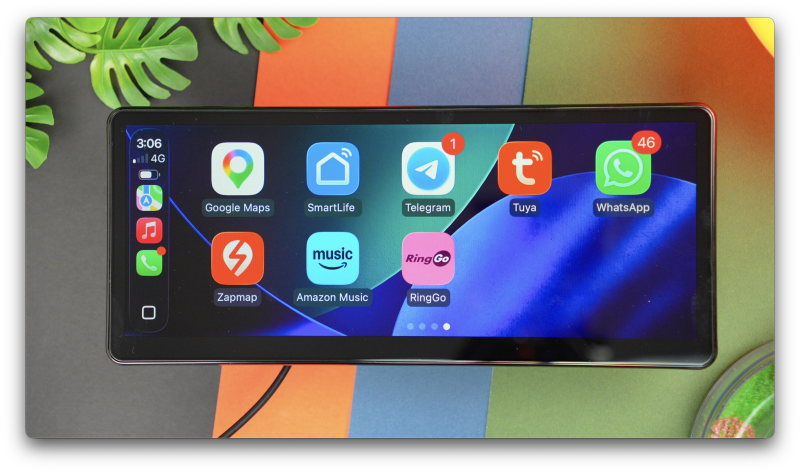
Once connected, you’re presented with the familiar Apple CarPlay interface.
Navigation, music, podcasts, phone calls and compatible messaging apps all work through the connected iPhone.
There’s no complicated additional operating system to learn.
For anyone already familiar with CarPlay, the experience should feel immediately recognisable.
Wireless and Wired Android Auto
Android users are equally well catered for.
The T4 Plus supports both wireless and wired Android Auto, allowing compatible Android smartphones to access navigation, music and other supported applications.
The basic principle is the same as Apple CarPlay.
Your smartphone provides the applications and underlying functionality, while the CarpodGo acts as the external display and control interface.
Although this review focuses primarily on the Apple CarPlay experience, Android Auto support makes the T4 Plus a more flexible option for households using different smartphones.
It’s also useful if you switch between iPhone and Android devices in the future.

A Dedicated Display, Not an Android Tablet
One important distinction is that the T4 Plus isn’t designed to operate as a standalone Android entertainment system.
It uses a lightweight Linux-based operating system rather than full Android.
That means you don’t get the Google Play Store, and you can’t install conventional Android tablet applications directly onto the display.
You also shouldn’t expect to install Netflix or YouTube and use the unit as a standalone streaming tablet.
Instead, the T4 Plus concentrates on displaying compatible smartphone interfaces.
Personally, I think that’s the right approach for this type of product.
Rather than introducing another complicated operating system, CarpodGo has focused on making the core CarPlay experience feel responsive and reliable.
However, if you’re specifically looking for a dashboard entertainment tablet with standalone applications, this isn’t the product to choose.
Display Only Bluetooth Mode: A Surprisingly Useful Feature
One of the more interesting features of the CarpodGo T4 Plus is something called Display Only Bluetooth Mode.
The name isn’t particularly exciting, but the functionality could make a substantial difference depending on your vehicle.
With many portable CarPlay screens, your smartphone connects to the display, which then needs to transmit audio to the car.
That might involve an AUX connection, FM transmission or another wireless audio arrangement.
These solutions can work, but they aren’t always ideal.
Audio quality, connection stability and latency can vary depending on the equipment involved.
CarpodGo offers a different approach.
With Display Only Bluetooth Mode, the T4 Plus handles the visual CarPlay interface while your smartphone continues sending audio directly to the vehicle’s original Bluetooth system.
Essentially, the display and audio are handled separately.
Why This Matters for Older Cars
Imagine owning a car that already has a perfectly good Bluetooth stereo but doesn’t support Apple CarPlay.
You might be completely happy with the existing speakers, audio quality and steering-wheel controls.
The only thing missing is a modern interface for navigation and smartphone applications.
In that situation, replacing the entire factory stereo can feel unnecessary.
Display Only Bluetooth Mode allows you to add the CarPlay screen while continuing to use your existing audio setup.
Music can still play through the original car speakers, while volume controls and potentially other factory functions remain available.
Depending on the vehicle, you may also retain steering-wheel track controls and the original microphone for calls.
Those features aren’t guaranteed in every car, so compatibility is worth checking.
Nevertheless, it’s a thoughtful solution to a common problem.
For vehicles with an existing Bluetooth system, this would probably be my preferred audio arrangement.
It also avoids relying on FM transmission when a better direct audio connection is already available.
Audio Options: Bluetooth, AUX, FM and Built-In Speaker
Not every older vehicle has Bluetooth connectivity.
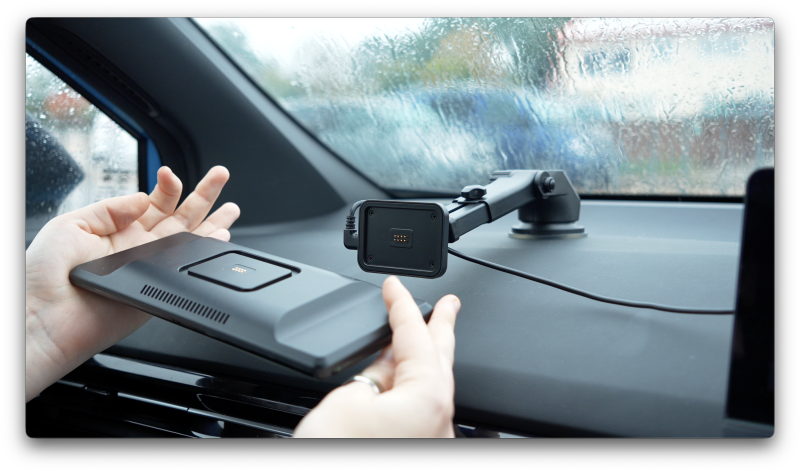
Fortunately, the T4 Plus provides several alternative audio options.
3.5mm AUX Output
If your car has an AUX input, you can connect the display directly to the existing stereo using a compatible audio cable.
For vehicles with a suitable AUX connection, this can provide a straightforward alternative to wireless audio transmission.
FM Transmission
The built-in FM transmitter allows audio to be played through a vehicle’s radio by tuning both devices to an appropriate frequency.
It’s a useful fallback for older vehicles without Bluetooth or AUX.
However, FM transmission can be affected by interference and local radio congestion, so it wouldn’t necessarily be my first choice where another connection is available.
Built-In Speaker
The T4 Plus also includes its own speaker.
This is convenient if you simply need to hear navigation instructions without connecting to the car’s audio system.
For music, however, expectations should remain realistic.
The built-in speaker is adequate as a fallback, but it isn’t something I’d recommend for regular listening.
Using the vehicle’s existing stereo is a considerably better option.
The flexibility is appreciated, though.
Whether your car has modern Bluetooth connectivity or a much older radio, there’s a reasonable chance you’ll find a workable audio arrangement.
Magnetic Quick-Release Mount: One of the Best Features
While the display quality attracts most of the attention, one of my favourite features of the T4 Plus is actually its mounting system.
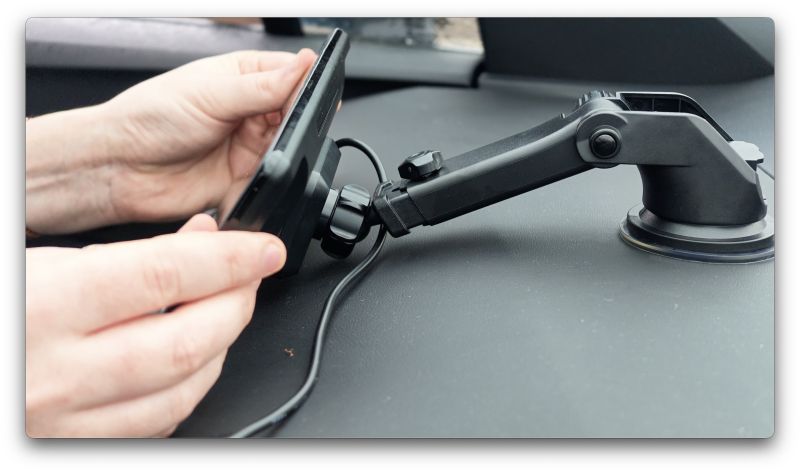
CarpodGo uses a magnetic quick-release mechanism with integrated pogo-pin connections.
Instead of plugging a cable directly into the display every time you install it, the electrical connection is incorporated into the mounting base.
The screen simply attaches magnetically.
When you want to remove it, you can lift it away without disconnecting the power cable.
It’s a relatively simple idea, but one that makes a surprising amount of sense in everyday use.
Easier Removal When Parking
Portable CarPlay screens are convenient, but leaving an expensive display permanently visible on the dashboard isn’t always ideal.
With the T4 Plus, removing the screen when you park takes very little effort.
That allows you to store it out of sight rather than leaving it prominently displayed inside the vehicle.
Of course, removing the screen doesn’t guarantee protection against theft, but it does make it easier to avoid leaving an obvious accessory on show.
Protection From Excessive Heat
Cars can become extremely hot when parked in direct sunlight.
Being able to remove the display also means you don’t have to leave it exposed behind the windscreen for extended periods.
This is particularly useful during warmer weather.
Less Wear on Connectors
Another advantage is that you’re not repeatedly inserting and removing a power cable from the display itself.
The pogo-pin connection handles power delivery through the mount.
It’s a more convenient arrangement and reduces the need to repeatedly handle the display’s physical connector.
During testing, the magnetic attachment felt reassuringly secure.
There wasn’t a sense that the screen was likely to detach during ordinary driving.
Combined with the recommendation to support the bottom edge against the dashboard, the system feels well considered.
For something you’ll potentially use every day, this is exactly the sort of practical feature that can make a difference over time.
Optional 1080p Reversing Camera
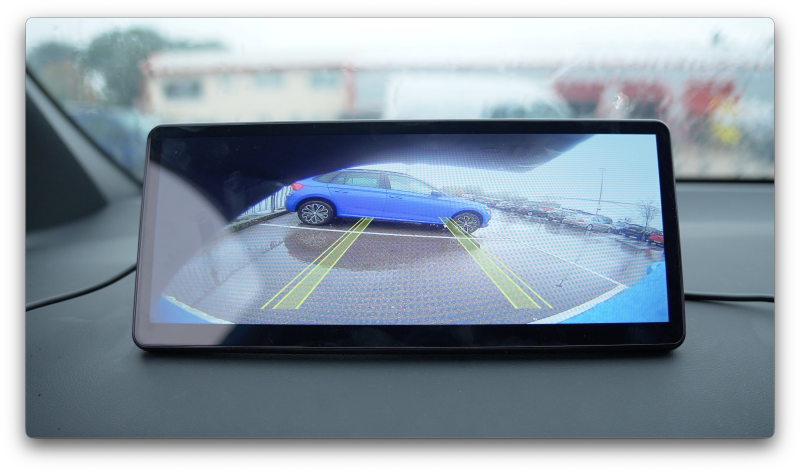
Both the T4 and T4 Plus support an optional 1080p reversing camera.
This can be particularly useful for older vehicles that don’t already have a factory reversing camera.
When correctly installed and connected, the display can automatically switch to the camera feed when reverse gear is selected.
That adds another layer of practicality beyond smartphone connectivity.
For larger vehicles, especially vans and SUVs, additional rear visibility can be valuable when manoeuvring in confined spaces.
However, it’s important to understand that installing the camera is more involved than installing the CarPlay screen.
The display itself is largely a plug-and-play accessory.
A reversing camera typically requires additional wiring and appropriate positioning at the rear of the vehicle.
Depending on your confidence with automotive electrical installations, professional fitting may be preferable.
The camera is also an optional purchase rather than part of the standard package.
Still, it’s a useful upgrade path for drivers looking to bring more modern convenience features to an older car.
As with any reversing camera, it should supplement rather than replace proper observation when manoeuvring.
Real-World Experience: Living With the CarpodGo T4 Plus
The Best Technology Is the Technology You Stop Thinking About
After spending time with the CarpodGo T4 Plus, one of the things I’ve appreciated most is how naturally it fits into everyday driving.
Once the display is mounted, powered and paired with your phone, there isn’t much reason to interact with CarpodGo’s own interface.
You start the car, CarPlay connects and you’re presented with the familiar applications you already use.
Apple Maps, Spotify, Apple Music, podcasts and phone controls are all accessible through the large touchscreen.
And that’s exactly how a product like this should behave.
I don’t particularly want another complicated infotainment system with its own collection of applications and menus.
I simply want CarPlay to appear reliably, respond quickly and remain easy to use.
The T4 Plus does that well.
Navigation Is Where the Larger Screen Shines
The 10.9-inch display is particularly enjoyable when using navigation.
Maps are large and clear, road names are easy to read and upcoming directions are visible without needing to concentrate on tiny interface elements.
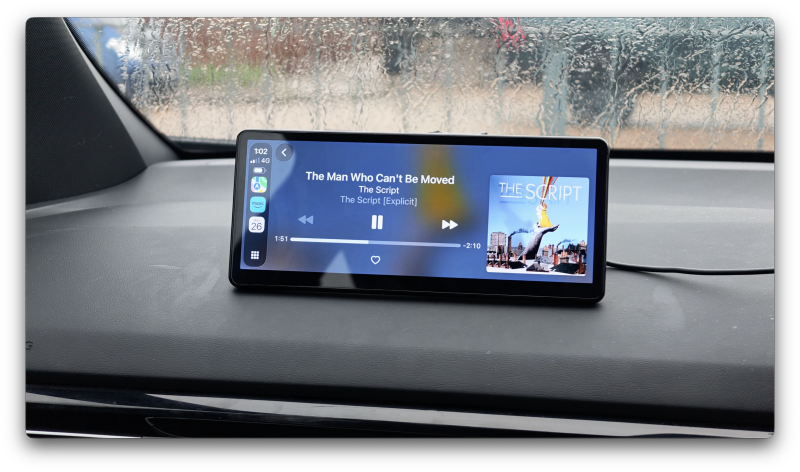
The wide aspect ratio also works nicely with CarPlay’s dashboard view.
Being able to display navigation alongside media information makes the interface feel considerably more useful than a small standalone screen.
For longer journeys, that additional physical display area is genuinely welcome.
It can also be beneficial in vehicles where the screen is positioned farther away from the driver.
Everyday Convenience
The wireless connection and magnetic mount complement each other particularly well.
You don’t need to connect your phone physically every time you drive, and you don’t need to unplug the display when removing it.
These are small conveniences individually, but together they make the overall experience feel more polished.
The automatic brightness system is another feature that quietly improves everyday usability.
The screen remains readable during bright conditions without requiring constant manual adjustment.
And when driving after dark, the softer display appearance makes it considerably more comfortable.
What Could Be Better?
Despite its strengths, the CarpodGo T4 Plus isn’t without limitations.
1. It’s More Expensive Than Budget Alternatives
Price is arguably the biggest consideration.
There are plenty of inexpensive portable CarPlay displays offering wireless connectivity, Android Auto, FM transmission and reversing camera support.
On paper, some appear remarkably similar.
The difference with the T4 Plus is less about having a dramatically longer feature list and more about improving the experience of using those features.
You’re paying for a sharper and brighter display, smoother interface performance, a more convenient mounting system and an established firmware support route.
Whether those improvements justify the premium depends on how frequently you’ll use the screen.
For daily driving, I can understand spending more on something that feels polished.
For occasional journeys, a cheaper alternative may be perfectly adequate.
2. Cable Management Still Requires Attention
Although the display itself is portable, it still requires an external power connection.
Unless you’re prepared to route the cable carefully around the dashboard and interior trim, some wiring will remain visible.
The magnetic mount makes removing the display easier, but it doesn’t eliminate the need for power.
Anyone hoping for a completely wireless installation should keep that in mind.
3. The Glossy Screen Can Reflect Light
The 1000-nit brightness rating is impressive, and the display performs well in daylight.
However, the glossy surface can still pick up reflections from windows and interior surfaces.
A stronger anti-reflective coating would make an already excellent display even better.
4. The 10.9-Inch Size Won’t Suit Every Car
This is probably the most important practical limitation.
The T4 Plus is wide, and its size can make installation more challenging in compact vehicles.
You need enough room to position it safely without obstructing visibility, air vents or important controls.
The smaller 8.9-inch T4 offers the same core technology and may be the more sensible choice for many drivers.
5. It’s Not a Standalone Entertainment System
The lightweight Linux operating system keeps the product focused, but it also limits what you can do independently of a connected smartphone.
You can’t install conventional Android applications directly onto the display.
If standalone video streaming and tablet-style functionality are priorities, you’ll need to consider a different category of device.
Pros and Cons
Pros
- Excellent 10.9-inch fully laminated IPS display
- Sharp 1920 × 720 resolution
- Very good daylight visibility
- Smooth and responsive wireless CarPlay experience
- Support for both wired and wireless Apple CarPlay
- Wired and wireless Android Auto compatibility
- Useful automatic brightness adjustment
- Display Only Bluetooth Mode works alongside existing factory audio systems
- Convenient magnetic pogo-pin quick-release mount
- Flexible Bluetooth, AUX, FM and speaker audio arrangements
- Optional 1080p reversing camera support
- Straightforward installation without replacing the factory stereo
- Firmware update support
- Particularly good for navigation in larger vehicles
Cons
- Considerably more expensive than many generic portable CarPlay displays
- Glossy screen can produce noticeable reflections
- Large dimensions may overwhelm smaller dashboards
- Visible power cable unless carefully routed
- Requires an appropriate 9V power supply
- Built-in speaker is best reserved for basic audio
- Optional reversing camera requires additional installation
- No standalone Android applications or streaming services
- Smaller T4 offers essentially identical core performance
Who Is the CarpodGo T4 Plus For?
The CarpodGo T4 Plus makes the most sense for drivers who want a premium CarPlay experience without replacing their existing stereo.
It’s particularly appealing for owners of older vehicles that already have a perfectly functional audio system but lack modern smartphone integration.
Rather than paying for a replacement head unit and potentially complicated installation, the T4 Plus provides a straightforward way to add wireless CarPlay or Android Auto.
The large display also makes it attractive for drivers who rely heavily on navigation.
If you regularly travel long distances, use unfamiliar routes or simply prefer having larger maps and controls, the 10.9-inch screen is a genuine advantage.
Owners of SUVs, vans and other vehicles with spacious dashboards are likely to find the larger dimensions easier to accommodate.
The magnetic quick-release mount also makes sense for anyone who prefers not to leave an expensive display permanently visible inside their vehicle.
Who Should Consider the Smaller T4 Instead?
If you drive a compact hatchback, smaller saloon or vehicle with limited dashboard space, the standard 8.9-inch T4 is probably the more practical option.
You still get the same resolution, claimed brightness, wireless connectivity and magnetic mounting system.
The main compromise is simply having a smaller screen.
In fact, because both models share the same resolution, the smaller display technically offers a higher pixel density.
For many vehicles, that makes the standard T4 the more balanced choice.
Who Should Look Elsewhere?
The T4 Plus is less suitable for buyers primarily interested in the cheapest possible way to add CarPlay.
Budget alternatives can provide the basic functionality for considerably less money, even if they don’t always match the refinement.
It’s also not the right choice if you’re looking for a standalone Android tablet capable of installing entertainment applications.
And if your vehicle already has a good factory CarPlay system, the benefits of adding another display may be limited unless you specifically want a larger screen.
Final Verdict: Is the CarpodGo T4 Plus Worth Buying?
The CarpodGo T4 Plus succeeds because it focuses on the aspects of a portable CarPlay display that actually matter during everyday driving.
Rather than relying on an enormous list of features, it concentrates on making the fundamentals feel more polished.
The display is sharp, bright and visually impressive.
Wireless CarPlay feels smooth, touch responsiveness is excellent and the overall interface is considerably more enjoyable than the sluggish experience sometimes associated with inexpensive portable screens.
Display Only Bluetooth Mode is another genuinely useful feature, particularly for older vehicles that already have a good factory audio system.
And the magnetic quick-release mount is one of those thoughtful additions that becomes more valuable the longer you use it.
Being able to remove the screen without disconnecting cables is simple, convenient and particularly well suited to a portable automotive accessory.
However, the T4 Plus isn’t an automatic recommendation for everyone.
Its large screen requires careful positioning, reflections remain noticeable in certain conditions and the premium pricing will be difficult to justify if you only use CarPlay occasionally.
More importantly, the smaller 8.9-inch T4 offers virtually the same experience.
For most compact and medium-sized cars, I’d seriously consider the standard T4 before choosing the Plus.
But if you’ve got a larger dashboard, regularly rely on navigation or simply want the biggest and most comfortable interface available in the range, the 10.9-inch T4 Plus is a very appealing option.
It doesn’t completely eliminate the compromises associated with portable CarPlay displays.
What it does is make the overall experience feel considerably more refined.
And when you’re using something every single day, that refinement can be worth paying for.
Gadget Crunch Verdict: A premium portable CarPlay display with excellent screen quality, smooth performance and genuinely thoughtful features. The T4 Plus is particularly compelling for larger vehicles, although the smaller T4 may offer a better balance for most drivers.
Watch the full cinematic video review on Gadget Crunch’s YouTube channel.
Add comment
Comments