

Introduction
Laptop cooling pads have been around for years, but they’ve never been particularly convincing accessories. Many cheaper models are little more than plastic stands fitted with a handful of small fans, promising dramatic temperature improvements without necessarily delivering a meaningful difference to your laptop’s cooling performance.
The llano V12 Ultra Laptop Cooling Pad takes a considerably more serious approach.
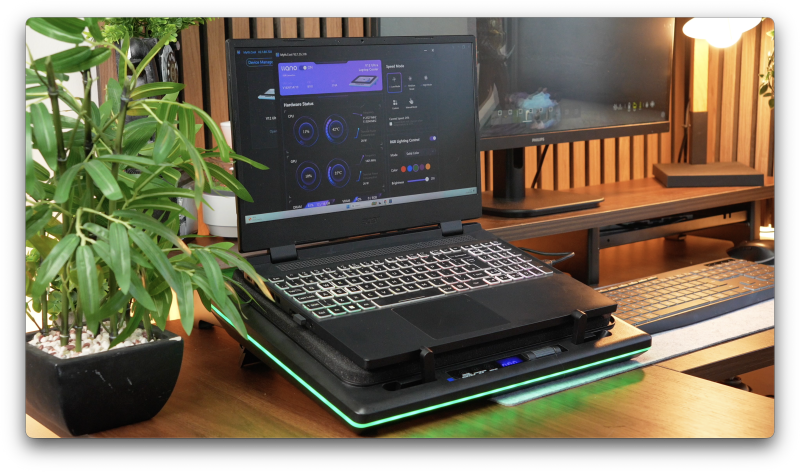
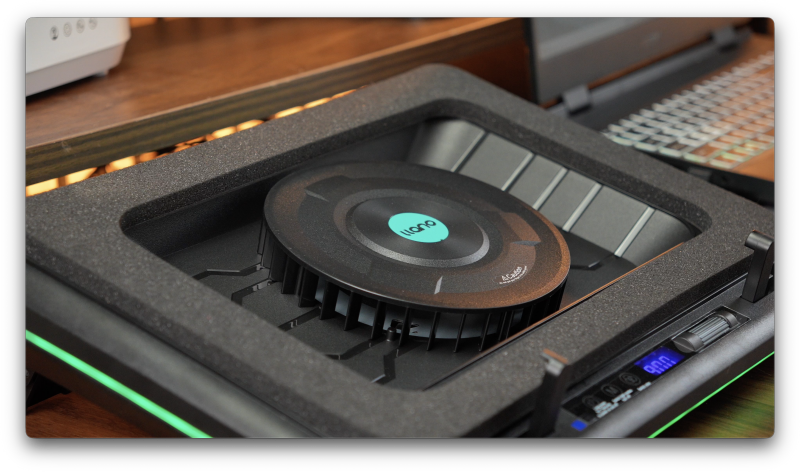
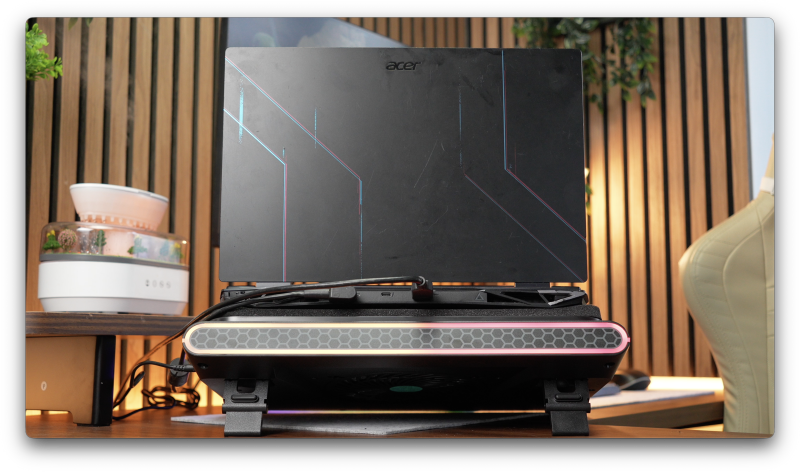
Rather than simply blowing air towards the underside of your laptop, the V12 Ultra combines a large 5.5-inch turbo fan with a memory-foam seal to create a pressurised cooling chamber. The idea is simple but effective: instead of allowing air to escape around the edges, the cooler directs it towards your laptop’s existing intake vents.
With fan speeds reaching 2,800 RPM, a dedicated 36W power supply, intelligent temperature-based fan control, three USB 3.0 ports and customisable RGB lighting, this is clearly more than your average laptop stand.
It’s also a substantial accessory, both physically and in terms of what it asks you to tolerate.
Because while the V12 Ultra promises impressive cooling performance, there’s an unavoidable compromise. Moving this much air generates noise, particularly when that enormous fan approaches its maximum speed.
After spending time using the V12 Ultra with a gaming laptop, the more interesting question isn’t simply whether it can reduce temperatures.
It’s whether the additional cooling, intelligent software and everyday convenience make it worth choosing over a conventional laptop cooling pad.
And perhaps more importantly, whether you actually need this much cooling in the first place.
Quick Summary
The llano V12 Ultra is a premium laptop cooling pad designed primarily for powerful gaming laptops and mobile workstations that generate significant heat during demanding workloads.
Its biggest advantage is the combination of high-pressure cooling and intelligent software control.
Unlike traditional cooling pads, which often struggle to direct airflow effectively, the V12 Ultra uses a sealed chamber to push additional air through compatible laptop intake vents.
The results can be particularly beneficial for machines that regularly operate close to their thermal limits.
The addition of llano’s Myth.cool software makes the Ultra model more practical for everyday use, automatically adjusting fan speed according to CPU and GPU temperatures rather than requiring constant manual adjustments.
However, this additional cooling comes with compromises.
The V12 Ultra is large, relatively heavy, predominantly plastic and requires a separate mains power connection. At higher fan speeds, it also becomes extremely loud.
For a powerful gaming laptop with substantial bottom ventilation, it offers a compelling cooling solution. For everyday laptops that already manage their temperatures comfortably, it’s probably unnecessary.
The biggest selling point isn’t simply maximum cooling performance. It’s having that cooling automatically managed around your workload.
What’s in the Box?
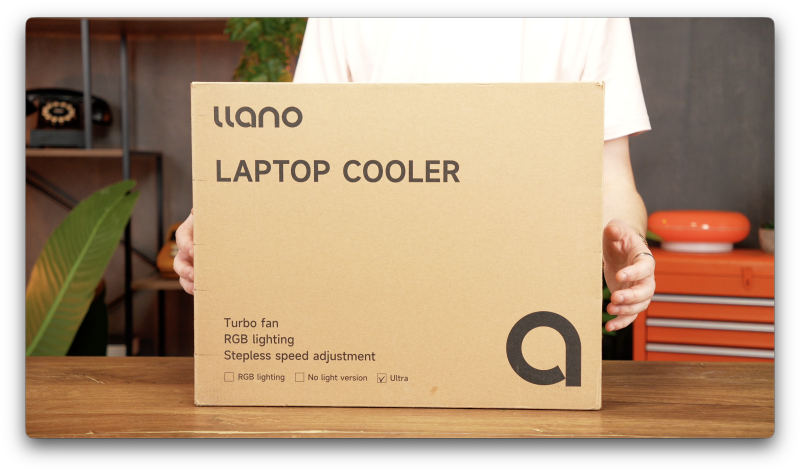
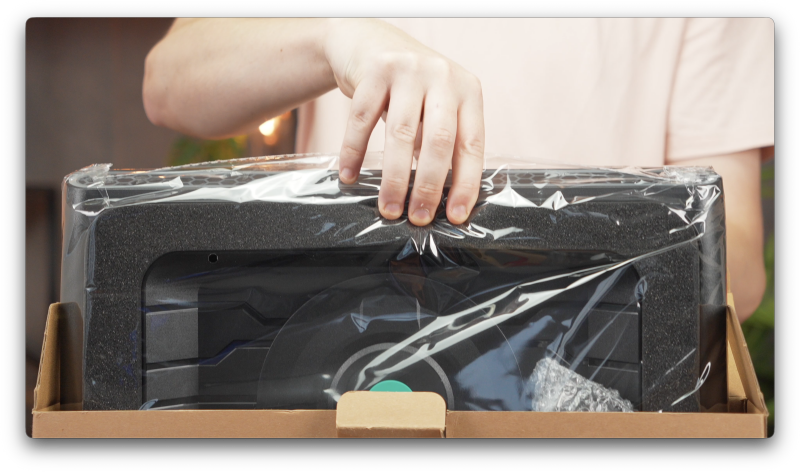
The llano V12 Ultra arrives with everything required to get started.
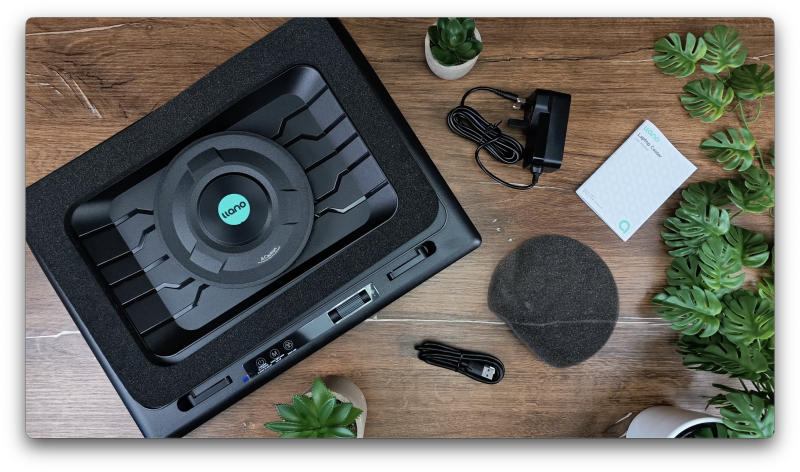
Inside the package, you’ll find:
- 1 × llano V12 Ultra laptop cooling pad
- 1 × 36W power adapter
- 1 × USB-A to USB-C connection cable
- 1 × Memory-foam sealing section
- 1 × Removable dust-filter cover
- 1 × User manual
There’s no complicated installation process or additional hardware required.
The dedicated power adapter provides electricity for the cooling system, while the supplied USB cable connects the pad to your laptop for software functionality and USB hub connectivity.
The memory-foam section is particularly important because it forms the seal that makes the V12 Ultra’s cooling system different from conventional alternatives.
Design & Build Quality
A Substantial Cooling Pad Designed for a Desk
The first thing you’ll notice about the llano V12 Ultra is its size.
This isn’t a lightweight accessory designed to disappear into a laptop bag.
Measuring approximately 43cm across and weighing around 2.15kg according to llano’s published specifications, the V12 Ultra has a substantial footprint.
It’s clearly intended to become a permanent part of a gaming or workstation setup rather than something you’ll regularly carry between locations.
That’s not necessarily a criticism.
The V12 Ultra needs enough physical space to accommodate its large cooling fan, enclosed airflow system and the laptops it’s designed to support.
Official compatibility covers laptops from 15.6 to 19 inches, making it suitable for many larger gaming machines from manufacturers such as ASUS, MSI and Alienware.
However, screen size alone doesn’t guarantee compatibility.
Laptop Ventilation Matters More Than Screen Size
One of the most important considerations when choosing the V12 Ultra is the location of your laptop’s intake vents.
Unlike conventional cooling pads, which simply circulate air underneath the chassis, the V12 Ultra relies on creating a seal between the cooling pad and the laptop.
This allows the fan to build pressure and direct airflow towards the laptop’s internal cooling system.
For the best results, your laptop’s bottom intake vents need to sit within the sealed cooling area.
If your machine has an unusual ventilation arrangement, or the foam overlaps important intake openings, cooling effectiveness could be reduced.
This makes checking the underside of your laptop particularly important before purchasing.
A large gaming laptop with extensive bottom ventilation is likely to be a much better candidate than a thin productivity laptop with minimal intake openings.
Build Quality: Functional Rather Than Luxurious
In terms of construction, the V12 Ultra feels reasonably sturdy.
The overall design is functional, with a predominantly plastic chassis that accommodates the large fan, integrated controls and adjustable stand.
However, considering its premium positioning, the materials don’t necessarily feel as expensive as the product itself.
There’s nothing particularly luxurious about the construction.
Instead, the money appears to be going towards the cooling hardware, intelligent control system and additional functionality.
That’s a reasonable compromise for a product designed around performance, although buyers expecting premium metal construction may be slightly disappointed.
The overall impression is of a substantial, purpose-built cooling accessory rather than a particularly elegant piece of desktop equipment.
Setup & First Impressions
Straightforward Installation
Setting up the llano V12 Ultra is refreshingly simple.
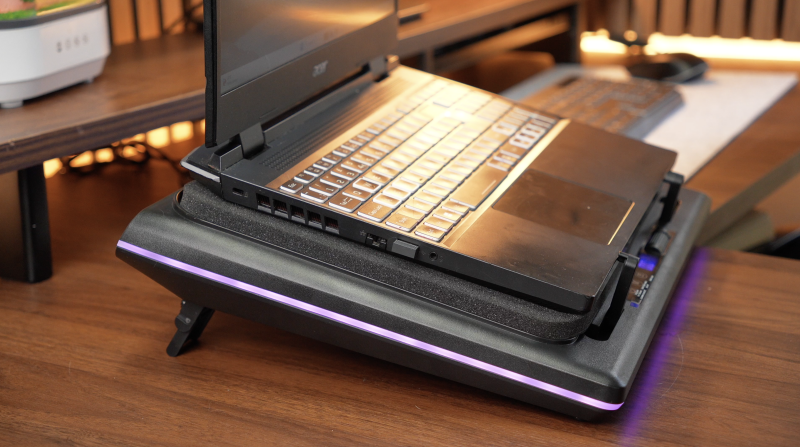
Position your laptop onto the memory-foam seal, connect the dedicated 36W power adapter and the cooler is ready for use.
There’s no requirement to install software before the fan can operate.
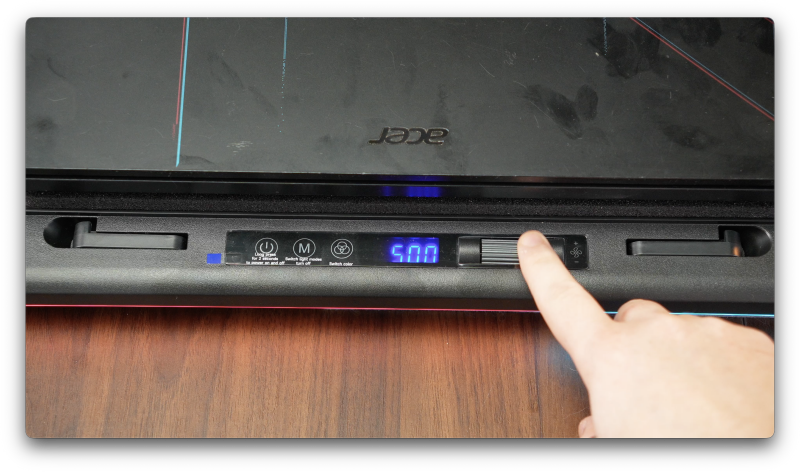
A physical control wheel allows you to adjust fan speed directly, making it possible to use the V12 Ultra as a standalone cooling pad.
This is an important design decision.
While the intelligent software is one of the Ultra model’s main attractions, basic cooling functionality doesn’t depend on an application running in the background.
The fan operates across a range of approximately 300 to 2,800 RPM, giving you considerable control over the balance between airflow and noise.
At lower speeds, the cooler provides a more restrained level of additional ventilation.
Increase the speed and the amount of air being pushed towards the laptop becomes considerably more noticeable.
The Dedicated Power Supply
Unlike many budget cooling pads that draw electricity directly from a laptop’s USB port, the V12 Ultra uses its own 36W power adapter.
This allows the cooling system to operate independently of the laptop’s USB power limitations.
However, it introduces another cable and power brick into your setup.
For a permanent gaming desk, that probably isn’t a major inconvenience.
For someone who regularly moves their laptop between rooms or wants a minimalist workspace, it’s another consideration.
The V12 Ultra is designed to prioritise cooling capability over portability.
And that philosophy becomes even clearer once you start exploring its performance.
Features & Performance
5.5-Inch Turbo Fan and High-Pressure Cooling
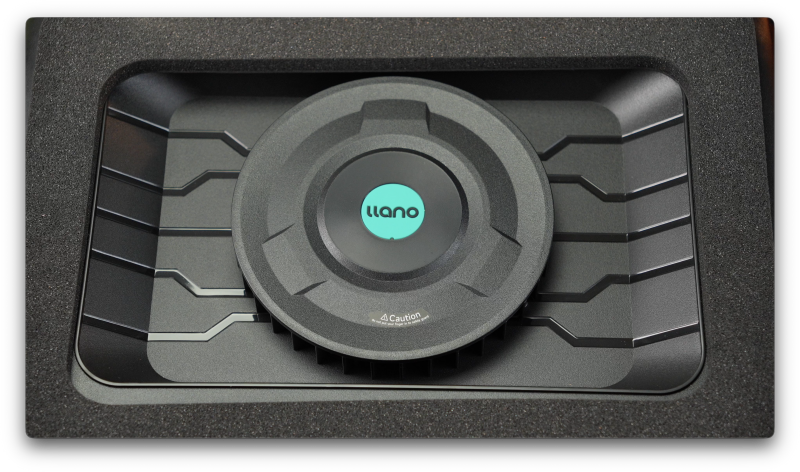
The centrepiece of the V12 Ultra is its large 5.5-inch turbo fan.
Capable of reaching 2,800 RPM, the fan works alongside the enclosed airflow system and memory-foam seal to direct air into the laptop’s underside.
This is fundamentally different from the approach taken by many inexpensive cooling pads.
Traditional designs generally rely on several small fans blowing air towards the laptop’s bottom panel.
Some of that airflow may reach the internal intake vents, but much of it can escape around the sides.
The V12 Ultra attempts to reduce that wasted airflow.
By creating a more controlled cooling chamber, it can push additional air towards the laptop’s existing fans and heatsinks.
For laptops with suitable ventilation, this provides a more direct way of improving cooling performance.
How Much Can It Reduce Temperatures?
llano advertises substantial temperature reductions under controlled testing conditions.
The company’s published material includes claims of temperature improvements exceeding 20°C, with its official V12 Ultra product information referencing reductions of up to 22°C within 90 seconds. The supplied UK retail listing also advertises reductions of up to 25°C.
Those are impressive figures.
However, they should be understood as manufacturer laboratory results rather than guaranteed improvements for every laptop.
Actual performance depends on several variables, including the laptop’s cooling design, intake vent placement, CPU and GPU workload, ambient temperature and the cooling pad’s fan speed.
A gaming laptop with extensive underside ventilation may respond very differently from a machine with restricted airflow.
Similarly, a laptop operating close to its thermal limits has more potential to benefit than one already maintaining comfortable temperatures.
The important distinction is that maximum advertised cooling performance doesn’t necessarily represent the most practical everyday experience.
Running the V12 Ultra at its full 2,800 RPM may produce the strongest cooling effect, but it also introduces substantially more noise.
For everyday gaming, a moderate fan speed can offer a more sensible compromise.
You still benefit from additional airflow without immediately introducing the considerable acoustic penalty associated with maximum performance.
Lower Temperatures Don’t Always Mean Higher FPS
Another important point is the relationship between cooling and gaming performance.
It’s tempting to assume that reducing CPU and GPU temperatures will automatically improve frame rates.
In reality, that isn’t always the case.
Modern gaming laptops dynamically manage their operating temperatures, clock speeds and power consumption.
If a laptop is experiencing thermal throttling, improved cooling may allow its processor or graphics chip to maintain higher clock speeds for longer.
That could translate into more consistent performance during extended gaming sessions.
However, if the laptop is already operating at its intended performance levels, additional cooling may not produce a noticeable increase in FPS.
Instead, the benefit may simply be lower operating temperatures.
That’s still useful.
For gaming laptops regularly handling demanding workloads, reducing internal temperatures can provide additional thermal headroom and potentially help the machine maintain more consistent behaviour over longer sessions.
The key is to understand what problem you’re trying to solve.
If your laptop is already running comfortably, the V12 Ultra may offer less practical benefit than its headline cooling figures suggest.
Noise Levels: The Biggest Compromise
There’s one aspect of the llano V12 Ultra that deserves particular attention.
At maximum fan speed, this cooling pad is loud.
Very loud.
With a large turbo fan forcing air through a relatively confined chamber, substantial airflow inevitably comes with considerable noise.
llano quotes noise levels approaching approximately 70dB at maximum speed.
As with temperature figures, manufacturer noise measurements depend on testing conditions, particularly microphone distance and the surrounding environment.
Nevertheless, the real-world impression is unmistakable.
At 2,800 RPM, the V12 Ultra becomes a dominant source of noise in the room.
It’s not something I’d personally want running beside me at maximum speed throughout an entire working day.
For gamers wearing headphones, the additional noise may be easier to tolerate.
If you’re playing demanding games with a headset, the sound of the cooling pad becomes less intrusive.
However, for productivity tasks, video editing without headphones or simply browsing the internet, maximum fan speed feels excessive.
Fortunately, the V12 Ultra becomes considerably more manageable at lower speeds.
And this is where finding the right balance becomes important.
Rather than automatically pushing the fan to its maximum setting, it makes more sense to identify a speed that delivers useful temperature improvements without unnecessarily increasing noise.
There’s also the question of diminishing returns.
Increasing fan speed may initially produce substantial temperature reductions, but eventually the additional cooling benefit can become relatively small compared with the extra noise.
That balance will vary between laptops.
For many users, the V12 Ultra’s most useful operating range is likely to be somewhere below its maximum capability.
And that’s precisely where its intelligent software becomes particularly valuable.
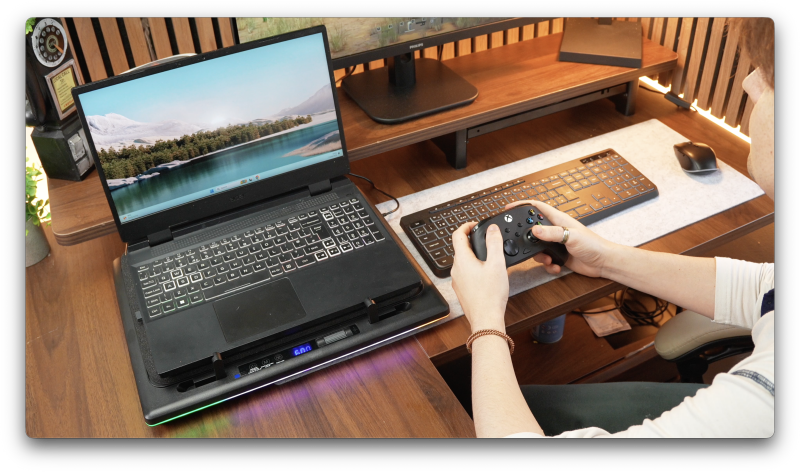
Myth.cool Software: The Ultra’s Biggest Advantage
Intelligent Cooling That Responds to Your Laptop
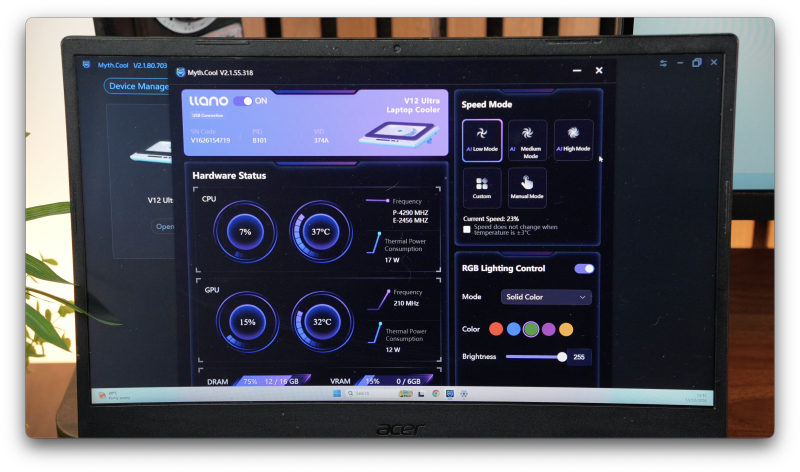
One of the main differences between the standard V12 and the V12 Ultra is the addition of intelligent software control.
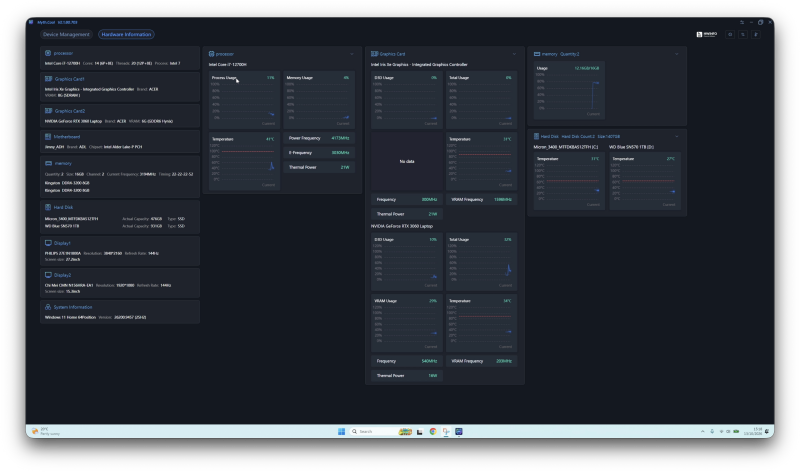
The Ultra supports llano’s Myth.cool application, allowing the cooling pad to respond automatically to changes in your laptop’s operating temperatures.
Connect the cooler to a compatible Windows laptop using the supplied USB cable, install the software and you gain access to additional controls and hardware monitoring.
The software can monitor CPU and GPU temperatures and adjust the cooling pad’s fan speed accordingly.
Instead of manually changing the fan speed whenever your workload changes, the V12 Ultra can manage that process for you.
And in practice, this is one of its most compelling features.
Automatic Fan Modes
Myth.cool includes three automatic cooling profiles:
- Low: Prioritises more restrained cooling behaviour.
- Medium: Offers a balance between temperature management and fan activity.
- High: Allows more aggressive cooling behaviour when additional airflow is required.
Manual control and custom cooling behaviour are also available.
This gives users flexibility over how the cooler responds to different workloads.
For example, during light tasks such as web browsing, email or watching videos, there’s little reason to have a large cooling fan operating at 2,000 RPM.
The software can allow the cooler to remain at a lower speed.
Launch a demanding game and the situation changes.
As CPU and GPU temperatures rise, the cooling pad can automatically increase its fan speed.
Once the workload decreases, the cooler can reduce its output again.
This makes the V12 Ultra considerably more convenient than a cooling pad that requires constant manual adjustment.
Why Automatic Cooling Actually Matters
Dedicated software isn’t always particularly useful for simple accessories.
However, in this case, it addresses one of the product’s biggest weaknesses.
Noise.
The V12 Ultra has enough cooling capability to become unnecessarily loud if you leave it running at an aggressive setting.
Automatic control means you don’t have to choose between permanently running the fan at maximum speed or repeatedly reaching for the physical control wheel.
Instead, the cooler can respond to what the laptop is doing.
That makes the product feel more integrated into a gaming setup.
It’s not simply a powerful fan underneath your laptop.
It’s a cooling system that can adapt its behaviour around the machine it’s supporting.
The software also provides access to RGB lighting controls and hardware information.
Windows-Only Compatibility
There is, however, an important limitation.
Myth.cool officially supports 64-bit versions of Windows 10 and Windows 11.
It does not offer equivalent support for macOS or Linux.
The cooling pad itself can still operate manually without the software, but users on unsupported operating systems lose one of the main reasons to choose the Ultra model.
If you’re using a Linux gaming laptop, for example, the physical cooling hardware may still be useful.
However, the intelligent automatic temperature control won’t be available through the officially supported software.
At that point, the standard V12 becomes worth considering.
If you don’t intend to use the intelligent controls, paying extra for the Ultra may be harder to justify.
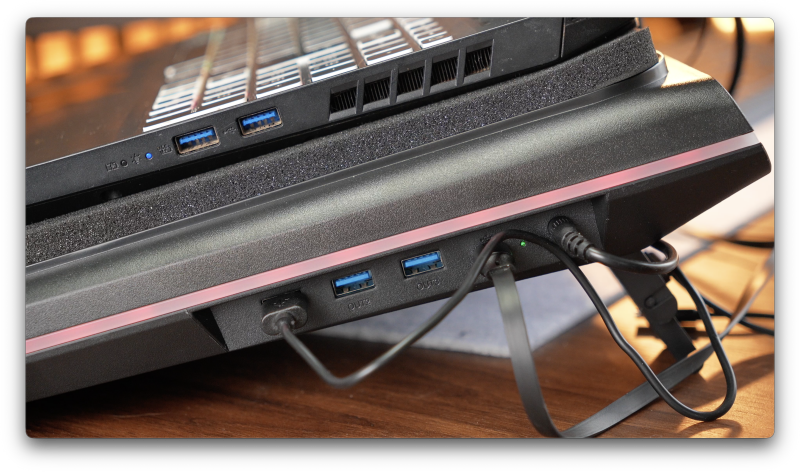
USB 3.0 Hub: A Useful Addition for Desk Setups
Beyond cooling, the V12 Ultra also includes a built-in USB hub.
There are three USB 3.0 ports, with supported data transfer speeds of up to 5Gbps.
These can be used to connect peripherals such as a mouse, keyboard, controller or external storage device.
It’s a practical addition.
Gaming laptops often have a limited number of conveniently positioned USB ports, particularly once you’ve connected a headset, external keyboard and other accessories.
Having additional connections built into the cooling pad helps reduce the need for a separate USB hub.
It also makes sense given the V12 Ultra’s intended use.
This isn’t an accessory you’re likely to carry around regularly.
It’s something designed to sit underneath your laptop as part of a permanent desk arrangement.
The USB hub helps support that role.
However, it’s worth remembering that this is a USB 3.0 expansion hub rather than a complete laptop docking station.
It doesn’t replace a dedicated dock offering features such as additional display outputs, Ethernet connectivity or laptop charging.
For everyday USB peripherals, though, it’s a welcome addition.
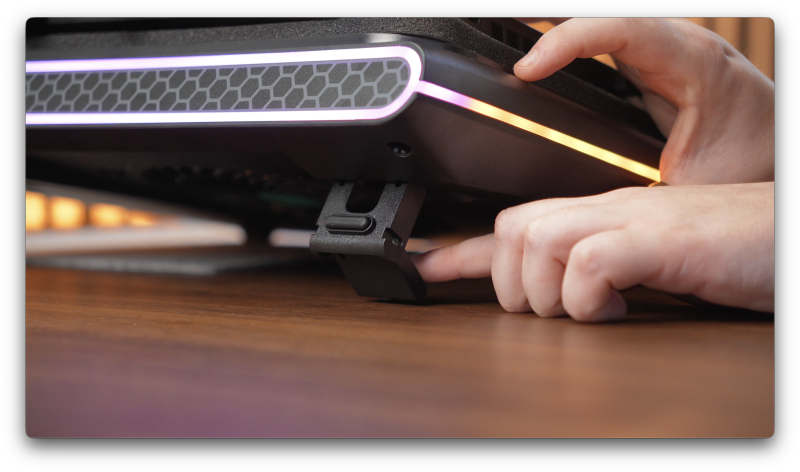
RGB Lighting and Adjustability
Customisable RGB Lighting
As you’d probably expect from a premium gaming accessory, the V12 Ultra includes RGB lighting.
The lighting can be customised through the onboard controls and compatible software.
llano advertises four lighting effects and five colour options, allowing users to coordinate the cooler with the rest of their gaming setup.
The lighting is bright enough to make the pad visually noticeable without being the product’s main attraction.
Personally, RGB lighting wouldn’t influence my decision to purchase a laptop cooler.
Cooling performance, noise and compatibility are considerably more important.
However, if the V12 Ultra is going to occupy a permanent position on your desk, having it match the rest of your setup is a pleasant bonus.
It gives the cooler a more recognisable gaming aesthetic, particularly alongside an RGB keyboard, mouse and other accessories.
Three Adjustable Height Positions
The V12 Ultra also offers three adjustable height settings.
According to llano’s specifications, these provide tilt angles of approximately 3°, 12° and 15°.
This allows you to raise the rear of your laptop to suit your preferred viewing and typing position.
The lower settings feel more natural for general desktop use, while the highest position creates a considerably steeper angle.
That additional flexibility is useful, particularly if you regularly switch between using the laptop’s built-in keyboard and an external keyboard.
The raised position can also improve screen positioning depending on your desk arrangement.
However, ergonomics remain personal.
A steep typing angle won’t necessarily be comfortable for everyone, particularly during extended sessions.
The important thing is that the V12 Ultra gives you several options rather than forcing the laptop into one fixed position.
The laptop also feels reasonably secure against the foam section, which is reassuring given the overall size and weight of the machines this cooler is designed to accommodate.
Removable Dust Filter: A Small but Important Feature
One of the more understated features of the V12 Ultra is its removable dust filter.
It might not sound particularly exciting, but it’s an important addition to a high-pressure cooling system.
The V12 Ultra is designed to move a substantial amount of air towards your laptop’s intake vents.
Unfortunately, air can also carry dust and other small particles.
Without filtration, that additional airflow could potentially introduce more debris into the laptop’s internal cooling system.
The removable filter helps capture some of that material before it reaches the laptop.
This is particularly useful for gaming laptops that spend long periods operating under heavy loads.
Over time, dust accumulation inside a laptop can restrict airflow through its heatsinks and cooling fans.
A removable external filter provides an additional layer of protection.
It’s also relatively easy to maintain.
The filter can be detached, cleaned and reinstalled without complicated disassembly.
There is one trade-off, though.
The filter becomes another component that requires occasional attention.
If it becomes heavily clogged with dust, airflow through the cooling pad may be restricted.
For that reason, regular cleaning is worth making part of your maintenance routine.
It’s a relatively small inconvenience, and certainly preferable to allowing excessive dust to accumulate inside an expensive gaming laptop.
The filter won’t eliminate the need for occasional laptop maintenance, but it’s a sensible feature for this type of cooling system.
Real-World Experience: Does the V12 Ultra Make Sense?
After spending time with the llano V12 Ultra, the biggest takeaway is that this isn’t really comparable with a conventional budget cooling pad.
Its design is considerably more aggressive.
The large turbo fan, enclosed airflow system and foam seal are all intended to deliver additional cooling directly where compatible laptops need it.
And that’s what makes the product interesting.
Rather than relying on a few small fans circulating air around the underside of a laptop, the V12 Ultra attempts to improve the airflow available to the laptop’s existing cooling system.
For powerful gaming laptops, that approach has clear advantages.
However, the overall experience depends heavily on how you use it.
Gaming
Gaming is arguably the V12 Ultra’s most obvious use case.
Modern gaming laptops can generate considerable heat, particularly when their processors and dedicated graphics chips are operating under sustained loads.
During demanding games, the V12 Ultra can provide additional airflow to support the laptop’s internal cooling system.
For machines that regularly approach their thermal limits, that additional cooling headroom may be particularly valuable.
The automatic fan control also makes sense here.
Rather than manually adjusting the cooling pad whenever you launch a game, the software can respond to changes in temperature.
That helps make the V12 Ultra feel more convenient during everyday use.
The main compromise remains noise.
If you want the strongest possible cooling performance, you’ll need to accept that the fan can become extremely noticeable.
For gaming with headphones, that’s potentially a reasonable trade-off.
For quieter gaming environments, a more moderate fan setting is likely to be preferable.
Video Editing and Creative Work
The V12 Ultra also makes sense for certain creative workloads.
Video editing, rendering, 3D modelling and other processor-intensive tasks can place sustained demands on a laptop’s cooling system.
Unlike short bursts of activity, these workloads may keep the CPU or GPU working hard for extended periods.
Additional cooling can be useful in those circumstances, particularly if the laptop’s performance is being limited by temperature.
However, the noise trade-off becomes more complicated.
If you’re editing audio, recording voiceovers or working in an environment where background noise matters, an aggressive cooling fan could become distracting.
Automatic control helps, but it doesn’t eliminate the acoustic limitations of the hardware.
Everyday Productivity
For lighter tasks, the V12 Ultra is considerably harder to justify.
Web browsing, emails, document editing and video streaming generally don’t require the same sustained cooling performance as demanding games or rendering workloads.
If your laptop already maintains reasonable temperatures, the additional cooling capacity may provide little meaningful benefit.
The V12 Ultra also occupies considerably more desk space than a conventional laptop stand.
For everyday productivity, a simpler and quieter solution may be more appropriate.
V12 Ultra vs Standard V12: Which Should You Choose?
One of the most important buying decisions is whether the Ultra model offers enough additional value over the standard llano V12.
Both products use a high-pressure cooling approach built around a large turbo fan and foam-sealed airflow system.
The standard V12 already offers substantial cooling capability.
The Ultra’s main advantage is its intelligent software integration.
With Myth.cool, the V12 Ultra can monitor supported laptop hardware temperatures and adjust fan speed automatically.
This changes the experience from manually managing a cooling pad to allowing the system to respond to your workload.
For someone who regularly switches between gaming, editing and lighter desktop tasks, that’s genuinely useful.
It can reduce the need to constantly adjust fan speed and potentially avoid unnecessary noise during less demanding activities.
However, if you normally set your cooling pad to one speed and leave it there, the benefit becomes less significant.
The same applies if you’re using an unsupported operating system.
The Ultra isn’t necessarily about delivering dramatically more cooling than the standard V12. Its main attraction is making that cooling more convenient to manage.
Whether that’s worth the additional cost depends on how much you value automatic control.
Pros
- Powerful high-pressure cooling design: The 5.5-inch turbo fan and memory-foam seal help direct additional airflow towards compatible laptop intake vents.
- Intelligent automatic fan control: Myth.cool adjusts cooling behaviour based on CPU and GPU temperatures.
- Wide fan-speed adjustment: Speeds from approximately 300 to 2,800 RPM provide flexibility between cooling performance and noise.
- Useful USB 3.0 hub: Three ports offer convenient connectivity for peripherals and external storage.
- Independent power supply: The included 36W adapter powers the cooling system without relying on laptop USB power.
- Removable dust filter: Helps capture dust before it reaches the laptop’s intake vents and is straightforward to clean.
- Adjustable height: Three tilt positions provide flexibility for different desk arrangements.
- Customisable RGB lighting: Offers additional visual customisation for gaming setups.
- Manual controls remain available: Basic cooling functionality doesn’t require software.
Cons
- Extremely loud at maximum speed: The 2,800 RPM setting produces substantial fan noise that won’t suit every environment.
- Large and heavy: At approximately 2.15kg, it’s better suited to permanent desk setups than regular travel.
- Requires mains power: The dedicated adapter introduces another cable and occupies a power socket.
- Predominantly plastic construction: Functional and reasonably sturdy, but not especially premium in terms of materials.
- Windows-only software: Myth.cool officially supports 64-bit Windows 10 and 11, excluding macOS and Linux users from intelligent control.
- Cooling effectiveness depends on laptop design: Machines without suitable bottom intake vents may benefit considerably less.
- Premium positioning: The additional cost is difficult to justify for laptops that already manage temperatures comfortably.
- Requires occasional maintenance: The removable dust filter needs cleaning to prevent restricted airflow.
Who Is the llano V12 Ultra For?
The llano V12 Ultra is best suited to users with powerful gaming laptops or mobile workstations that regularly operate under sustained loads.
If your laptop has substantial bottom ventilation and frequently approaches its thermal limits, the V12 Ultra offers a more serious cooling solution than a conventional budget pad.
It’s particularly appealing for gamers who spend hours playing demanding titles, content creators working with intensive rendering workloads and users who want greater control over their laptop’s cooling environment.
The intelligent software also makes it attractive to people who regularly switch between demanding and lightweight tasks.
Instead of manually adjusting fan speed throughout the day, the cooler can respond automatically.
However, it’s not an accessory I’d recommend universally.
If you’re using a relatively cool-running office laptop, the V12 Ultra is probably excessive.
The same applies if portability, minimal desk clutter or quiet operation are your biggest priorities.
And before buying, it’s worth checking the underside of your laptop carefully.
The foam-sealed cooling system is central to the V12 Ultra’s design, so compatible ventilation placement is essential for getting the most from it.
Ultimately, this is a specialist accessory for people who have a genuine reason to improve their laptop’s cooling performance.
Final Verdict: Powerful Cooling, but Not for Everyone
The llano V12 Ultra has slightly changed my opinion of what a laptop cooling pad can offer.
For years, many cooling pads have relied on a fairly basic formula: a plastic stand, several small fans and a promise of lower temperatures.
The V12 Ultra takes a different approach.
Its combination of a large turbo fan and a sealed cooling chamber is designed to direct significantly more air through a laptop’s existing intake vents.
For compatible gaming laptops, particularly those regularly operating under demanding workloads, that approach makes considerably more sense than simply blowing air towards the underside of the chassis.
But the cooling hardware is only part of the story.
What makes the Ultra particularly interesting is its intelligent control system.
The ability to monitor CPU and GPU temperatures and automatically adjust fan speed addresses one of the biggest frustrations with powerful cooling pads.
Noise.
Rather than leaving the fan running at an unnecessarily aggressive setting, Myth.cool allows the cooler to adapt to what your laptop is actually doing.
That makes the V12 Ultra considerably more practical for a setup used for both gaming and everyday tasks.
There are also some thoughtful additions.
The integrated USB 3.0 hub is genuinely useful, the adjustable stand provides flexibility, and the removable dust filter is a sensible inclusion for a device designed to move substantial amounts of air.
However, the compromises are equally important.
This is a large, heavy cooling pad that requires its own power adapter.
The construction is mostly plastic, the intelligent software is limited to Windows, and maximum fan speed produces enough noise to become distracting.
It’s also not something every laptop needs.
If your machine already maintains comfortable temperatures and isn’t experiencing thermal throttling, spending premium money on additional cooling may offer relatively little practical benefit.
But for a powerful gaming laptop that regularly runs hot, particularly one with extensive bottom ventilation, the V12 Ultra becomes a much more compelling proposition.
Personally, I wouldn’t want to run it anywhere near 2,800 RPM all the time.
I’d much rather find a sensible middle ground where the cooler delivers meaningful additional airflow without making the entire desk sound like a small wind tunnel.
And that’s where the Ultra’s automatic control becomes particularly valuable.
The llano V12 Ultra isn’t simply about delivering more cooling. It’s about making powerful cooling easier to live with.
For the right gaming laptop, that’s a worthwhile advantage.
For everyone else, it’s probably considerably more cooling pad than you’ll ever need.
Watch the Video Review
Watch the full cinematic video review on Gadget Crunch’s YouTube channel.
Add comment
Comments