

Introduction
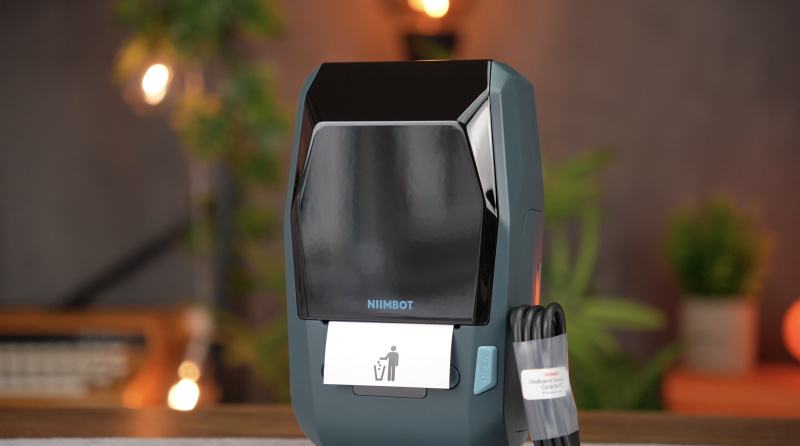
There is a reason compact Bluetooth label makers have become so popular. They are inexpensive, easy to use and, thanks to direct thermal printing, require no conventional ink cartridges. Load a roll of labels, connect your phone and you can be organising cables, drawers and storage boxes within minutes.
The compromise is longevity.
Direct thermal labels work by using heat-sensitive material, and over time that printed surface can be affected by heat, sunlight, rubbing and certain chemicals. That is perfectly acceptable when you are labelling something temporary, but it becomes less appealing when the label is attached to equipment, an office asset or a cable that you expect to identify several years from now.
That is where the NIIMBOT M2 takes a different approach.
Rather than conventional direct thermal printing, the M2 uses thermal transfer technology. There is still no traditional liquid ink or toner cartridge, but the printer uses a separate ribbon to transfer the printed material onto the label itself.
NIIMBOT claims compatible labels can consequently withstand water, oil, scratching, alcohol, sunlight and temperature changes considerably better than ordinary thermal labels, with printed information potentially remaining legible for around 8–10 years.
Clearly, that last point is a manufacturer longevity claim rather than something that can realistically be verified during a normal review period. What can be evaluated is how the M2 performs as an everyday label maker.
After using it for office organisation, storage, cables, equipment, parcels, QR codes and several different styles of label, including transparent and more decorative media, the appeal of the M2 becomes fairly clear.
This isn’t necessarily the label printer everyone should buy.
But for the right buyer, its more durable printing system makes considerably more sense than another inexpensive direct thermal machine.
Quick Summary
The NIIMBOT M2 is a compact desktop thermal-transfer label printer designed for situations where longevity matters more than having the smallest or cheapest label maker available.
Its 300 DPI resolution produces crisp text, QR codes, barcodes and simple graphics, while support for labels roughly 20–50mm wide gives it considerably more versatility than narrow traditional label makers. Bluetooth printing through the NIIMBOT app is straightforward, and USB computer support makes larger or repeated labelling jobs more practical.
The main attraction, however, is durability. Thermal transfer adds the complication and cost of a ribbon, but it also makes the M2 better suited to equipment, cables, office assets, storage, laboratory-style applications and other labels that need to survive handling and environmental exposure.
The biggest caveats are the additional consumable cost, NIIMBOT’s app ecosystem with optional premium features, and the potentially misleading idea of “colour printing”. The M2 supports different coloured ribbons, but it is not a full-colour printer.
For temporary household labels, it is probably excessive. For labels you want to create once and leave in place for years, it makes much more sense.
What’s in the Box
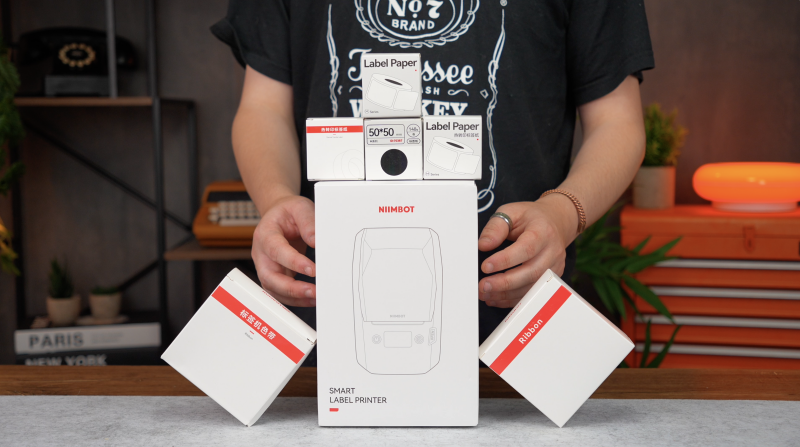
The supplied M2 package reviewed here includes:
- NIIMBOT M2 thermal-transfer label printer
- Black thermal-transfer ribbon
- Roll of 50 × 30mm labels
- Charging/data cable
- Documentation
The exact contents can vary depending on the bundle purchased, particularly as NIIMBOT offers versions with additional label rolls and different media.
Design & Build Quality
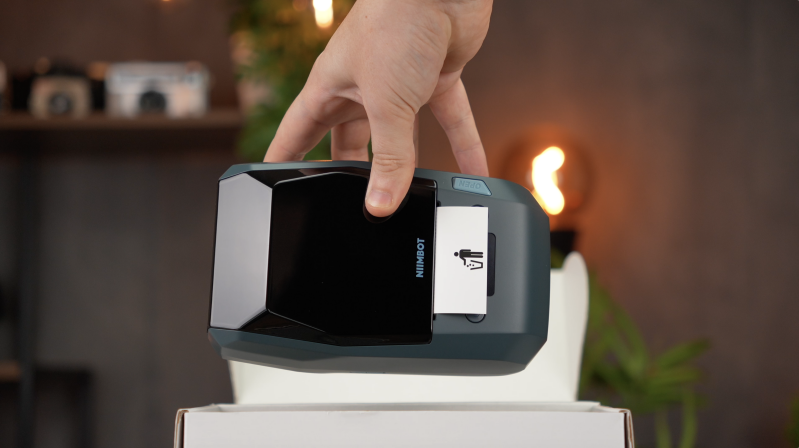
The first thing worth knowing about the M2 is that it isn’t one of NIIMBOT’s tiny pocket-sized label printers.
It is still compact enough to sit comfortably on a desk or disappear onto a shelf when it isn’t being used, but at roughly 760g, it feels much more like a small desktop printer than something designed to live permanently in your bag.
For this sort of machine, that isn’t necessarily a disadvantage.
The additional weight helps keep the M2 planted while it is printing, and the footprint remains small enough that it doesn’t consume much permanent desk space.
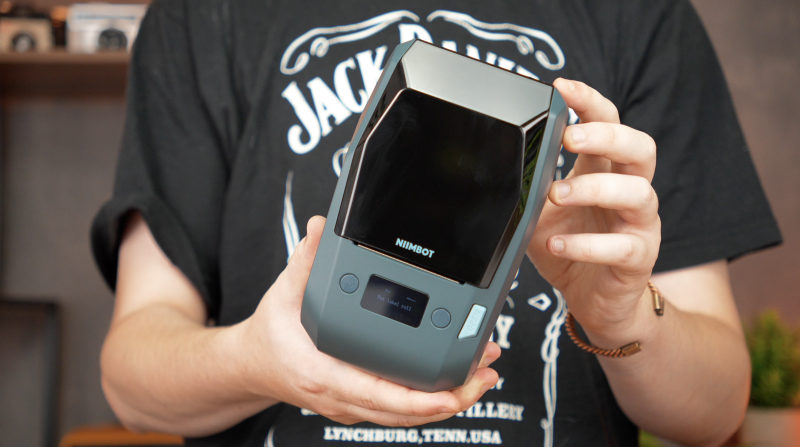
Construction is predominantly plastic and the finish doesn’t feel especially luxurious, but everything fits together well and the unit feels reassuringly solid rather than flimsy. It is functional hardware first and foremost, which suits the type of office, workshop and organisational jobs for which it is likely to be used.
There is also a rechargeable battery inside, so the printer doesn’t need to remain permanently connected to mains power. That makes it considerably easier to move around an office, stock room or workspace when required.
Overall, this isn’t a premium piece of industrial hardware, but neither does it feel like a disposable gadget. For a compact desktop labelling machine, the construction feels appropriate.
Setup & First Impressions
Getting started with the M2 is straightforward, although thermal transfer inevitably adds one extra step compared with direct thermal printing.
Open the printer, install the thermal-transfer ribbon, load the labels and close everything back up.
One particularly useful feature is automatic recognition of compatible NIIMBOT labels. Rather than manually measuring the label or repeatedly calibrating where each sticker begins, the M2 can identify supported media and position it appropriately before printing.
That sounds like a minor convenience, but it makes experimenting with different label sizes significantly less frustrating.
On the mobile side, setup happens through the NIIMBOT app. Turn on Bluetooth, open the application and connect to the printer from there. You don’t need to spend time manually pairing the M2 through your phone’s Bluetooth settings before you can begin designing labels.
There is computer support as well. The M2 can connect to a PC over USB, although NIIMBOT’s software and appropriate driver need to be installed first. Desktop support is available for Windows and Mac environments.
Which method makes more sense depends largely on what you are doing.
For one or two labels, using a phone is far quicker. You can open the app, change some text and print within moments.
For a larger batch — particularly when working with repeated product details, asset information or spreadsheet-style data — moving over to a computer becomes considerably more appealing.
Having both options is one of the M2’s strengths.
Features & Performance
Thermal Transfer: Why Does It Matter?
Thermal transfer is the feature that separates the M2 from the huge number of inexpensive Bluetooth label makers already on the market.
A conventional direct thermal printer is extremely simple. Its print head heats specially treated thermal material, causing sections of the label itself to darken.
There is no ribbon and no ink.
That simplicity is excellent for quick labels, receipts, temporary organisation and situations where long-term durability isn’t particularly important. The drawback is that the material remains sensitive to environmental conditions.
The M2 approaches the problem differently.
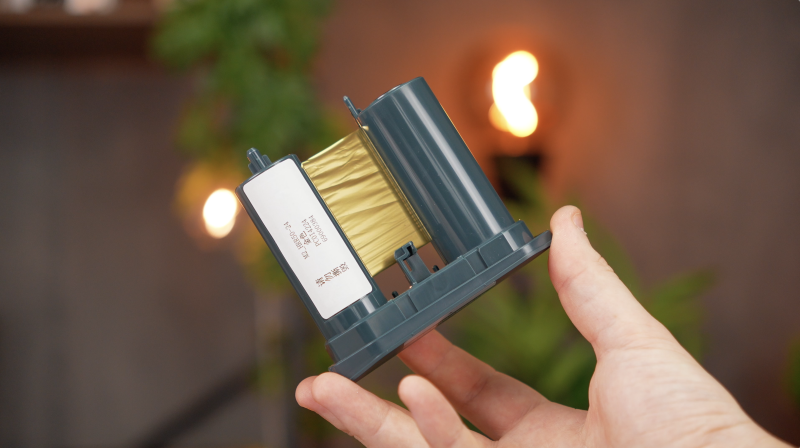
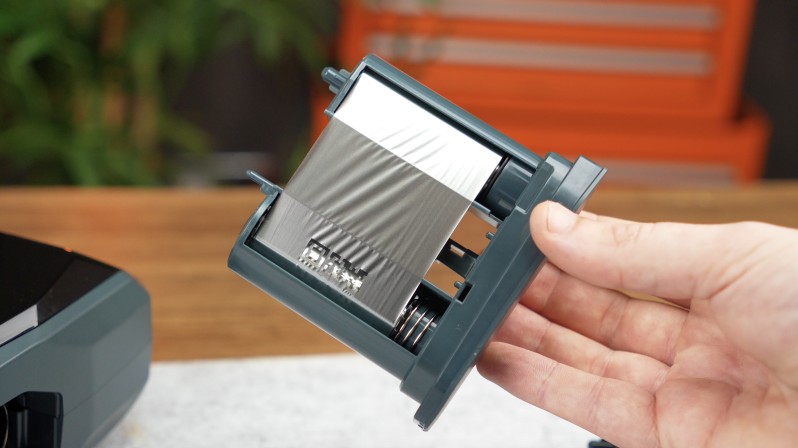
Its print head heats the thermal-transfer ribbon and transfers material from that ribbon onto the label.
There is an obvious trade-off: you now have an additional consumable to replace.
But durability is the reason to accept that compromise.
NIIMBOT positions the M2’s compatible thermal-transfer labels as being resistant to water, oil, alcohol, scratching, friction, sunlight and changes in temperature, while claiming an expected lifespan of approximately 8–10 years under suitable conditions.
That claim should be treated as NIIMBOT’s specification rather than a verified ten-year test result, but the underlying distinction between direct thermal and thermal-transfer printing is meaningful.
If you’re attaching labels to cables, storage drives, office equipment, tools or assets that shouldn’t need relabelling every few months, the M2’s printing method becomes much easier to justify.
If you’re labelling a box that will probably be emptied next month, a cheaper direct thermal printer is likely all you need.
Label Sizes and Versatility
Another advantage is the range of label sizes the M2 can accommodate.
It supports label widths of approximately 20–50mm, with an effective printing width of roughly 48mm.
That makes it significantly more flexible than a traditional narrow strip-style label maker.
At the smaller end, cable labelling is an obvious use.
Anyone with a drawer full of USB-C cables, camera chargers, power adapters, hard-drive leads and proprietary accessories will know how quickly they all become impossible to distinguish.
Even very simple labels such as:
MACBOOK
CAMERA CHARGER
DJI CABLE
can save a surprising amount of time.
Because the M2 prints at 300 DPI, small lettering remains impressively sharp rather than looking ragged or blurred.
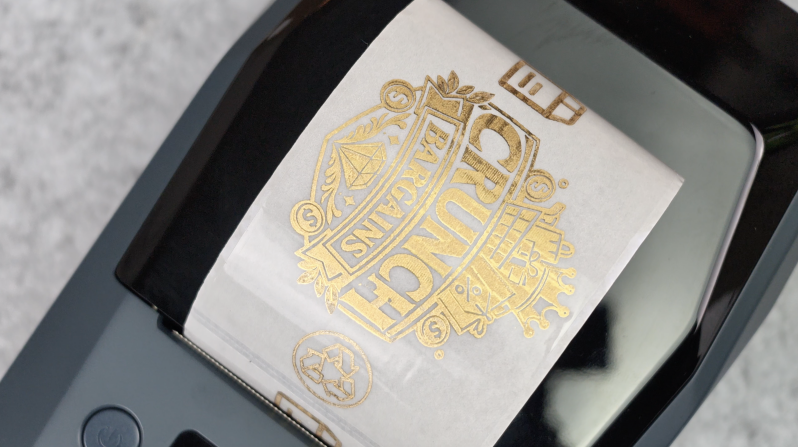
Move up to the supplied 50 × 30mm labels and considerably more information becomes possible. You could include an equipment name, serial or asset number and a QR code on the same label without making everything impossibly cramped.
That QR code could then point towards an instruction manual, inventory record, product page, maintenance information or another internal resource.
For offices and small businesses, that sort of application is arguably where the M2 starts becoming substantially more useful than a basic household label maker.
Transparent, Silver and Holographic Labels
You aren’t restricted to plain white labels either.
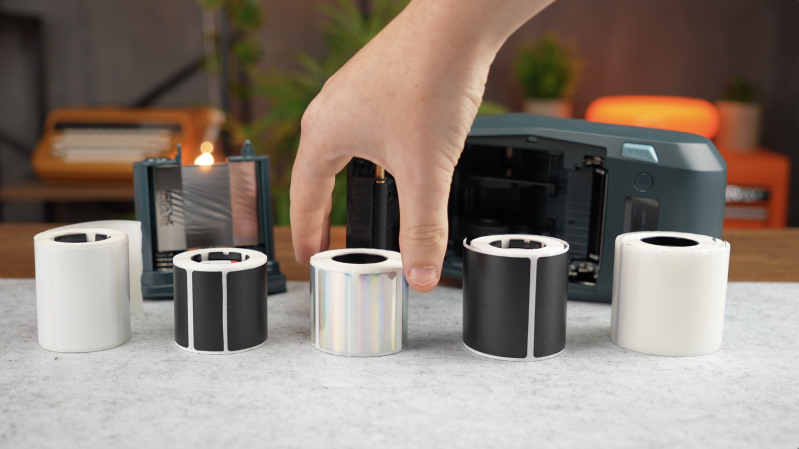
NIIMBOT offers a much broader range of compatible media, including transparent labels, silver-style finishes, brushed effects, holographic designs and other specialist options.
Some of these are more decorative than functional, but they can make a noticeable difference when appearance matters.
Transparent labels, for example, work well on clean electronics, containers or equipment where a large white sticker would look unnecessarily intrusive.
Metallic finishes can suit product packaging or more permanent equipment identification.
Having that variety gives the M2 a slightly unusual position between a straightforward office labeller and something that can also be used for basic branding or presentation work.
Understanding the “Colour Printing”
There is one piece of marketing terminology buyers should understand before purchasing.
NIIMBOT promotes the M2 as supporting multiple colours, with as many as seven ribbon colours available.
That does not mean the M2 is a conventional full-colour printer.
The printed colour depends on the thermal-transfer ribbon physically installed inside the machine. Install a different ribbon and you can produce labels using that colour.
You cannot simply import a photograph and expect the M2 to reproduce its complete range of colours as an inkjet printer would.
That distinction matters.
Changing a ribbon isn’t especially difficult, but regularly switching between colours could become tedious if you’re producing numerous differently coloured labels throughout the day.
For most people, the sensible approach will probably be choosing the ribbon colour they use most frequently and leaving it installed, swapping only when a particular project demands something different.
Colour ribbon support is still a useful feature. It just shouldn’t be confused with true multi-colour image printing.
Creating Labels in the NIIMBOT App
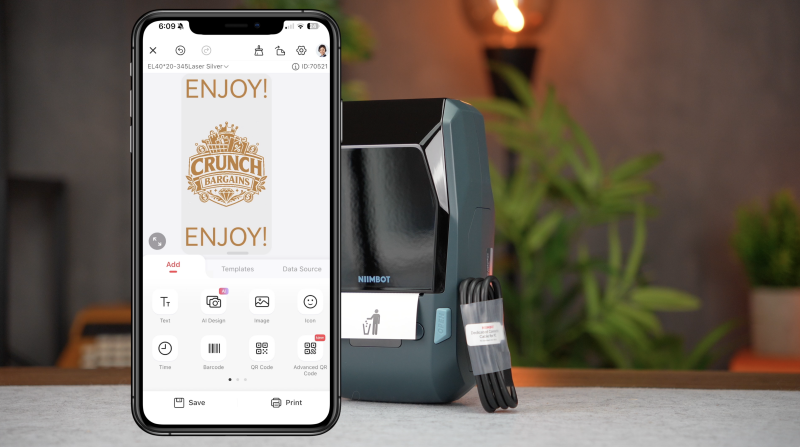
The NIIMBOT mobile application offers considerably more control than you might expect from a compact label maker.
You can create labels containing:
- Text
- Logos
- Icons
- Images
- Borders
- Barcodes
- QR codes
- Dates
- Tables
- Templates and repeated layouts
NIIMBOT also advertises a substantial library of fonts, icons and decorative borders.
There is enough flexibility here to create surprisingly elaborate designs, although elaborate isn’t always better.
Particularly on a 30mm or 40mm label, a clean font, sensible spacing and perhaps one simple graphic usually looks considerably more professional than squeezing several icons, multiple typefaces and decorative elements into a tiny area.
QR code creation is especially straightforward.
Add a QR element, enter the required information, resize it to fit the design and print.
In testing, printed QR codes scanned reliably, and this is one area where the 300 DPI resolution genuinely matters. Fine geometric elements remain well enough defined for practical use without requiring an enormous label.
Barcodes also reproduce cleanly, and frequently used designs can be saved as templates rather than rebuilt every time.
The application itself is therefore fairly capable.
The more contentious element is NIIMBOT’s VIP ecosystem, with additional software features placed behind a premium membership.
You don’t need to subscribe simply to create ordinary labels, and plenty can be accomplished without paying for every optional feature. Even so, seeing subscription-style premium functionality inside an application effectively required to make full use of hardware you’ve already purchased isn’t particularly appealing.
The M2 would feel like a more complete package if the associated design software placed less emphasis on paid extras.
Print Quality
For this category of printer, 300 DPI feels like the right resolution.
Text is clean and sharp.
Small lettering remains easy to read.
Barcodes reproduce well.
QR codes have enough definition to scan reliably.
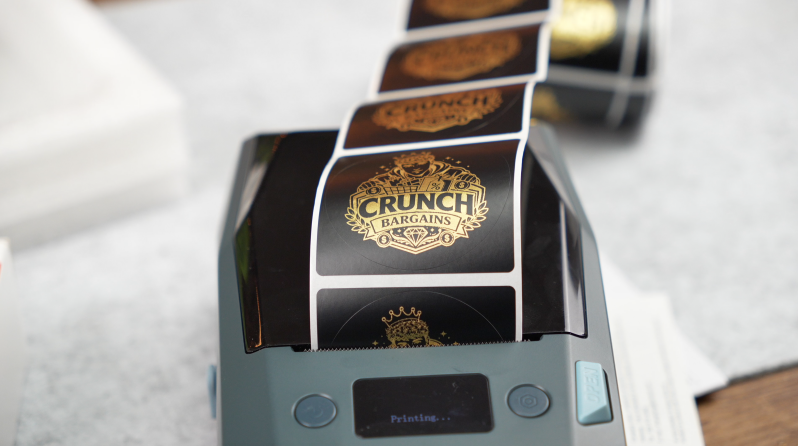
Simple logos and icons can look excellent, particularly when they use bold shapes and clean lines.
Where expectations need to be managed is photography and highly detailed graphic artwork.
This is still a thermal-transfer label printer.
Importing an intricately shaded image or complicated photograph doesn’t suddenly turn it into a miniature photographic printing system. Detailed artwork has to be reduced to something the relatively small print head and installed ribbon can physically reproduce.
The result can therefore lose subtle gradients, shading and fine detail.
If your main intention is producing highly detailed professional graphics, photographic stickers or complex colour artwork, the M2 is the wrong category of printer entirely.
For the things it is designed for — text, symbols, line-art logos, QR codes, barcodes and identification labels — print quality is very good.
Real-World Experience
What becomes apparent after using the M2 is that its greatest strength isn’t any individual specification.
It is the number of practical situations where a more permanent label can make sense.
Cable organisation is an easy example. Chargers and adapters can be labelled once instead of repeatedly trying to remember which identical-looking USB-C lead belongs to which piece of equipment.
Storage is another.
Office equipment can carry identification information and QR codes. Camera equipment can be categorised. Drives can display their purpose or storage contents. Tools and workshop items can have more permanent identification.
For a small business, the possibilities widen considerably.
Asset labels, stock identification, product information, storage locations, QR-linked instructions and barcoded items are all realistic applications.
And because the printer isn’t dependent solely on a phone, larger jobs can be moved onto a computer when designing dozens or potentially hundreds of related labels becomes cumbersome on a touchscreen.
There are still situations where buying the M2 would be unnecessary.
For labelling kitchen containers, temporary moving boxes, children’s storage or something that will only keep its sticker for a few months, thermal transfer solves a problem you may not actually have.
You are accepting an additional consumable and potentially paying more for the hardware and labels in exchange for durability.
Whether that trade makes sense depends entirely on what you intend to label.
That is arguably the most important buying decision surrounding the M2.
Pros
- Thermal-transfer printing should provide greater longevity than ordinary direct thermal labels
- Sharp 300 DPI output
- Excellent for text, QR codes, barcodes and simple logos
- Supports a useful range of roughly 20–50mm-wide labels
- Automatic recognition of compatible NIIMBOT media makes setup easier
- Bluetooth smartphone printing is simple
- USB computer support adds flexibility for larger jobs
- Rechargeable design avoids needing permanent mains power
- Broad selection of transparent, metallic, holographic and other specialist label media
- Different ribbon colours expand creative possibilities
- Particularly well suited to cables, equipment and office asset management
Cons
- More expensive and complicated than a basic direct thermal label maker
- Thermal-transfer ribbon becomes another consumable to replace
- “Colour printing” means selecting a coloured ribbon rather than true full-colour output
- Regularly changing between ribbon colours could become inconvenient
- NIIMBOT’s optional VIP app features make the software ecosystem feel less complete than it could
- Photographs and highly detailed shaded artwork aren’t the M2’s strength
- Automatic label recognition is designed around compatible NIIMBOT media
- Manufacturer durability claims of 8–10 years aren’t something that can realistically be verified during a normal review period
- Overkill for temporary household labelling
Who Is This For?
The NIIMBOT M2 makes the most sense for somebody who cares about what happens to a label after it has been printed.
For an occasional home user who simply wants to organise a few cupboards and storage containers, an inexpensive direct thermal printer is probably the smarter purchase.
The M2 becomes much more compelling for:
- Offices managing equipment or fixed assets
- Small businesses producing identification and QR labels
- People organising large collections of cables and electronics
- Workshops and equipment storage
- Product and inventory labelling
- Labels that may encounter moisture, rubbing or regular handling
- Anyone wanting a label to remain readable for substantially longer than a temporary thermal sticker
It is less about making everyday label printing dramatically easier and more about producing labels intended to remain useful for the long term.
Final Verdict
The NIIMBOT M2 is an interesting label maker because its biggest selling point isn’t speed, portability or some revolutionary smartphone feature.
It is durability.
The move from direct thermal to thermal-transfer printing gives the M2 a clear reason to exist. There is an additional ribbon to consider, but in return you get a printing system designed for labels that need to cope better with handling, moisture, chemicals, sunlight and temperature changes.
Print quality at 300 DPI is very good for the things that matter here. Text is sharp, QR codes and barcodes reproduce cleanly, and straightforward logos and icons look impressive.
The variety of supported label formats is another strength. From narrow cable labels through to larger asset stickers, transparent designs and metallic finishes, the M2 can cover significantly more ground than a traditional narrow label maker.
There are limitations.
NIIMBOT’s “colour” capability shouldn’t be mistaken for full-colour printing, changing ribbons introduces another step, highly detailed images aren’t the printer’s speciality and the premium side of the NIIMBOT app ecosystem remains difficult to get excited about.
More importantly, not everyone needs what the M2 offers.
If you print an occasional label for a storage box around the house, save the money. A straightforward direct thermal printer will probably do everything you require with fewer consumables.
If you’re producing equipment labels, QR codes, cable identification, office asset labels or anything else that is regularly handled and expected to remain readable for years, thermal transfer starts to make considerably more sense.
And that is the distinction that ultimately defines the NIIMBOT M2.
Printing the label is only half the job. The M2 is for situations where you also care what that label looks like several years later.
Watch the full cinematic video review on Gadget Crunch’s YouTube channel.
Add comment
Comments