

NTRODUCTION
Video doorbells are incredibly useful, but choosing the right one often means deciding which compromise you are willing to live with.
Battery-powered models are usually the easiest to install. There is no need to touch existing doorbell wiring, they can be positioned where the camera view makes the most sense, and they are particularly appealing for renters or anyone who simply wants a straightforward installation. The trade-off is that battery cameras typically need to wake up when motion is detected, which can sometimes mean the beginning of an event is missed. Then, eventually, the battery needs charging.
Wired doorbells solve some of those problems. They can remain active for longer, respond more quickly and potentially offer features such as pre-recording or continuous recording. But that only helps if suitable wiring already exists — or you are prepared to install it.
Then there is the increasingly familiar issue of subscriptions. Many smart doorbells reserve useful recording, cloud history or intelligent detection features for customers willing to pay an ongoing monthly fee.
The Reolink Video Doorbell (2nd Gen) takes a considerably more flexible approach.
It can operate completely wirelessly from its internal battery, connect to compatible existing wiring to keep that battery topped up, or run in a full wired power mode that unlocks features including pre-recording and 24/7 continuous recording.
It records at 2048 × 2048 resolution, uses a square head-to-toe field of view and can distinguish between people, vehicles, animals and packages. There is local microSD storage of up to 512GB, while Reolink also supports broader storage options through compatible Home Hubs, NVRs and FTP.
Most importantly, the core local recording and smart-detection experience does not depend on a compulsory monthly subscription.
I installed mine in battery mode to find out how easy it is to set up, how useful that unusual square camera view really is and whether Reolink’s more flexible approach makes it a serious alternative to some of the more familiar subscription-driven video doorbells.
QUICK SUMMARY
The Reolink Video Doorbell 2nd Gen gets the fundamentals right while giving buyers considerably more control over how they power the camera and where their recordings are stored.
Its 2K head-to-toe image works particularly well for deliveries, smart detection covers the categories most households actually care about, and local microSD storage means you can retain recordings without immediately committing to another monthly bill.
Battery installation is remarkably straightforward, but it does not unlock everything the doorbell can do. Pre-recording and 24/7 recording require suitable wired power, while Reolink’s extensive settings make the app slightly more involved than the most simplified consumer alternatives.
For buyers who value local storage, flexibility and control over simplicity at any cost, though, this is a very compelling package.
WHAT’S IN THE BOX
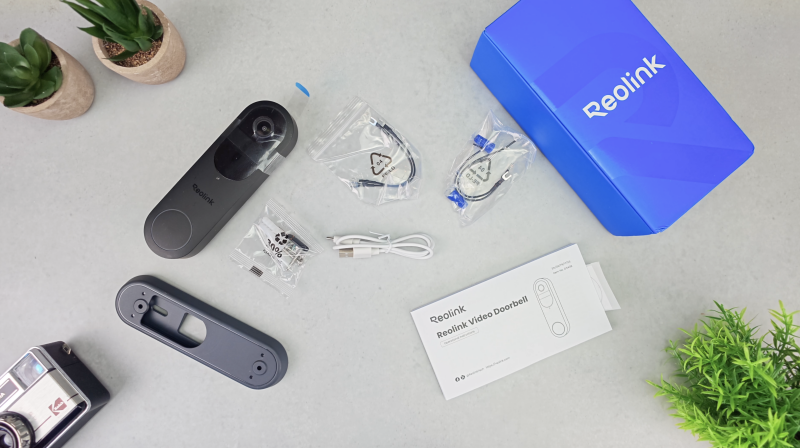
The supplied package I tested included:
- Reolink Video Doorbell 2nd Gen
- Mounting bracket
- Mounting screws
- Wall plugs
- USB charging cable
- Setup documentation
Accessory bundles can vary, so it is worth checking the exact package before ordering, particularly if you want an indoor wireless chime. Do not automatically assume one is included with every configuration.
DESIGN & BUILD QUALITY
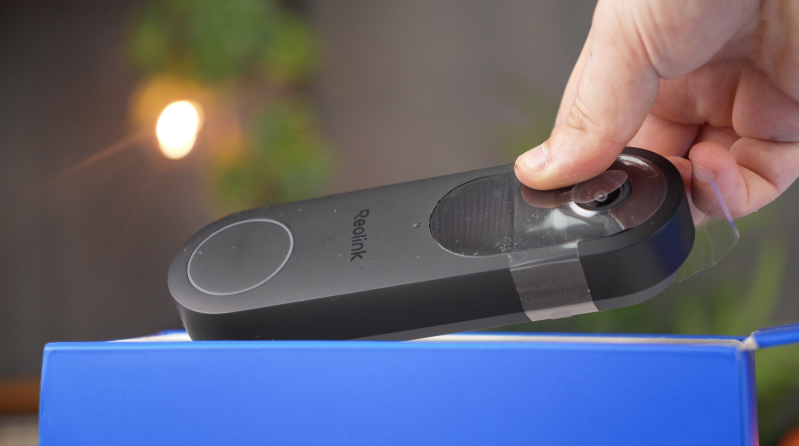
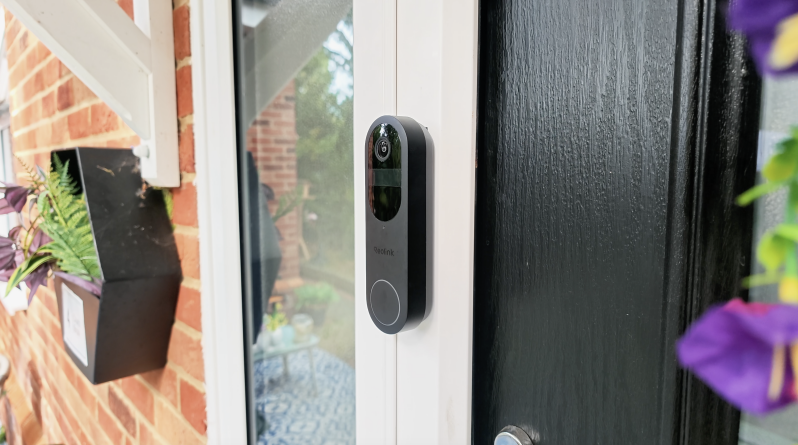
The Reolink follows the familiar shape of a modern smart video doorbell, with a relatively tall and narrow body, the camera positioned towards the top and a large, clearly identifiable doorbell button beneath it.
It feels reassuringly solid in the hand.
At approximately 160mm tall, this is not an especially discreet doorbell, and it can look fairly prominent when mounted beside a particularly narrow doorframe. Whether that is a disadvantage depends on what you want from a security camera.
There is an argument for visibility. A clearly identifiable doorbell camera makes it obvious that an entrance is being monitored and could potentially act as a deterrent.
The front design itself is clean enough, and the doorbell button is sufficiently obvious that visitors should not be left wondering where they are supposed to press.
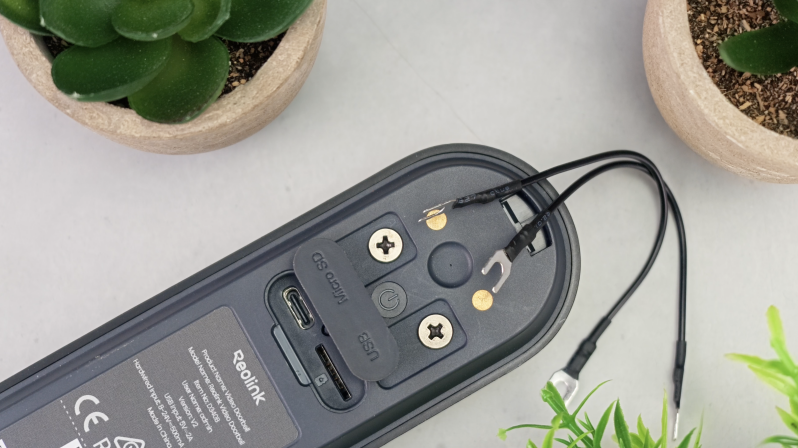
Around the rear are the mounting and electrical connections required for its different operating modes, while a USB-C connection is provided for charging.
One particularly important feature is the microSD slot, which accepts cards up to 512GB.
That means the camera can retain recordings locally without requiring a Reolink Home Hub, NVR or mandatory cloud-storage subscription.
There is, however, an unavoidable compromise with storing security footage inside the security camera itself. If somebody removes the entire doorbell, the memory card containing the footage could disappear with it.
Reolink provides features including tamper detection, but anyone particularly concerned about retaining important footage should consider using a secondary storage destination such as a compatible Home Hub, NVR or FTP server rather than treating the card inside the camera as the only copy.
SETUP & FIRST IMPRESSIONS
One of the biggest attractions of this doorbell is that electrical wiring is entirely optional.
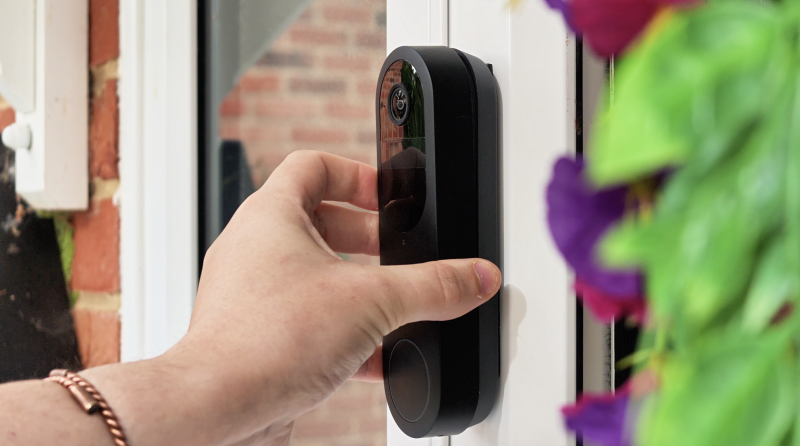
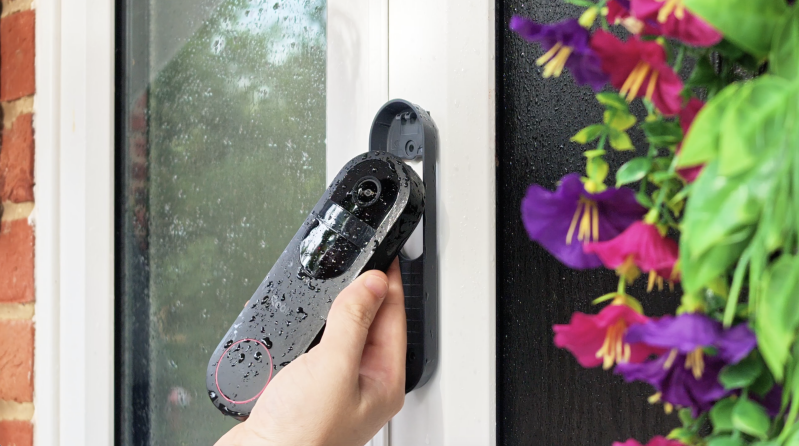
For battery operation, you charge the internal battery through USB-C, mount the bracket and attach the doorbell. There is no requirement to start dismantling an existing doorbell circuit just to get the camera online.
I installed the review unit this way, and the physical installation was refreshingly straightforward.
Position the mounting bracket, mark the holes, secure the bracket to the wall or doorframe and lock the doorbell into place.
That is essentially it.
The next stage takes place through the Reolink app. The app walks you through connecting the doorbell to your Wi-Fi network, including displaying a QR code that is presented to the camera during setup. After that, you name the device and work through the initial configuration.
Anyone who already owns a Reolink camera will find the process immediately familiar.
From mounting the camera to pairing it with the app, the overall experience is genuinely simple.
That makes battery mode a particularly attractive starting point. Even if you ultimately intend to have the doorbell wired, you can get the system running and work out whether its position gives you the coverage you want without tackling the electrical side first.
FEATURES & PERFORMANCE
2K Video and a Proper Head-to-Toe View
The camera records at 2048 × 2048 resolution, giving you 4-megapixel 2K video.
More important than the resolution itself, however, is the shape of the image.
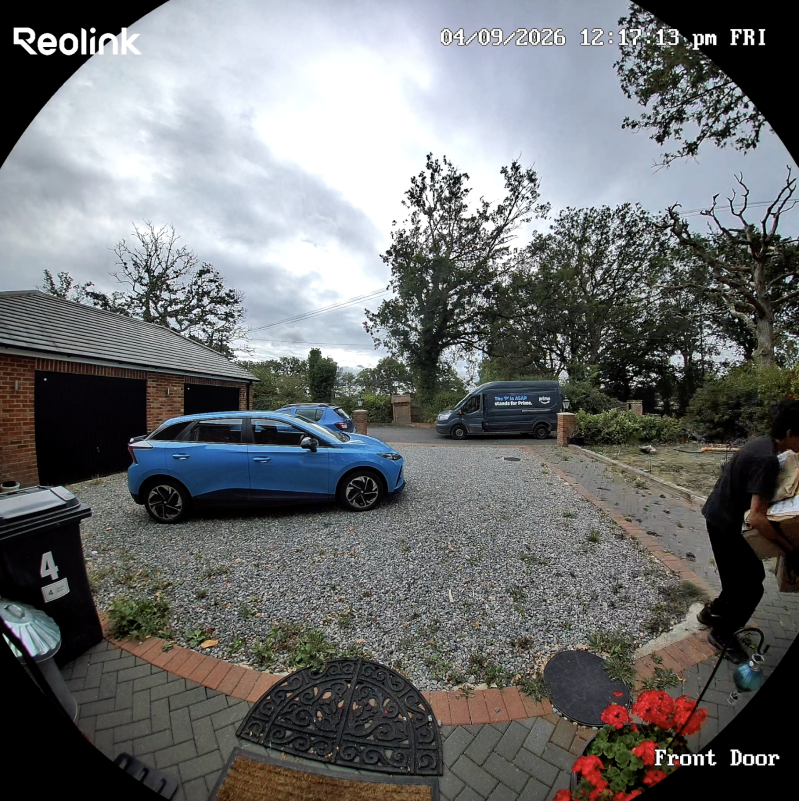
Rather than using a conventional widescreen frame, Reolink has opted for a 1:1 square view designed to capture substantially more vertical information.
For a doorbell camera, that decision makes a lot of sense.
The objective is not simply to capture the widest possible stretch of road or driveway. You need to see the person standing in front of the entrance while also being able to see what they have placed on the ground.
With the head-to-toe perspective, a visitor’s face can remain visible towards the upper part of the image while a package sitting near the doorstep remains within view below.
For deliveries in particular, that additional vertical coverage is far more useful than simply stretching the image further sideways.
Daytime footage provides enough detail to identify visitors clearly when they are within a sensible distance of the camera. Colours look natural, while HDR helps in difficult scenes where a shaded doorway sits in front of a much brighter road, driveway or sky.
HDR cannot magically recover every blown highlight or deep shadow, but it improves the chances of keeping a visitor’s face usable when they are strongly backlit.
There is some visible distortion towards the edges of that very wide head-to-toe image. It is one of the compromises of achieving this much coverage from a compact camera.
For security footage, though, I would take the increased visibility over perfect geometric accuracy.
Night Vision
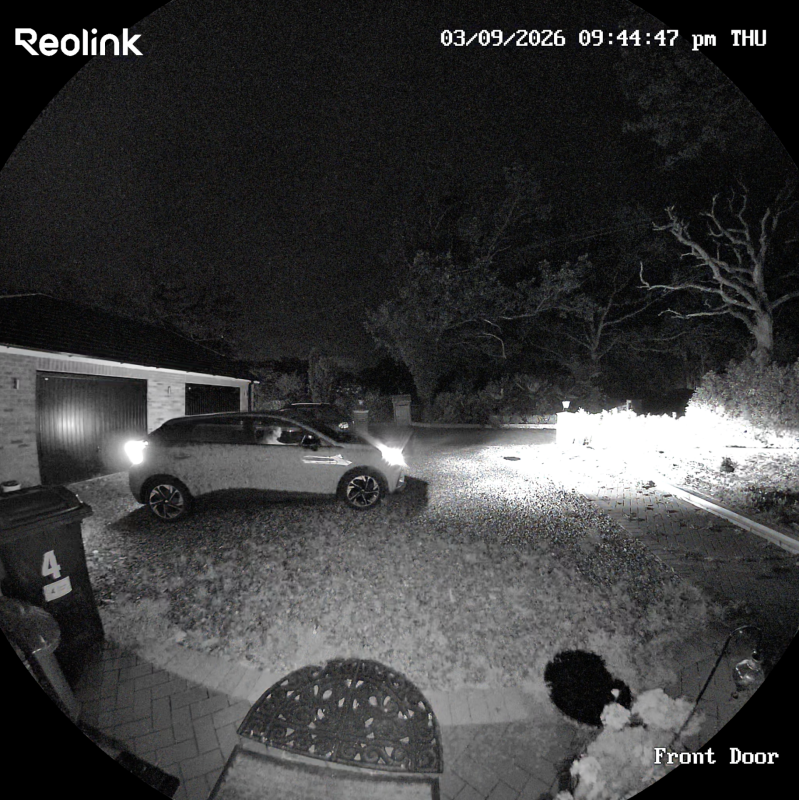
After dark, the Reolink switches to infrared night vision and produces a black-and-white image.
Around a typical front entrance, the resulting footage is impressively usable. Important activity remains visible and motion alerts were responsive during my testing.
As with almost any infrared security camera, placement matters.
Someone standing extremely close to the lens can appear overexposed because of the infrared illumination, while nearby reflective materials can throw that infrared light back towards the camera.
Those are not unusual problems for this type of camera, but they are worth considering when choosing the mounting position.
Overall, though, nighttime performance is good enough for the job this camera is intended to do.
Person, Vehicle, Animal and Package Detection
The Reolink can classify motion into several useful categories, including:
- People
- Vehicles
- Animals
- Packages
Crucially, those primary detection features do not require a paid subscription.
That makes a significant difference to the everyday experience.
A video doorbell that alerts you every time a branch moves, a shadow crosses the path or traffic passes in the background quickly becomes annoying. Reolink lets you concentrate on the activity that actually matters.
If the doorbell overlooks a busy street, for example, you could prioritise person and package detection while reducing or disabling vehicle alerts.
Package detection works particularly well alongside the vertical head-to-toe camera angle. The doorbell can recognise a delivery appearing near the entrance, and the camera framing makes it much easier to check whether that parcel is still sitting there later.
No consumer AI detection system should be treated as infallible, however.
Performance depends significantly on configuration. Sensitivity levels, detection areas and object-size settings can all affect what the system chooses to report.
I found it worthwhile spending some time defining the entrance as the important detection area and excluding unnecessary parts of the pavement or road wherever possible.
Fortunately, the Reolink app makes those adjustments relatively easy.
Privacy zones are available as well, allowing parts of the image to be blocked where appropriate — useful, for example, if the camera naturally captures part of a neighbour’s property.
NSWERING THE DOOR AND TWO-WAY AUDIO
When somebody presses the physical button, the notification can behave more like an incoming video call than an ordinary motion alert.
You can open the camera view and communicate through the doorbell using two-way audio from virtually anywhere you have an internet connection.
Audio quality is perfectly adequate for the sort of conversations you are likely to have through a doorbell: asking who somebody is, telling a courier where to leave a parcel or letting a visitor know you are on your way.
There is naturally some latency, so it does not feel exactly like speaking face-to-face, but it works well enough for short exchanges.
I also like Reolink’s preset response system.
There are several responses available, ranging from straightforward instructions to slightly more light-hearted options, and being able to quickly tell a delivery driver to leave something at the door when you cannot answer properly is genuinely useful.
WI-FI PERFORMANCE AND THE REOLINK APP
The doorbell supports both 2.4GHz and 5GHz Wi-Fi.
That gives you some welcome flexibility.
A 5GHz connection can deliver stronger performance when the doorbell is reasonably close to the router, whereas 2.4GHz will often cope better with longer distances and physical barriers.
The key is to test the signal where the doorbell will actually be installed.
Checking Wi-Fi performance while standing inside next to your router does not tell you much about what the camera will experience outside. Exterior walls, metal frames, insulation and the construction of the entrance can all weaken the connection.
Poor Wi-Fi can manifest itself as slow live-view loading, delayed notifications and potentially unreliable recording behaviour, so network quality should be considered part of the installation.
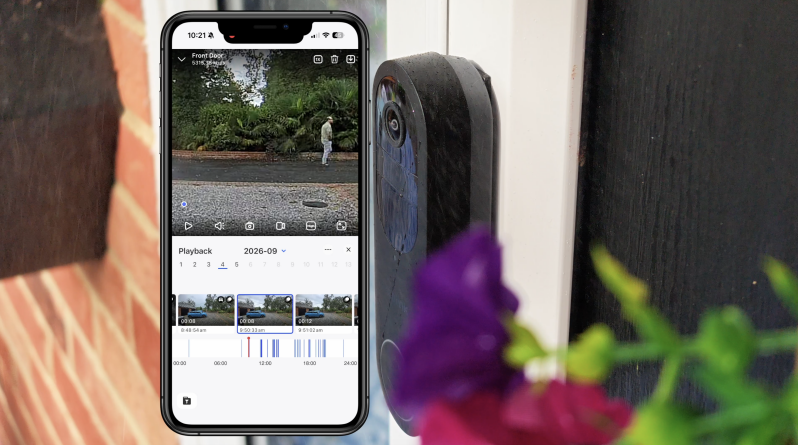
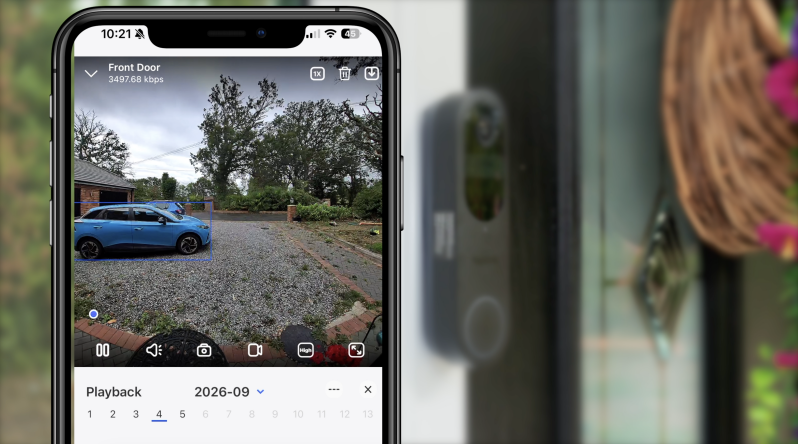
Inside the app, Reolink gives you access to the live feed, previous events, battery status, detection configuration and playback options.
Recorded clips can be filtered according to event type, which is much more convenient than dragging through a long timeline trying to find one particular delivery.
There is a considerable amount of control available.
That is both a strength and a weakness.
Compared with some simplified smart-home platforms, Reolink gives enthusiasts substantially more to adjust. If you like being able to fine-tune detection areas, alerts and recording behaviour, that is excellent.
For someone buying their first smart camera and wanting almost no configuration beyond plugging it in, the number of options can initially feel slightly overwhelming.
Personally, I would rather have those controls available, but I would not call every corner of the Reolink experience completely beginner-proof.
BATTERY LIFE
Reolink advertises up to 300 days of battery operation from a full charge.
That headline figure needs context.
The estimate is based on approximately five minutes of recording per day, which represents a relatively light workload.
A quiet entrance with strong Wi-Fi, limited motion and relatively few live-view sessions could potentially deliver excellent endurance.
A busy family home facing a pavement or road is an entirely different situation.
Every triggered event, recording, live-view session, video call and notification places additional demand on the battery. Wi-Fi conditions also matter, and colder weather can affect battery performance — an especially relevant consideration for anyone using the doorbell outdoors through a British winter.
From my experience with the doorbell, I would consider 200-plus days achievable under the right usage conditions, but the important point is that battery endurance will vary dramatically according to how active your entrance is.
I would therefore treat the 300-day claim as a best-case figure rather than an expectation for every household.
If your front entrance is constantly busy and your priority is comprehensive monitoring rather than convenience, wired operation makes considerably more sense.
LOCAL STORAGE AND SUBSCRIPTIONS
Local recording is arguably one of the biggest reasons to consider the Reolink over some better-known competitors.
A microSD card of up to 512GB can be installed directly inside the doorbell.
The wider Reolink ecosystem also provides additional storage possibilities through compatible Home Hubs, NVR equipment and FTP.
Cloud storage exists as an option rather than being fundamental to the basic local-recording experience.
That means you do not have to continue paying every month simply to access locally recorded events or use the doorbell’s primary object-detection features.
For buyers who are becoming increasingly tired of subscription stacking across every smart device in the home, that is a substantial advantage.
There can still be differences between standard notifications and enhanced or rich-notification functionality depending on Reolink’s current services and plan availability, so anyone who considers snapshot previews essential should check the latest terms for their region before buying.
But that does not change the bigger point: the fundamental recording experience is considerably less dependent on an ongoing subscription than many mainstream alternatives.
Local storage should not be confused with automatic redundancy, though.
If every important recording exists only on a microSD card physically inside the doorbell, there is still a single point of failure. Anyone building the system primarily for security rather than convenience should think about where footage will be backed up.
CHIMES AND SMART-HOME SUPPORT
There are several ways of receiving alerts around the home rather than relying entirely on your phone.
Depending on your setup and compatible hardware, the Reolink can work alongside supported Reolink chimes, Home Hub equipment and existing chime arrangements.
Compatibility deserves particular attention if you already own older Reolink accessories. Not every previous-generation wireless chime works with this second-generation doorbell, so it is worth checking the precise model rather than assuming an existing accessory can simply be reused.
The same principle applies to wired mechanical chimes, where the installation requirements and additional hardware should be confirmed before purchasing.
Smart-home functionality extends beyond Reolink’s own ecosystem as well, with integrations available across platforms including Google Assistant, Alexa and IFTTT, while deeper Home Assistant integration can be possible through compatible Reolink Hub hardware.
The exact functions exposed to each smart-home platform can vary, however.
I therefore would not purchase the doorbell purely because you need one very specific automation without first checking that the exact action you want is supported.
WIRED MODE, PRE-RECORDING AND 24/7 RECORDING
Battery operation may be the easiest way to install this doorbell, but wired mode is where the second generation becomes considerably more interesting.
With compatible wired power and the appropriate wired operating mode enabled, the doorbell can remain active rather than relying on the battery-saving wake-up behaviour of a completely wireless camera.
That enables pre-recording.
Pre-recording is particularly valuable for security cameras because it addresses one of the fundamental weaknesses of battery-powered systems: by the time motion wakes the camera and recording begins, the person approaching may already be halfway to the door.
Capturing the moments immediately before the trigger provides a much more complete record of what actually happened.
The Reolink Video Doorbell 2nd Gen can also provide 24/7 continuous recording when configured appropriately.
There is an important limitation buyers need to understand.
Continuous 24/7 recording is designed for the doorbell operating in wired power mode with recording to its standalone microSD storage. When the doorbell is connected through compatible Reolink Home Hub or NVR configurations, those systems handle motion-event recordings rather than receiving the doorbell’s full continuous stream.
That distinction matters if you are planning an installation specifically around constant recording.
Continuous recording will naturally consume storage substantially more quickly than event-only recording, and for many normal residential front doors it is probably unnecessary.
Still, having the option is valuable — and it substantially increases what this doorbell can become if you move from its convenient battery configuration to permanent power later.
REAL-WORLD EXPERIENCE
The best thing about the Reolink Video Doorbell 2nd Gen is not one individual specification. It is the amount of flexibility built around the entire product.
You can begin with a completely wireless installation.
That is what I did, and it makes the process exceptionally approachable. There is no electrical work, installation takes very little time and you can position the camera according to the view you actually want rather than being entirely dictated by old doorbell wiring.
For renters, houses without an existing wired doorbell or anyone uncomfortable working with electrical connections, that is likely to be the most attractive way to use it.
And importantly, battery mode does not turn the device into a severely compromised version of itself.
You still get the useful head-to-toe camera view, 2K recording, smart object detection, two-way communication, app access and local recording.
The limitations only become more noticeable when your expectations shift towards comprehensive security-camera behaviour.
If you want recording before an event begins or you want continuous footage throughout the day, wired power is the proper solution.
That creates an interesting upgrade path.
You can buy and install the Reolink as a convenient battery doorbell today, then move it to permanent power later without replacing the entire product.
That is a far more adaptable approach than choosing between completely separate battery and permanently powered models from the beginning.
The head-to-toe image is another feature that feels genuinely practical rather than included simply because it looks good on a specifications sheet.
Being able to see both a delivery driver and the package at their feet makes considerably more sense at a front door than chasing cinematic widescreen video.
There are imperfections. The wide optics create visible edge distortion, the app demands more attention than some streamlined competitors and battery endurance depends enormously on your environment.
But the overall experience feels designed around giving the owner choices rather than nudging them towards one fixed setup.
PROS
- Excellent 1:1 head-to-toe camera view
- Sharp 2048 × 2048 2K/4MP recording
- Useful person, vehicle, animal and package detection
- Core smart detection does not require a compulsory subscription
- microSD storage up to 512GB
- Very straightforward battery-powered installation
- Can also use compatible existing doorbell wiring
- Wired power mode adds pre-recording and continuous recording
- Good infrared night performance around a typical entrance
- Useful HDR for difficult backlit doorways
- Dual-band 2.4GHz and 5GHz Wi-Fi
- Two-way audio and preset responses
- Extensive detection and recording configuration
- Compatible with broader Reolink storage options
- Gives buyers considerably more control over their footage than many subscription-focused rivals
CONS
- 300-day battery claim represents relatively light usage rather than every real-world household
- Busy entrances can reduce battery life considerably
- Pre-recording requires wired power mode
- 24/7 continuous recording requires the correct wired and standalone storage configuration
- 24/7 recording is not sent as a continuous stream to a Home Hub or NVR
- Wide head-to-toe lens introduces noticeable edge distortion
- Reolink’s extensive settings can initially feel overwhelming
- Older Reolink chimes are not universally compatible
- Some wired chime configurations may require additional hardware
- No PoE option on this particular model
- A microSD card inside the doorbell is vulnerable if the entire unit is stolen
- Some remote and connected features still rely on Reolink’s wider platform even though a subscription is not mandatory
WHO IS THIS FOR?
The Reolink Video Doorbell 2nd Gen makes the most sense for buyers who want the convenience of a battery doorbell without permanently accepting all of the limitations normally associated with one.
It is particularly well suited to renters, homes without usable doorbell wiring and anyone who wants a quick installation without calling an electrician.
It also makes a strong case for buyers who dislike compulsory smart-home subscriptions.
If you want recordings stored locally and prefer to decide for yourself whether footage lives on a microSD card, Reolink hardware or another compatible destination, the platform provides substantially more freedom than many mainstream consumer alternatives.
Existing Reolink users may find it especially appealing because it can slot into a wider camera and storage ecosystem.
On the other hand, somebody who values absolute simplicity above everything else may still prefer the more tightly controlled experience of a platform such as Ring. Reolink gives you considerably more control, but getting the most out of that flexibility means spending some time understanding the settings.
It is also worth considering the wired configuration from the outset if your front door is extremely active or you specifically want pre-event footage and 24/7 recording.
FINAL VERDICT
The Reolink Video Doorbell 2nd Gen is one of the more flexible smart doorbells I’ve used.
Its head-to-toe camera view is genuinely useful, particularly when deliveries are involved, and the 2K footage provides a good balance between usable detail and sensible file sizes.
Smart detection covers the categories most households are likely to care about, and having those core features without a compulsory subscription is a substantial advantage.
I particularly like the flexibility of the power system.
Installing it in battery mode was easy, required no electrical work and meant I could position the doorbell according to the camera view rather than existing wiring.
For renters, homes without conventional doorbell wiring or anybody who simply does not want to touch the electrics, that is an excellent starting point.
Battery mode does come with compromises.
You lose pre-recording and continuous 24/7 capture, and sooner or later the internal battery will need charging. At a busy entrance, that could be considerably sooner than the headline 300-day figure suggests.
If compatible wiring is already available, the full wired power mode is unquestionably the more complete configuration.
Would I choose it over a Ring doorbell?
If my priorities were local storage, avoiding a compulsory monthly fee and having greater control over where my security footage is kept, I probably would.
Ring’s ecosystem can still feel more polished and immediately familiar for somebody looking for the simplest possible consumer experience. Reolink asks more of the owner in terms of configuration.
What you get in return is considerably more control.
The Reolink Video Doorbell 2nd Gen is not perfect. Some of its headline functionality depends on wired installation, accessory compatibility requires checking and the abundance of settings may intimidate complete beginners.
But as a genuinely useful battery doorbell that can later evolve into a permanently powered, always-on security camera, it strikes an unusually sensible balance.
The most important decision is therefore not simply whether to buy it. It is deciding how you intend to power it and where you intend to store the footage, because those two choices have a significant impact on what the doorbell can ultimately do.
Watch the full cinematic video review on Gadget Crunch’s YouTube channel.
Add comment
Comments