


Reolink OMVI 2i Ultra Review — Two Cameras, One Smarter Way to Protect Your Home?
A 4K wide-angle camera, a separate 3K tracking lens, intelligent motion detection and solar-powered convenience. The Reolink OMVI 2i Ultra promises to solve one of the biggest frustrations with traditional outdoor security cameras. But does its clever dual-camera design make it worth buying?
Introduction
Choosing the right outdoor security camera often comes down to making compromises. A traditional fixed camera can provide an excellent view of your driveway, garden or entrance, but anything happening outside its field of view is easily missed. Pan-and-tilt cameras offer considerably more flexibility, allowing you to follow movement around your property. However, they introduce another problem: whenever the camera turns to follow somebody, it temporarily stops watching the area it was originally monitoring.
It’s a frustrating limitation, particularly when you’re trying to keep an eye on several areas at once.
The Reolink OMVI 2i Ultra takes a rather different approach.
Instead of relying on a single camera to handle everything, Reolink has combined two independent cameras into one outdoor security system. The upper 4K camera maintains a wide, consistent view of your property, while a separate 3K motorised camera underneath can rotate and automatically follow people, vehicles and animals.
The idea is simple but genuinely appealing. You can keep an eye on your driveway while simultaneously following somebody approaching your front door, without constantly sacrificing one view for another.
And there’s another interesting element to this design.
Unlike many advanced dual-camera security systems, the OMVI 2i Ultra is completely battery-powered, with a removable 10,000mAh battery and an included 6W solar panel. That means you can install it without running permanent power cables through your walls.
Add intelligent motion detection, dual-band Wi-Fi 6, local storage and two different night vision modes, and you’ve got a surprisingly comprehensive package.
Having reviewed several Reolink security cameras, I’ve generally found the company’s approach quite appealing. Its products tend to focus on genuinely useful features without making everyday operation unnecessarily complicated.
However, the OMVI 2i Ultra raises some important questions.
Does having two cameras actually make a noticeable difference? How well does the tracking system work? Is the image quality good enough to justify the asking price? And perhaps most importantly, can a battery-powered camera with two separate lenses realistically deliver the sort of reliability you’d want from a home security system?
After looking at its design, installation, image quality and everyday features, I think there’s quite a lot to like here.
But there are also a few compromises worth understanding before spending your money.
Quick Summary
The Reolink OMVI 2i Ultra is an impressive dual-camera outdoor security system that combines the reliability of a fixed wide-angle view with the flexibility of automatic pan-and-tilt tracking.
Its biggest advantage is the ability to monitor two perspectives simultaneously. The upper 4K camera continues watching your main area while the lower 3K camera follows movement, providing a closer view of whatever has triggered the detection.
Daytime image quality is particularly good, with sharp details, natural-looking colours and surprisingly consistent results between the two cameras. Night vision is also capable, offering both discreet infrared monitoring and spotlight-assisted colour footage.
The wire-free installation, removable battery, included solar panel and subscription-free local recording make it an attractive option for homeowners who want a capable security system without complicated installation or ongoing fees.
However, the relatively bulky design, 15fps recording limit and dependence on motion-triggered recording won’t suit everybody. Battery life will also vary considerably depending on activity levels, tracking usage and available sunlight.
Overall, it’s a compelling choice for monitoring driveways, gardens and garages, particularly where installing a wired camera would be inconvenient.
Its dual-camera arrangement is more than just an interesting specification. It’s a genuinely practical way of keeping the bigger picture in view while following the details.

What’s in the Box?
Reolink includes the main equipment needed to install the OMVI 2i Ultra, which is particularly welcome considering that solar panels are often sold separately with battery-powered security cameras.
The package includes:
- Reolink OMVI 2i Ultra dual-camera security camera
- Removable 10,000mAh rechargeable battery
- 6W Reolink SolarEase solar panel
- Three-metre solar panel extension cable
- Camera mounting bracket
- Mounting screws and installation accessories
- USB-C charging cable
- Operating instructions and setup documentation
The included solar panel is a particularly useful addition.
Rather than purchasing an additional accessory to keep the battery charged, you’ve already got a complete solar-compatible setup.
The three-metre extension cable also provides some flexibility when positioning the solar panel. This is important because the ideal location for monitoring your property isn’t necessarily the best place for collecting sunlight.
One thing worth noting is that a microSD card isn’t included, so you’ll need to purchase one separately if you want to record footage directly to the camera.
Otherwise, the package covers the essentials for getting everything installed and operational.

Design & Build Quality
A substantial camera with a purposeful design
The first thing you’ll notice about the OMVI 2i Ultra is that it isn’t particularly discreet.
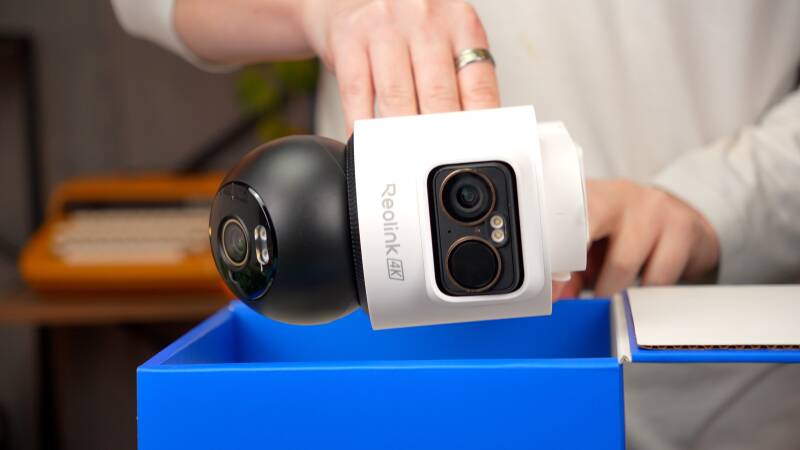
This is a fairly substantial outdoor security camera, with a distinctive stacked design that immediately separates it from more conventional single-lens alternatives.
The upper section houses the fixed 4K wide-angle camera, while the lower section contains the motorised 3K tracking camera.
The solar panel can be positioned above the camera or mounted separately using the included extension cable.
Personally, I quite like the appearance.
There’s something reassuring about a security camera that looks purposeful rather than trying to disappear completely into the background. The two-camera arrangement gives it a slightly more industrial appearance, but it also makes the design feel more functional.
That said, if you’re looking for a small camera that blends neatly into the side of your house, this probably wouldn’t be my first choice.
Measuring approximately 180 × 168 × 99mm, the OMVI 2i Ultra is noticeably larger than many compact battery-powered cameras.
It also weighs around 1,010g with its mounting bracket, so you’ll want to make sure you’re attaching it to a suitable surface.
A solid brick wall or another secure mounting location would be preferable to anything particularly flimsy.
Two cameras with different responsibilities
The most interesting aspect of the design is how the two cameras operate independently.
The upper camera provides a fixed overview of your chosen area. Although its position can be adjusted during installation, it doesn’t automatically rotate to follow movement.
Instead, that responsibility belongs to the lower camera.
The motorised unit offers approximately 355 degrees of horizontal rotation and up to 55 degrees of vertical movement, allowing it to monitor a much wider area than its narrower lens would otherwise suggest.
This arrangement is particularly useful because the upper camera doesn’t need to move whenever the lower camera starts tracking somebody.
It’s a clever solution to a fairly common problem.

Weather resistance
The OMVI 2i Ultra carries an IP65 weather-resistance rating, meaning it’s designed to withstand dust and water jets under specified test conditions.
For normal outdoor installations, including exposure to rain and changing weather conditions, that should provide a suitable level of protection.
However, IP65 doesn’t mean the camera is completely waterproof in every situation.
It isn’t designed to be submerged, and I’d still recommend installing it somewhere reasonably sheltered if possible.
The manufacturer lists an operating temperature range of approximately -20°C to 55°C, although charging performance and battery behaviour can be affected by temperature.
For UK homeowners, the more significant long-term consideration is likely to be maintaining sufficient solar charging during colder, darker months.
Setup & First Impressions
Wireless installation makes a genuine difference
One of the biggest attractions of the OMVI 2i Ultra is how straightforward installation can be.
Because the camera uses a rechargeable battery, there’s no need to run a permanent mains power connection or Ethernet cable to the mounting position.
That makes it particularly appealing for detached garages, garden walls, sheds and other areas where installing a traditional wired camera would be inconvenient.
The basic installation process is relatively simple.
Once you’ve selected a suitable location, you attach the mounting bracket, secure the camera and position the solar panel.
There’s no complicated electrical installation involved.
However, I would recommend spending a little time choosing the right mounting position before drilling any holes.
Although the lower camera can rotate automatically, the upper camera is still responsible for maintaining your main surveillance view.
For example, if you’re installing it above a driveway, you’ll want the upper camera pointing towards the area you most want to monitor continuously.
The lower camera can then take care of following people or vehicles as they move around.
Getting that initial position right makes a considerable difference to how useful the dual-camera system becomes.
Solar panel positioning matters
The included solar panel adds another consideration.
Ideally, you’ll want it positioned somewhere that receives a reasonable amount of direct sunlight throughout the day.
Fortunately, the three-metre extension cable means you don’t necessarily have to mount the panel directly beside the camera.
If your preferred camera location sits underneath an overhang or on a shaded wall, you may be able to position the solar panel somewhere more suitable.
It’s a small detail, but one that could make a significant difference to how often the battery needs charging.
Connecting to the Reolink app
Once installed, the camera connects through the Reolink app, available for Android and iOS.
The setup process is guided, making it relatively approachable even if you haven’t installed a security camera before.
The OMVI 2i Ultra supports Bluetooth-assisted setup alongside dual-band Wi-Fi 6 connectivity.
You can connect using either a 2.4GHz or 5GHz wireless network.
The 2.4GHz band will often be the more practical choice for cameras mounted further away from your router, while 5GHz can provide faster connectivity where signal strength is sufficient.
However, Wi-Fi 6 doesn’t automatically guarantee a reliable connection.
If you’re installing the camera on a detached garage or at the far end of your garden, it’s worth checking your wireless coverage beforehand.
One additional setup step is worth mentioning: Reolink recommends performing PTZ calibration after installation to ensure SyncTrack and Pinpoint operate correctly.
Once everything is configured, the app provides access to both camera views, motion alerts, tracking controls and recorded footage.
Overall, installation is refreshingly straightforward for a security camera offering this level of functionality.

Features & Performance
Dual-Camera System — The Feature That Makes It Different
The dual-camera arrangement is easily the most interesting aspect of the OMVI 2i Ultra.
Rather than simply combining two lenses for the sake of having more cameras, Reolink has given each one a specific responsibility.
Upper camera: 4K wide-angle monitoring
The upper camera uses an 8-megapixel sensor capable of recording at 3840 × 2160 resolution, providing a detailed 4K image.
Its 110-degree horizontal field of view is wide enough to cover a substantial section of a typical driveway, garden or entrance.
This is the camera responsible for maintaining your overall view.
If you’ve positioned it towards your driveway, it continues monitoring that area regardless of what the lower camera is doing.
That consistency is important.
With a conventional motorised security camera, tracking somebody towards one side of your property can mean temporarily losing visibility elsewhere.
The OMVI 2i Ultra avoids that particular compromise by keeping its main camera stationary.
Lower camera: 3K motorised tracking
Underneath the main camera sits a separate 5-megapixel sensor recording at approximately 3K resolution.
This camera uses a narrower 6mm lens, providing a much tighter perspective than the upper camera.
Its horizontal field of view is approximately 52 degrees, compared with 110 degrees on the main camera.
That narrower perspective is useful when you want to concentrate on a particular person, vehicle or area without relying entirely on digital enlargement of the wide-angle footage.
The motorised mechanism allows the camera to rotate through approximately 355 degrees horizontally, giving it considerable flexibility.
For example, somebody could enter your driveway from the street and begin walking towards your front door.
The lower camera can follow that person while the upper camera continues showing the wider driveway.
If another vehicle arrives during that time, you still have the original overview available.
It’s a considerably more practical arrangement than relying on a single moving lens.
Of course, two cameras don’t magically eliminate every blind spot.
Walls, parked vehicles, fences and other obstacles can still obstruct the view, and the lower camera can only point in one direction at a time.
Nevertheless, the ability to maintain a consistent overview while tracking movement is a genuinely useful improvement.
SyncTrack — Intelligent Tracking Without Losing the Bigger Picture
The technology connecting the two cameras is called SyncTrack.
Essentially, it allows the upper camera to detect movement and coordinate with the lower motorised camera.
When somebody enters the monitored area, the system can direct the lower camera towards that person and begin following their movement.
The lower camera can also detect and track activity within its own viewing area.
What makes this particularly interesting is that Reolink has designed the tracking system to continue following subjects even after they move beyond the upper camera’s original field of view.
In theory, this provides a much more complete picture of what’s happening around your property.
And I think the underlying concept makes a lot of sense.
With traditional pan-and-tilt cameras, automatic tracking is useful, but it introduces a constant compromise.
Every time the camera follows somebody, it’s turning away from somewhere else.
Here, that compromise is significantly reduced.

How reliable is automatic tracking?
Automatic tracking is useful, but I wouldn’t treat it as a guarantee that every second of movement will be captured perfectly.
If somebody suddenly changes direction, moves quickly or disappears behind a parked vehicle, tracking can become more difficult.
That’s not necessarily a specific criticism of the OMVI 2i Ultra. It’s a limitation worth considering with motorised tracking systems generally.
There are also situations where multiple people or vehicles might enter the scene simultaneously.
A single motorised camera can’t independently follow several subjects in completely different directions at once.
The supplied review experience doesn’t establish a measured tracking success rate, so I wouldn’t claim that SyncTrack is flawless or that it can reliably follow every possible movement.
However, the dual-camera arrangement provides an important advantage even when tracking isn’t perfect.
If the lower camera loses its subject, the upper camera is still maintaining the wider view.
And for me, that’s probably the strongest argument for this entire system.
You’re not relying exclusively on the motorised camera to understand what’s happening.
Pinpoint Control — A Small Feature That Makes Everyday Use Easier
Another feature I particularly like is Pinpoint.
It’s a relatively simple idea, but one that makes controlling the camera considerably more intuitive.
Normally, manually positioning a pan-and-tilt camera involves using directional buttons or a virtual joystick inside an app.
That works, but it can feel unnecessarily fiddly.
With Pinpoint, you can simply tap a particular location within the upper camera’s wide-angle image.
The lower motorised camera then turns towards that area.
Imagine you’re looking at your garden through the Reolink app and notice something near the back fence.
Rather than repeatedly pressing directional controls, you can tap the relevant area of the image and let the lower camera reposition itself.
It’s quicker, more natural and makes much better use of the dual-camera arrangement.
The feature is especially appealing because you can retain the wide-angle overview while directing the secondary camera towards something specific.
For everyday monitoring, I can see this being one of those features that becomes surprisingly useful.
It doesn’t replace automatic tracking, but it gives you a much more convenient way to take manual control whenever you want to inspect something.
Daytime Image Quality — Sharp, Detailed and Surprisingly Consistent
Image quality is obviously one of the most important considerations with any security camera.
After all, having two lenses and clever tracking features isn’t particularly useful if the recorded footage doesn’t contain enough detail to understand what’s happening.
Fortunately, this is an area where the OMVI 2i Ultra makes a strong impression.
4K main camera
Starting with the upper 4K camera, the footage looks impressively sharp.
There’s plenty of visible detail across the wider image, with brickwork, plants, buildings and smaller objects appearing well-defined.
Even towards the edges of the frame, the image retains a reasonable amount of clarity.
That’s particularly important for a wide-angle security camera because the entire purpose is to capture as much useful information as possible within one view.
Colours are another area where the camera performs nicely.
The footage has a vibrant appearance without looking excessively processed or artificially saturated.
Greens appear rich, while buildings and surrounding surfaces retain relatively natural tones.
Contrast is also handled quite well.
In scenes containing both bright sunlight and shaded areas, there’s a reasonable amount of detail preserved across the image.
The camera doesn’t completely eliminate the challenges of difficult lighting, but the overall results are pleasing.
For general home surveillance, the upper camera delivers the sort of image quality I’d expect from a capable modern 4K security camera.

3K tracking camera
What’s perhaps more surprising is how closely the lower camera matches the main lens.
Despite its lower 5-megapixel resolution, the secondary camera still produces impressively detailed footage.
Its narrower field of view gives subjects a larger presence within the frame, which can be particularly useful when monitoring people or vehicles further away.
Rather than digitally zooming into a wide-angle image, you’re working with a separate camera designed to capture a tighter perspective.
The difference is noticeable when following movement around a driveway or garden.
Colours and contrast are also reasonably consistent between the two cameras.
Switching from the wide-angle view to the tracking camera doesn’t produce a dramatic change in overall image character.
That consistency helps make the two-camera arrangement feel like one coordinated system rather than two completely unrelated devices.
The upper 4K camera still has a slight advantage when examining finer textures and small details.
However, during normal viewing, the difference isn’t nearly as dramatic as the resolution figures might suggest.
The 15fps limitation
There is one specification that I find slightly disappointing.
Both cameras record at a maximum of 15 frames per second at their listed resolutions.
For general security monitoring, this is perfectly usable.
However, footage won’t look quite as fluid as recordings captured at 25 or 30fps.
The difference becomes more noticeable when somebody moves quickly across the frame or when the motorised camera follows a moving subject.
A lower frame rate also means fewer individual frames are available when examining a fast-moving event.
I wouldn’t consider this a deal-breaker for ordinary residential surveillance, but it’s worth knowing.
If smooth motion capture is a major priority, there are cameras offering higher frame rates.
Night Vision — Two Different Approaches to After-Dark Security
A security camera needs to remain useful when the sun goes down.
And the OMVI 2i Ultra provides two different night vision options: traditional infrared recording and spotlight-assisted colour night vision.
Both have their advantages.
Infrared night vision
Starting with infrared, I actually quite like the results.
Naturally, you’re losing colour information, but the image retains a reasonable amount of sharpness and contrast.
Objects remain distinguishable, and there’s enough visible detail to understand what’s happening within the illuminated area.
Reolink specifies an infrared illumination range of approximately 10 metres.
Actual visibility will depend on the environment, distance and available light, but this should be suitable for many typical residential installations.
One of the biggest advantages of infrared is that it allows the camera to monitor an area without constantly illuminating it with bright visible lights.
If you’re watching a garden or driveway overnight, that can be considerably less intrusive.
Personally, infrared would probably be my preferred default mode.
It provides useful night-time monitoring while avoiding unnecessary spotlight activation.
Full-colour night vision
Switching to colour night vision produces a noticeably different image.
With the built-in spotlights activated, the camera can capture colour information that would otherwise disappear in infrared mode.
This is particularly useful when trying to distinguish clothing colours, vehicles or other objects.
The additional illumination also helps reveal more detail in the surrounding environment.
However, I wouldn’t say the footage looks quite as clean as it does during daylight.
There’s still some visible image noise in darker areas, and finer textures aren’t always as well-defined.
That’s fairly typical of security cameras operating in low-light conditions.
The more significant compromise is power consumption.
Activating the spotlights requires additional battery energy, particularly if they’re triggered frequently throughout the night.
There is also the question of whether you actually want bright lights illuminating your driveway or garden whenever movement is detected.
For some homeowners, that’s a useful deterrent.
For others, it could become unnecessarily intrusive.
Overall, I think having both options is the right approach.
Infrared offers discreet monitoring, while colour night vision provides additional visual information when you need it.
And based on the footage discussed in the review, both modes deliver pleasing results for this type of camera.

Intelligent Motion Detection — More Useful Alerts, Less Unnecessary Noise
One of my biggest frustrations with outdoor security cameras is receiving endless notifications about movement that doesn’t really matter.
A tree moving in the wind, an animal wandering across the garden or something blowing along the driveway can quickly result in a phone full of alerts.
And once that happens, notifications become considerably less useful.
The OMVI 2i Ultra attempts to address this through intelligent detection.
It can distinguish between three main categories:
- People
- Vehicles
- Animals
This allows you to concentrate on the types of activity that actually matter to you.
For example, if you’re primarily interested in knowing when somebody approaches your front door, you can configure the camera around person detection.
If you’re monitoring a driveway, vehicle detection may be equally useful.
The system also benefits from having two separate cameras.
The upper camera can monitor the wider area while the lower camera follows the activity that triggered the detection.
This makes the entire setup feel more purposeful than a basic camera that simply records a wide shot whenever movement occurs.
However, intelligent detection isn’t necessarily perfect.
Lighting conditions, movement direction, distance and environmental factors can all influence detection performance.
I’d recommend spending some time adjusting the available sensitivity settings, detection zones and notification preferences.
It’s also worth checking the system after dark rather than assuming the daytime settings will work equally well overnight.
A little time spent configuring the camera properly can make a considerable difference to the usefulness of its alerts.
Two-Way Audio, Spotlight and Siren
Beyond recording footage, the OMVI 2i Ultra includes several features designed to help you respond to activity around your home.
Two-way communication
A built-in microphone and speaker allow you to communicate with somebody through the Reolink app.
This is particularly useful when you’re away from home.
If a delivery driver approaches your property, for example, you can potentially speak to them without physically being there.
It’s also useful if you notice somebody somewhere they shouldn’t be.
I wouldn’t expect the audio system to deliver exceptional sound quality, but that’s not really the point.
For a security camera, the priority is being able to understand somebody and communicate clearly enough in return.
The supplied review doesn’t include measured microphone or speaker performance, so audio clarity in noisy outdoor conditions remains something worth considering.
Spotlight and siren deterrent
The camera also includes built-in spotlights and a siren.
These can be used to draw attention to unwanted activity.
I quite like having these features available, although I’m slightly less convinced about relying on them as a serious deterrent.
A bright light or audible warning might discourage somebody casually wandering around your property.
However, I certainly wouldn’t assume that either feature would stop somebody determined to steal something.
They’re useful additional security tools rather than replacements for proper locks, alarms or other protective measures.
I’d also recommend being selective about how the siren activates.
An alarm that repeatedly sounds because of harmless movement could quickly become annoying, particularly in a residential area.
Used sensibly, though, these features provide another way to respond to activity rather than simply recording it.
Battery Life & Solar Charging — Convenient, but Keep Expectations Realistic
Battery life is probably one of the biggest considerations with the OMVI 2i Ultra.
And it’s also where I think buyers need to approach the manufacturer’s claims with realistic expectations.
Removable 10,000mAh battery
The camera uses a removable 10,000mAh rechargeable battery.
Reolink advertises up to six months of battery life on a single charge.
On paper, that sounds excellent.
However, six months is a manufacturer estimate rather than a guaranteed result for every installation.
Actual endurance will depend heavily on how the camera is being used.
A camera overlooking a quiet garden with only occasional movement is likely to consume considerably less power than one monitoring a busy driveway.
Every recording event, tracking movement, live-view session and spotlight activation places additional demands on the battery.
Wi-Fi signal quality and temperature can also influence power consumption.
With two separate cameras and a motorised tracking mechanism, I would be particularly cautious about assuming the advertised maximum endurance applies to a busy installation.
The review doesn’t establish six months of independent battery testing, so that figure should be treated as an optimistic upper-end claim rather than a confirmed real-world result.

Included 6W SolarEase panel
Fortunately, Reolink includes a 6W SolarEase solar panel.
This is one of the strongest practical advantages of the package.
Instead of relying entirely on periodic manual charging, the solar panel can help replenish the battery during daylight hours.
Reolink claims that approximately 30 minutes of suitable sunlight per day can provide enough energy for typical operation.
It’s an appealing idea.
However, the important words here are suitable sunlight and typical operation.
Solar charging performance depends on several factors, including panel positioning, available sunlight, weather conditions and camera activity.
And living in the UK, I think we all know how unpredictable those conditions can be.
A solar panel receiving direct sunlight throughout summer is in a completely different situation from one mounted on a shaded wall in December.
During winter, shorter days, cloud cover and lower sun angles can significantly reduce the amount of energy available.
If the camera is also recording frequently and regularly activating its tracking mechanism, the solar panel may struggle to replenish everything being consumed.
So while I think solar charging is a genuinely useful feature, I wouldn’t automatically assume you’ll never need to charge the battery manually.
Why the removable battery matters
This is where the removable battery becomes particularly appealing.
Rather than having to remove the entire camera whenever the battery needs charging, you can access the battery separately.
For a camera mounted high on an exterior wall, that can make maintenance more manageable.
You’ll still need safe access to the battery compartment, of course, but it’s a more flexible arrangement than having a permanently enclosed battery.
The camera also supports USB-C charging, although Reolink specifies using a compatible USB-A to USB-C charging connection.
Overall, I like the approach.
The combination of a substantial battery, solar charging and removable design gives the OMVI 2i Ultra a good balance of installation convenience and practical maintenance.
Just don’t confuse wireless operation with being completely maintenance-free.
Storage & The Reolink App — No Mandatory Monthly Subscription
Another area where Reolink continues to make a strong argument is local storage.
Many modern security cameras rely heavily on cloud subscriptions.
While those services can be convenient, the ongoing costs can quickly add up when you’ve got several cameras installed around your property.
The OMVI 2i Ultra offers an alternative.
Local microSD recording
The camera supports microSD cards with capacities of up to 512GB.
This allows you to save recordings locally without needing a paid cloud subscription.
For homeowners who simply want to review motion events through the Reolink app, that’s a considerable advantage.
You can access recorded clips, check detected activity and manage the camera without committing to another monthly payment.
The amount of footage you can retain will depend on recording settings, event frequency and clip duration.
A microSD card is also something you’ll need to purchase separately.
One practical consideration is that recordings stored only inside the camera could be lost if the device or memory card is stolen or damaged.
For more comprehensive security, compatible external storage options may be worth investigating.

Motion-triggered recording
There is an important limitation to understand.
According to Reolink’s published specifications, the OMVI 2i Ultra is primarily designed around motion-triggered recording.
Rather than continuously recording everything happening throughout the day, the camera saves footage when relevant activity is detected.
For many homeowners, that will be perfectly adequate.
Personally, I’m usually more interested in reviewing somebody approaching the house than scrolling through hours of completely uneventful footage.
However, motion-triggered recording has limitations.
If an event isn’t detected, the camera may not save the footage you were hoping to review.
The official specifications also don’t list pre-recording support, meaning buyers shouldn’t assume they’ll receive footage from several seconds before an event begins.
And while some campaign materials mention broader recording and integration capabilities, the product’s published specification sheet identifies motion-triggered recording as its standard recording mode.
If uninterrupted 24/7 surveillance is essential, I’d recommend verifying the exact supported recording configuration before buying.
A wired camera designed for continuous recording may be the more appropriate choice.
Everyday app experience
The Reolink app brings the main features together in one place.
You can access the two camera views, review recorded events, adjust detection settings and control the motorised camera.
Pinpoint is particularly useful here because it provides a more intuitive way to reposition the lower camera.
The camera also supports compatible Alexa and Google Assistant integrations, which may appeal to homeowners already using smart displays.
Overall, I like that Reolink provides a relatively complete set of features without making a cloud subscription mandatory for basic local recording.
It’s an important advantage when considering the long-term cost of ownership.
Pros — What I Like About the Reolink OMVI 2i Ultra
- Genuinely useful dual-camera design: The fixed 4K camera maintains the main overview while the separate 3K camera follows movement.
- Sharp daytime image quality: Both cameras produce detailed footage, with pleasing colours and good overall clarity.
- Consistent image quality between lenses: The secondary camera delivers surprisingly strong results despite its lower resolution.
- SyncTrack automatic tracking: A practical way to follow movement without constantly losing the original surveillance view.
- Convenient Pinpoint control: Tapping the wide-angle image to reposition the lower camera is much easier than using traditional directional controls.
- Completely wire-free installation: Ideal for driveways, gardens and garages where running power cables would be inconvenient.
- Included 6W solar panel: A welcome addition that could significantly reduce manual charging.
- Removable 10,000mAh battery: Makes charging and maintenance more flexible.
- Infrared and colour night vision: Two useful options depending on lighting conditions and personal preferences.
- Intelligent detection: Person, vehicle and animal recognition helps make notifications more relevant.
- Subscription-free local recording: Supports microSD cards up to 512GB without requiring monthly cloud storage fees.
- Dual-band Wi-Fi 6: Provides flexibility when connecting to modern home networks.
Cons — What Could Be Better?
- 15fps recording: Both cameras are limited to 15 frames per second at their listed resolutions, making fast movement look less fluid than on higher-frame-rate alternatives.
- Fairly bulky design: The camera is considerably larger than many conventional battery-powered security cameras.
- Battery life depends heavily on usage: The advertised six-month endurance shouldn’t be treated as a guaranteed result, particularly with frequent recording and tracking.
- Solar charging isn’t guaranteed year-round: Shaded installations and British winter weather could make occasional manual charging necessary.
- Motion-triggered recording limitations: The standard recording arrangement isn’t designed around conventional uninterrupted 24/7 surveillance.
- Tracking has practical limitations: Fast movement, obstacles and multiple subjects can present challenges for any single motorised tracking camera.
- Spotlight-assisted colour night vision uses additional power: Frequent activation could reduce battery endurance.
- Not a complete replacement for multiple cameras: The dual-camera design improves coverage, but physical obstacles and separate entrances can still require additional cameras.
- Long-term reliability remains to be established: Extended battery performance, motor durability and tracking consistency across different environments require longer-term evaluation.

Final Verdict — Is the Reolink OMVI 2i Ultra Worth It?
The Reolink OMVI 2i Ultra is one of those security cameras where the main attraction isn’t necessarily the resolution, the battery capacity or the number of features.
It’s the way those features work together.
And I think that’s what makes this camera genuinely interesting.
Having a fixed 4K camera continuously monitoring your main area while a separate 3K camera follows movement is a sensible approach to outdoor surveillance.
It addresses one of the biggest frustrations with traditional motorised cameras: losing sight of the original scene whenever the lens turns towards something else.
The image quality is also impressive.
Both cameras produce sharp, detailed daytime footage, with natural-looking colours and surprisingly consistent results between the two perspectives.
Night vision is equally versatile, offering discreet infrared monitoring alongside spotlight-assisted colour recording.
I also appreciate the practical decisions Reolink has made elsewhere.
The completely wireless installation makes the camera accessible to homeowners who don’t want to run cables through their walls.
Including a 6W solar panel adds real value, while the removable battery provides a convenient alternative when sunlight isn’t sufficient.
And the ability to save footage locally without paying a monthly subscription remains an important advantage.
However, there are compromises.
The 15fps recording limit is a little disappointing, particularly for a camera designed to follow moving subjects.
The physical design is fairly bulky, and the advertised six-month battery life is something I’d approach with realistic expectations.
Solar charging is useful, but it doesn’t automatically eliminate battery maintenance, especially during a British winter.
It’s also important to remember that this is primarily a motion-triggered security camera.
If you need uninterrupted recording or a more demanding surveillance system, a wired alternative may be the better investment.
And although the dual-camera arrangement improves coverage, it doesn’t completely eliminate blind spots or guarantee perfect tracking.
So, would I recommend the Reolink OMVI 2i Ultra?
For the right property, absolutely.
If you’re looking to monitor a driveway, garden or garage without the hassle of installing permanent power cables, there’s a lot to like here.
The dual-camera arrangement provides a genuinely useful advantage over conventional single-lens systems, while the combination of solar charging, intelligent detection and local storage makes it a well-rounded package.
I wouldn’t buy it expecting flawless tracking, six months of guaranteed battery life or complete surveillance coverage from a single mounting position.
But if your priority is maintaining a wide view while automatically following movement elsewhere, the OMVI 2i Ultra offers a thoughtful and practical solution.
Ultimately, this camera isn’t simply about having two lenses. It’s about being able to follow what’s happening without losing sight of everything else.
And for everyday home security, that’s a genuinely worthwhile improvement.
Watch the full cinematic video review on Gadget Crunch’s YouTube channel.
Add comment
Comments