

INTRODUCTION
Outdoor security cameras usually ask you to compromise.
Go for a wide-angle camera and you can see more of the scene, but fine detail at distance often suffers. Choose a pan-and-tilt camera and you get movement tracking, but the moment it turns to follow someone, another part of the property can fall out of view. For small entrances, that is not always a major issue. But for a bigger driveway, a wide front garden, a side passage, a courtyard, or a back garden with several access points, those blind spots can become frustrating very quickly.
That is exactly the problem the Reolink OMVI 3i PoE is trying to solve.
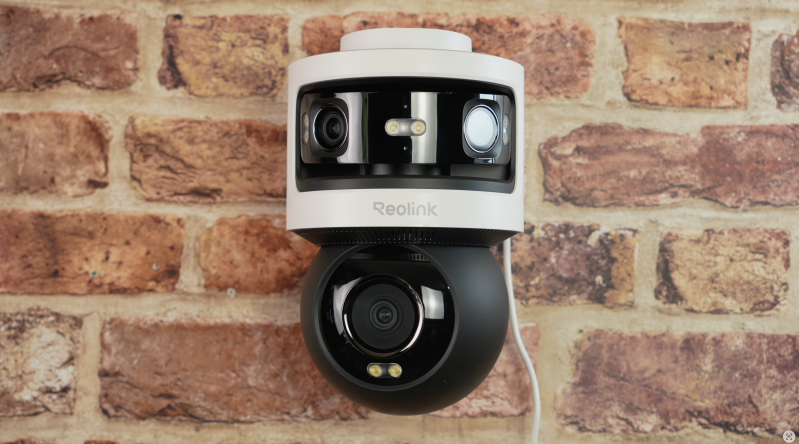
This is not a small, subtle battery camera designed to disappear under a porch. It is a serious outdoor security camera with a triple-lens layout, combining a fixed 180-degree panoramic camera at the top with a separate 4K pan-and-tilt camera underneath. The idea is simple: one part of the camera keeps watching the full scene, while the moving lens locks onto activity and follows the detail. Reolink describes it as an 18MP triple-lens system, with a 10MP dual-lens panoramic upper camera and an 8MP lower 4K camera.
In real-world terms, that means you are not choosing between wide coverage and close tracking. You are getting both at the same time.
And that is what makes the OMVI 3i interesting. It is not just another outdoor camera with a higher resolution number stamped on the box. It is trying to reduce the need for multiple cameras by giving you two useful perspectives from one mounting point: the full context of the scene and the closer evidence when something actually happens.
It is clever, it is powerful, and in the right property, it makes a lot of sense. But it is also not the cheapest, smallest, or simplest option for everyone.
This is a camera for people who want proper coverage, not just basic motion alerts.
QUICK SUMMARY
The Reolink OMVI 3i PoE is a feature-packed outdoor security camera designed for larger spaces where a single standard camera might not be enough. Its biggest strength is the dual-view experience: a fixed 180-degree panoramic feed keeps the whole area visible, while the 4K pan-and-tilt lens tracks movement for closer detail.
In daylight, the combination works very well. You get a broad overview that helps you understand the full scene, plus a separate moving camera that can follow people, vehicles, or activity without leaving you completely blind elsewhere. The app experience is also genuinely useful, especially with features like Pinpoint, preset positions, patrol routes, detection zones and local AI video search.
The PoE version is the one to go for if you can run Ethernet, because it gives you power and data through one cable, making it a much more stable long-term outdoor solution. Reolink also keeps one of its biggest advantages here: local-first storage, with microSD support up to 512GB, plus compatibility with Reolink NVR, NAS and FTP options.
It is not perfect. The design is large and obvious, which will not suit everyone. The tracking needs tuning in busier locations. The panoramic image can show some softness or distortion towards the edges, which is normal for ultra-wide stitched views. And for smaller homes, front doors, flats or narrow spaces, this camera may simply be more than you need.
But for larger driveways, gardens and outdoor areas where blind spots are the main concern, the OMVI 3i PoE feels like one of Reolink’s most practical all-in-one security cameras so far.

WHAT’S IN THE BOX
The OMVI 3i PoE comes with the usual Reolink-style installation package. It is not overloaded with accessories, because the camera itself is very much the main event.
You should expect:
- Reolink OMVI 3i PoE camera unit
- Mounting base/bracket
- Mounting screws and fittings
- Mounting template
- Basic setup paperwork/user documentation
The supplied source does not clearly confirm every small accessory included in the retail box, so items such as Ethernet cable length, waterproof connector parts or additional tools may vary by region or sales package. What is clear is that this is designed as a permanently mounted outdoor camera rather than a casual battery-powered camera you can stick up in a few minutes and move around later.
DESIGN & BUILD QUALITY
The first thing to know about the Reolink OMVI 3i PoE is that it looks like a proper security camera.
That may sound obvious, but it matters. This is not one of those tiny compact cameras that blends quietly into the background. It has a large, visible body, a distinctive triple-lens layout and a shape that immediately tells you it is there to watch a wide area. For some people, that will be a downside. If you want something discreet, subtle or almost invisible, this is not really that kind of product.
But for security, visibility can also be a strength. A camera like this can act as a deterrent simply because it is obvious. Mounted on the front of a house, above a driveway, on the corner of a building or overlooking a yard, it gives the impression of serious coverage rather than casual monitoring.
The design is split into two main sections. The upper section houses the dual-lens panoramic camera, which provides a fixed 180-degree view. This part stays pointed at the wider scene all the time. Underneath that is the separate 4K pan-and-tilt camera, which physically moves to follow subjects and focus on specific areas.
That two-part design is what gives the OMVI 3i its personality. It looks slightly more complex than a normal bullet camera or dome camera because it is doing more than one job at once.
Reolink lists the OMVI 3i PoE at 202 x 151 x 125mm and around 1.3kg without accessories, so this is a fairly substantial unit. It is also rated IP66 weatherproof, which means it is built for outdoor use against dust and rain. Reolink lists the working temperature range as -10°C to +55°C, so it should be suitable for typical outdoor home use in the UK and many other climates.
From a practical installation point of view, the size means you will want to think carefully about where it goes. This is not something I would casually mount too low or too close to where someone can easily reach it. It suits higher positions where the panoramic camera can see across the full area and the lower PT lens has enough room to move.
The overall feel is very much “mount it properly and leave it alone”. That is where this camera makes the most sense.

SETUP & FIRST IMPRESSIONS
Setup is fairly typical for a Reolink PoE camera.
The physical installation starts with mounting the bracket to the wall, ceiling or suitable surface, then attaching the camera and connecting it to power/network. With the PoE model, one Ethernet cable can handle both data and power, provided you have the right PoE switch, PoE injector or compatible Reolink NVR setup. Reolink lists the OMVI 3i PoE as using IEEE 802.3at active PoE, while it can also be powered by 12V DC.
That PoE setup is one of the camera’s biggest practical advantages.
For a security camera covering a large outdoor space, reliability matters more than convenience. Wi-Fi cameras are easier to place in some homes, but they are also more dependent on signal strength, walls, distance from the router and local interference. And outdoor cameras are often mounted exactly where Wi-Fi can become unreliable: far from the router, outside thick walls, or at the edge of the property.
With PoE, you avoid most of that. One cable gives the camera stable power and a stable network connection. For a camera that may be recording 24/7, handling high-resolution video and sending motion alerts, that is a much better long-term solution if you can run the cable.
Once physically installed, the rest of the setup is handled through the Reolink app or desktop client. You add the camera, follow the pairing process, configure recording and detection preferences, then spend some time fine-tuning how the camera behaves.
That last part is important. This is not a camera you should just slap on a wall, leave on default settings and expect perfect results in every environment. Because it sees such a wide area and has tracking features built in, you will get the best experience by adjusting detection zones, sensitivity, object detection and tracking preferences.
The good news is that the app experience is central to the camera’s appeal. The OMVI 3i is not just about recording video. It is about giving you control over a large scene in a way that feels faster and more useful than a traditional PTZ camera.

FEATURES & PERFORMANCE
Triple-Lens Coverage: The Main Reason This Camera Exists
The headline feature is the triple-lens system.
At the top, the OMVI 3i uses a dual-lens panoramic camera to provide a 180-degree horizontal field of view. Reolink lists the upper camera resolution as 5120 x 1920, which is around 10MP. Underneath, the lower camera records at 3840 x 2160, giving you an 8MP 4K view with pan-and-tilt movement.
Together, Reolink markets this as an 18MP triple-lens camera.
But the resolution number is not the most important part. The useful bit is how those cameras work together.
A normal wide-angle camera lets you see a lot, but it cannot physically move to follow someone. A normal PTZ camera can track someone, but when it turns away, you lose the rest of the scene. The OMVI 3i solves that by giving each part of the camera a different job.
The panoramic camera watches the whole area. The pan-and-tilt camera investigates the detail.
That makes a genuine difference in real use. When someone walks up a path, enters a driveway or moves across the edge of the frame, the wide view keeps the full context visible while the lower lens follows the person or object. You are not left wondering what is happening elsewhere while the camera is tracking.
For larger properties, that is a very practical advantage.
Dual View in the Reolink App
The dual-view experience is where this camera either works or falls apart. Thankfully, it is one of the strongest parts of the OMVI 3i.
Being able to see the panoramic feed and the PT feed at the same time makes the camera feel much more useful than a standard PTZ. The wide feed gives you situational awareness. The lower feed gives you detail. Together, they make the whole system feel more complete.
This is especially helpful if you are monitoring a wide driveway, a front garden with multiple entrances, or a back garden where someone could appear from different angles. Instead of constantly dragging a PTZ control around the screen, you can see the full area and let the tracking lens handle the closer view.
It also makes reviewing events easier. The wide view tells you where something started and how it moved through the scene. The closer view gives you a better look at what happened.
That combination is the camera’s biggest selling point, and it does not feel like a gimmick.
Pinpoint: One Tap to Look Closer
One of the most practical features is Pinpoint.
The idea is simple: you tap somewhere on the panoramic view, and the pan-and-tilt lens moves to focus on that area. Reolink describes Pinpoint as a way to pan and focus on a specific area quickly, such as driveways, courtyards and corners.
In practice, this is much quicker than manually steering a PTZ camera.
Traditional PTZ controls can feel fiddly, especially on a phone screen. You tap, drag, overshoot, correct, wait for the camera to move, then adjust again. With Pinpoint, the panoramic image becomes more like a map of the scene. Tap the area you care about, and the camera moves there.
That sounds small, but it makes the whole experience feel more fluid. It is the kind of feature that actually improves day-to-day use rather than just looking good on a spec sheet.
SyncTrack and Auto Tracking
Tracking is the other major headline feature.
Reolink calls its system SyncTrack, where the pan-and-tilt camera can lock onto movement and keep the subject centred in the frame when auto framing is enabled. Reolink also says tracking can continue even if the subject moves out of the panoramic view.
When it works well, it is genuinely impressive.
The panoramic camera acts like the spotter. It sees motion across the wide 180-degree view. Then the lower lens moves to follow the subject, giving you a closer and more focused perspective. For someone walking up a driveway, approaching a gate or moving through a garden, the result feels much more useful than a simple motion clip from one fixed angle.
You get context and detail at the same time.
But it is worth being realistic. Tracking is not magic. Its performance depends on distance, lighting, subject speed and how busy the scene is. If your camera faces a road with constant passing traffic, delivery vans, pedestrians, pets and trees moving in the wind, you will need to spend time tuning detection zones and sensitivity.
That is not a flaw unique to this camera. It is just the reality of smart outdoor security cameras. The more a camera can see, the more you need to tell it what not to care about.
In a more typical home setup, such as a driveway, front path, side entrance or enclosed garden, the tracking feels much more grounded. It is less about the camera wildly spinning around and more about having a second lens that intelligently follows the thing you are likely to care about.
Detection Settings, Zones and Presets
The OMVI 3i gives you a lot of control over detection.
Reolink lists local AI detection for people, vehicles and animals, along with motion detection. The camera also supports detection zones, virtual fence-style perimeter alerts such as line crossing, zone intrusion and zone loitering on the upper camera.
That level of control is important because this camera sees such a wide area.
For example, if your driveway faces a public road, you probably do not want alerts every time a car passes. If your garden has trees or moving shadows, you do not want the camera reacting to every bit of background movement. If a side gate is the main security concern, you can focus attention there.
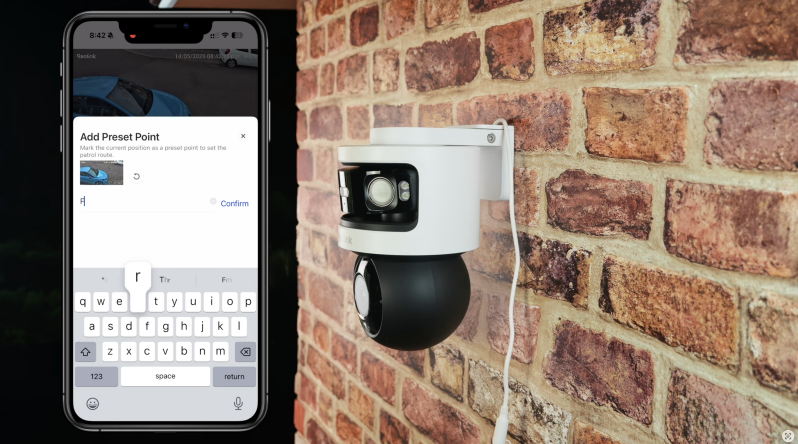
You can also create preset points. Reolink says the OMVI 3i supports up to 64 preset positions, plus one guard position, and patrol support with up to four presets per patrol.
That gives you the option to create automatic checks across key areas. For example, the camera could look at the gate, then the driveway, then the side passage. For a larger yard or business-like setting, that could be genuinely useful.
Personally, this is not something everyone needs to use constantly. For a home, event-based tracking often makes more sense than having the camera sweep around all day. But the option is useful, especially for larger properties where there are multiple points of interest.

Image Quality
The OMVI 3i’s image quality is strong, but it is important to understand what each camera is doing.
The panoramic camera is not just about pixel-peeping tiny details at the far edge of the frame. It is covering a huge 180-degree scene, so its job is to show the full picture clearly enough that you understand what happened and where it happened.
In daylight, that wide view is very useful. It gives you a proper overview rather than a narrow slice of the scene. You can see where someone entered, where they moved, and what else was happening at the same time.
The lower 4K camera is where the more focused detail comes from. Because it can move and centre the subject, it is better suited to capturing the closer view that may actually matter when reviewing an event.
Together, the two feeds make the image quality feel more useful than either one would on its own.
There are some realistic limitations. With ultra-wide panoramic cameras, the edges of the image can show some distortion or softness. That is normal for this type of view, especially where images are being stitched or stretched across a very wide field of view. It is not a deal-breaker, but anyone expecting perfect sharpness from corner to corner may notice it.
The key point is that the OMVI 3i is not trying to make the panoramic view do everything. It uses the panoramic view for awareness and the PT camera for closer detail. That is the right approach.
Night Vision
Night performance is flexible, which is exactly what you want from an outdoor camera.
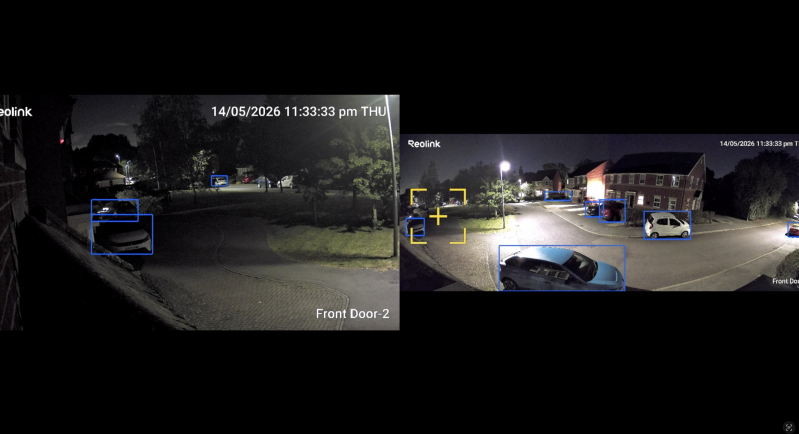
The OMVI 3i offers full-colour night vision with the integrated spotlight, along with infrared night vision for more discreet monitoring. Reolink lists infrared night vision up to 30 metres / 100 feet, with colour night vision supported by an integrated spotlight system.
In real use, colour night vision is most effective when there is already some ambient light. A porch light, street lamp, garden light or nearby house lighting can help the camera keep the image more natural and easier to read. Colour footage can make it easier to identify clothing, vehicles and general scene detail compared with flat black-and-white infrared footage.
If the scene is darker, the spotlight can kick in to illuminate the area. That improves visibility and also adds a deterrent effect, because it makes the camera’s presence obvious when motion is detected.
That said, not everyone will want a spotlight blasting on all the time. In some homes, especially if the camera is near neighbours, bedrooms or a shared access path, you will want to configure this carefully. Motion-triggered spotlight use is likely to be more practical than leaving it permanently active.
In proper darkness, infrared mode is still the safer and more discreet option. You lose colour, but you still get usable movement, shapes and general activity. For security footage, that is often enough.
Local AI Video Search
The OMVI 3i also includes Local AI Video Search, which is one of the more interesting software features.
Instead of scrubbing through a timeline manually, you can search recorded footage using natural language-style terms. Reolink gives examples such as searching for a person in a blue shirt, a red vehicle, or someone carrying a package.
This is one of those features that could easily sound like marketing fluff, but it has a very practical purpose. Anyone who has owned a security camera knows how annoying it can be to scroll through clips looking for one specific moment. If you know you are looking for a person, a dog, a vehicle or a package delivery, being able to search for that type of event can save time.
It also fits the OMVI 3i well because the camera is likely to be installed in larger, busier spaces. The more footage you capture, the more useful search becomes.
As with all AI search and detection tools, expectations should stay realistic. It will not replace careful review in every situation, and results can depend on image quality, lighting and how clearly the subject appears. But as a time-saving tool, it is genuinely useful.
Storage and Local Recording
One of Reolink’s biggest advantages continues to be its local-first approach.
The OMVI 3i PoE supports microSD cards up to 512GB, and Reolink also lists support for Reolink NVR, NAS and FTP storage. It also supports protocols including RTSP, RTMP, FTP and other network standards, which is useful for more advanced setups.
This matters because many smart security cameras feel incomplete unless you pay for a subscription. Reolink’s approach is different. You can keep recordings local, use a microSD card, connect to an NVR, or integrate the camera into a broader storage setup.
For basic home users, a microSD card may be enough, especially if you are using motion-triggered recording. For heavier use, 24/7 recording or multi-camera setups, an NVR makes more sense.
The OMVI 3i supports motion-triggered recording by default, as well as scheduled and 24/7 recording modes. That flexibility is exactly what you want from a serious outdoor camera.
The only thing to bear in mind is that high-resolution footage from multiple feeds can eat storage more quickly than a basic single-lens camera. If you plan to record continuously, do not cheap out on storage.

Audio and Smart Home Features
The camera includes a built-in microphone and speaker, giving you two-way audio. This can be useful for speaking to visitors, warning off someone on the property, or simply checking what is happening outside.
Two-way audio on outdoor cameras is rarely something I would treat as the main reason to buy, but it is a useful extra. The more important part is that it gives you another way to interact with the scene rather than just passively recording.
Reolink also lists Google Assistant support, meaning you can view the camera through compatible Google smart displays or Chromecast-enabled devices. That is handy if you already use Google’s smart home ecosystem, although anyone wanting deeper Apple HomeKit or Alexa-style integration should check compatibility carefully before buying.
REAL-WORLD EXPERIENCE
The OMVI 3i PoE makes the most sense when you have a space that feels slightly too large or too awkward for a normal single camera.
A standard fixed camera above a driveway might show the cars but miss the side gate. A wide-angle camera might cover the whole front garden but not give enough detail when someone is further away. A PTZ camera might follow someone well, but then lose sight of another entrance. This is where the OMVI 3i starts to feel genuinely useful.
The dual-view approach changes how you monitor the space. You are not constantly choosing where to look. The camera gives you the wide view by default, then uses the lower lens to focus on activity. It feels more like having a lookout camera and a tracking camera working together.
For a driveway, it can show the full area while following a person or vehicle as they enter. For a back garden, it can keep the wider layout visible while zooming attention towards movement. For a side path or courtyard, it can reduce the feeling that you need a second camera just to cover the blind angle.
That does not mean it replaces every multi-camera setup. If your property has completely separate areas with no shared line of sight, you will still need more than one camera. A single OMVI 3i cannot see around corners or through walls. But for wide open spaces where one mounting point can see most of the area, it can reduce the number of cameras needed.
The other real-world advantage is the app workflow. Pinpoint makes it much faster to check a specific area, and local AI search makes it easier to find past events. Those are the features that make the camera feel more polished in daily use, not just powerful on paper.
The trade-off is complexity. A simple camera is easier to live with if all you need is a front-door view. The OMVI 3i rewards setup time. You will want to adjust zones, decide what objects matter, test tracking behaviour, configure night vision, set storage preferences and check that the mounting position gives the best view.
For some people, that will be part of the appeal. For others, it may feel like overkill.
PROS
- Excellent all-in-one coverage for large outdoor areas
- 180-degree panoramic view keeps the full scene visible
- Separate 4K pan-and-tilt lens provides closer tracking detail
- Dual-view layout is genuinely useful in the app
- Pinpoint feature makes it much quicker to check specific areas
- SyncTrack can follow movement while the panoramic feed stays active
- Strong daylight performance across both wide and closer views
- Flexible night vision with colour, spotlight and infrared options
- Local AI detection for people, vehicles and animals
- Detection zones, line crossing, intrusion and loitering alerts add useful control
- Supports preset positions and patrol routes
- Local AI video search can save time when reviewing footage
- Local-first storage with microSD support up to 512GB
- Works with Reolink NVR, NAS and FTP storage options
- PoE connection provides stable power and networking through one cable
- IP66 weatherproofing makes it suitable for proper outdoor use
- No mandatory monthly subscription required for core local recording features
CONS
- Large and very noticeable design will not suit discreet installations
- More expensive and more advanced than a basic outdoor camera
- Needs careful placement to get the most from the panoramic and PT views
- Tracking performance depends on distance, lighting, movement speed and scene complexity
- Busy roads or active public areas may require careful sensitivity and zone tuning
- Panoramic edges can show softness or distortion, which is normal but still noticeable
- PoE is best for reliability, but running Ethernet may not be practical for every home
- Wi-Fi users should be cautious if the mounting location is far from the router
- More involved setup than a simple plug-and-play camera
- Not necessary for small entrances, flats or narrow front-door views
- Spotlight use needs consideration in shared or neighbour-facing areas
- Advanced users may still prefer multiple separate cameras for completely different angles

WHO IS THIS FOR?
The Reolink OMVI 3i PoE is best suited to homeowners or small property owners who need wider outdoor coverage than a standard camera can comfortably provide.
It makes the most sense if you have:
- A wide driveway
- A large front garden
- A back garden with multiple entry points
- A side path or courtyard
- A garage and driveway area
- A small business yard
- A property where you would normally consider installing two cameras
It is also a good fit for people who like Reolink’s local storage approach and do not want to rely on cloud subscriptions just to make their security camera useful.
The PoE model is especially suited to anyone who is comfortable running Ethernet or already has a Reolink NVR or PoE network setup. For long-term reliability, that is the version I would choose.
However, this is probably not the right camera if you only need to watch a front door, a small porch, a narrow alleyway or one simple entrance. In those cases, a smaller fixed Reolink camera, doorbell camera or basic turret-style PoE camera may be cheaper, neater and easier to install.
The OMVI 3i is for people who have a coverage problem to solve.
FINAL VERDICT
The Reolink OMVI 3i PoE is one of those cameras that makes much more sense once you think about the problem it is trying to fix.
It is not just trying to be sharper than a normal outdoor camera. It is trying to be more useful. The 180-degree panoramic view gives you the full picture, while the 4K pan-and-tilt lens gives you the closer tracking detail. That combination genuinely changes the experience, because you are no longer forced to choose between context and focus.
For larger spaces, that is a real advantage.
The image quality is strong in daylight, the dual-view app experience is genuinely practical, Pinpoint is faster than traditional PTZ controls, and local AI search adds a useful layer when reviewing footage. Reolink’s local-first storage approach also remains a big selling point, especially for buyers who do not want another monthly subscription.
But it is not a camera for everyone. It is big, obvious, more involved to configure, and likely more than many smaller homes need. Tracking still depends on the environment, and anyone facing a busy road or complex scene will need to spend time tuning the settings.
Still, when placed in the right location, the OMVI 3i PoE is a very compelling outdoor security camera. It feels like a proper solution for people who have outgrown basic single-lens cameras but do not want to install multiple units just to cover one wide area.
It is powerful, practical and genuinely different — but it is at its best when you actually need the coverage it offers.
Watch the full cinematic video review on Gadget Crunch’s YouTube channel.
Add comment
Comments