

XGIMI HORIZON 30 Ultra Max Review — Brilliant 4K Gaming Meets Serious Home Cinema
A powerful RGB triple-laser projector with impressive brightness, advanced contrast technology and genuinely exciting gaming performance. But is it worth nearly £3,000?
Introduction
There’s something undeniably special about watching a film on a genuinely enormous screen. Whether it’s the sweeping landscapes of a cinematic blockbuster, the atmosphere of a packed football stadium or the immersive experience of playing your favourite game at 120 inches, a good projector can deliver something even the largest televisions struggle to replicate.
But achieving a truly impressive projected image involves considerably more than simply making it brighter.
Over the years, one of the biggest weaknesses of home cinema projectors has been their ability to reproduce convincing blacks and maintain detail in darker scenes. Plenty of projectors can produce spectacular colours and dazzling highlights, only to struggle when a film moves into a dimly lit environment. Shadows become grey, contrast disappears, and the image loses that sense of depth that makes a great picture feel cinematic.
It’s an area where projector technology has improved significantly, and it’s also where XGIMI is concentrating much of its attention with the new HORIZON 30 Ultra Max.
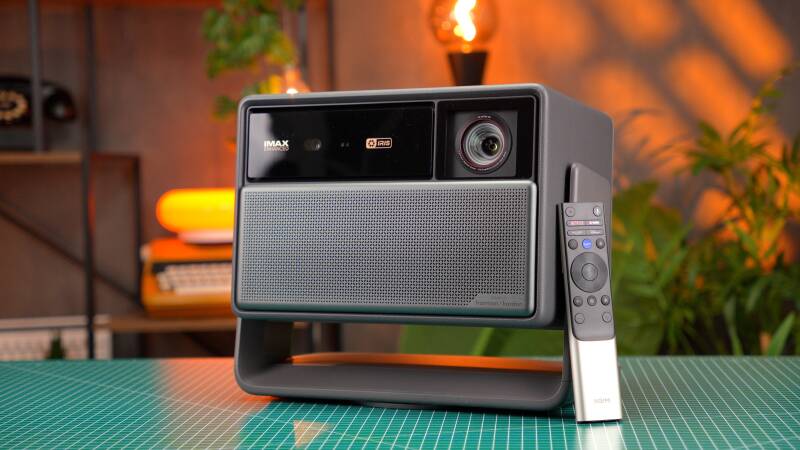
This is the flagship model in XGIMI’s latest HORIZON 30 series, combining an RGB triple-laser light source, 4K UHD projection at 120Hz, an advanced Dual Intelligent Iris system and an advertised brightness of up to 6,000 ISO lumens.
It also introduces substantial gaming capabilities, including variable refresh rate support, AMD FreeSync and exceptionally low claimed input latency.
On paper, it’s an impressive collection of technologies.
However, with a regular UK retail price of approximately £2,799, this is firmly positioned as a premium home entertainment product. At this price, buyers should expect more than an impressive specification sheet.
After spending time with the HORIZON 30 Ultra Max, exploring its picture quality, installation flexibility, gaming performance and everyday usability, it’s clear that XGIMI has produced something genuinely interesting.
There are several areas where it excels, but there are also some compromises worth understanding before investing in one.
And perhaps most importantly, the Ultra Max raises an interesting question: can a projector finally deliver the brightness, contrast and gaming responsiveness needed to become a serious alternative to a premium large-screen television?
Let’s find out.
Quick Summary
Overall Rating: 8.5/10
The XGIMI HORIZON 30 Ultra Max is an impressive premium 4K projector that combines exceptional brightness potential, vibrant RGB laser colours, flexible installation and outstanding gaming capabilities.
Its biggest improvements aren’t necessarily about brightness alone. The introduction of a dual-iris contrast system and 4K 120Hz support makes this a more versatile projector than its predecessors.
In everyday use, the picture can look spectacular, particularly with colourful 4K content, while the integrated adjustable stand and automatic image correction make installation remarkably straightforward.
Gaming is another major highlight. During testing with an Xbox and gaming PC, the projector delivered a responsive, immersive experience that felt surprisingly close to using a conventional gaming display.
However, the Ultra Max isn’t without limitations.
Black levels still fall short of the very best dark-room cinema experiences, achieving the strongest contrast requires sacrificing brightness, and the enormous external power adapter isn’t particularly convenient.
The built-in speakers are perfectly usable, but a dedicated sound system would be preferable for a projector at this price.
Ultimately, this is an excellent all-round projector for people who want a genuinely large image without compromising too heavily on gaming performance or everyday convenience.
Best for: Home cinema enthusiasts, console gamers, PC gamers and anyone wanting a premium large-screen entertainment experience.
Biggest strengths: Brightness, colour reproduction, 4K 120Hz gaming and installation flexibility.
Biggest weaknesses: Premium pricing, imperfect black levels, brightness-versus-contrast compromises and the bulky external power supply.
What’s in the Box?
First impressions are important, particularly when purchasing a projector costing nearly £3,000.
Thankfully, XGIMI has put some thought into the unboxing experience.
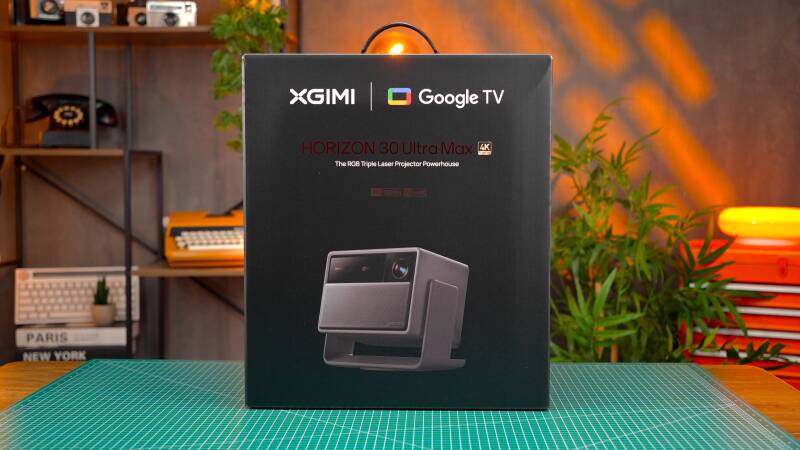
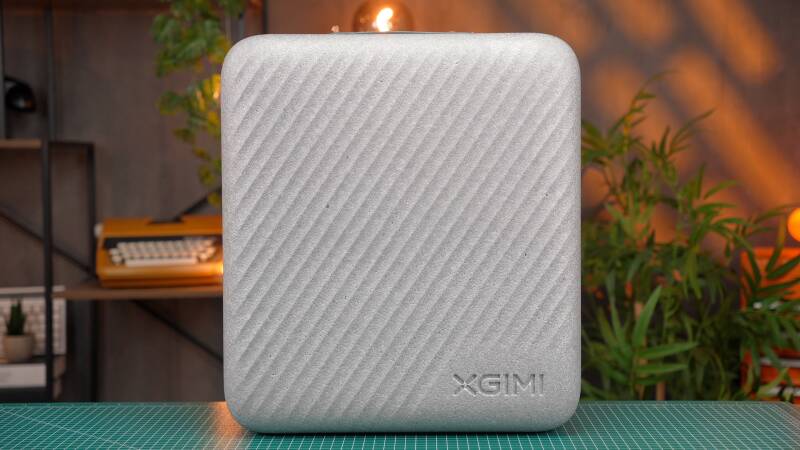
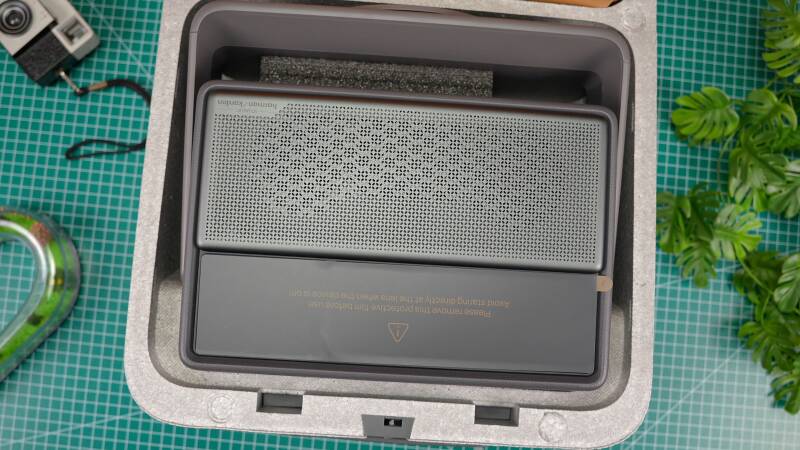
Rather than simply opening a cardboard box and removing the projector from protective packaging, you’re greeted by a rather attractive carrying case.
It’s a thoughtful inclusion that immediately makes the package feel more premium.
Inside the box, you’ll find:
- XGIMI HORIZON 30 Ultra Max projector
- Protective carrying case
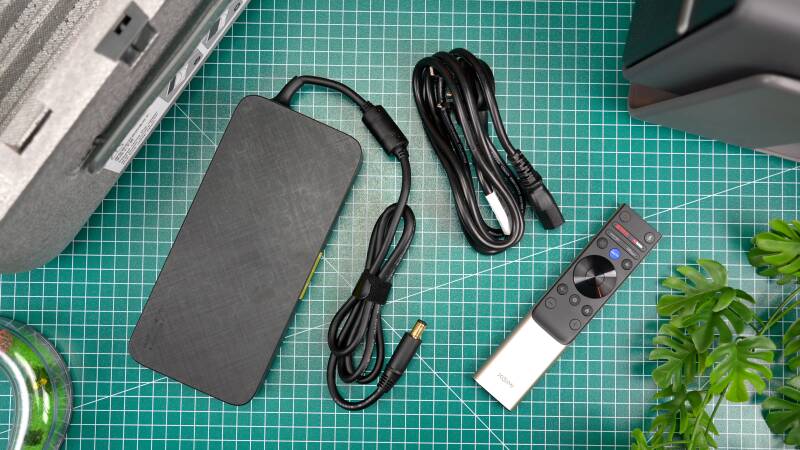
- External power adapter
- Power cable
- Backlit Bluetooth remote control
- Two AAA batteries
- User manual
- Warranty documentation
The carrying case is particularly welcome.
Realistically, most people purchasing a projector in this category will probably install it in a relatively permanent position. However, having a dedicated case makes storage easier and offers some additional protection if you occasionally move it between rooms or take it somewhere else.
It’s also a useful reminder that, despite its high-end specifications, the Ultra Max is designed to be more flexible than a traditional permanently mounted cinema projector.
There is one accessory that immediately stands out, though, and unfortunately not for the right reasons.
The external power adapter is enormous.
It’s considerably larger than you might expect, and although it serves an important purpose, it isn’t particularly convenient when trying to create a clean entertainment setup.
Ideally, an expensive home cinema projector would integrate its power supply into the main chassis.
Of course, there are engineering considerations involving heat management, internal space and cooling, but it’s still something worth considering when deciding where the projector will live.
Fortunately, the projector itself makes a much better first impression.
Design & Build Quality
A Premium Design That Doesn’t Try Too Hard
One thing XGIMI generally does well is creating projectors that look like modern consumer technology rather than industrial equipment.
The HORIZON 30 Ultra Max continues that approach.
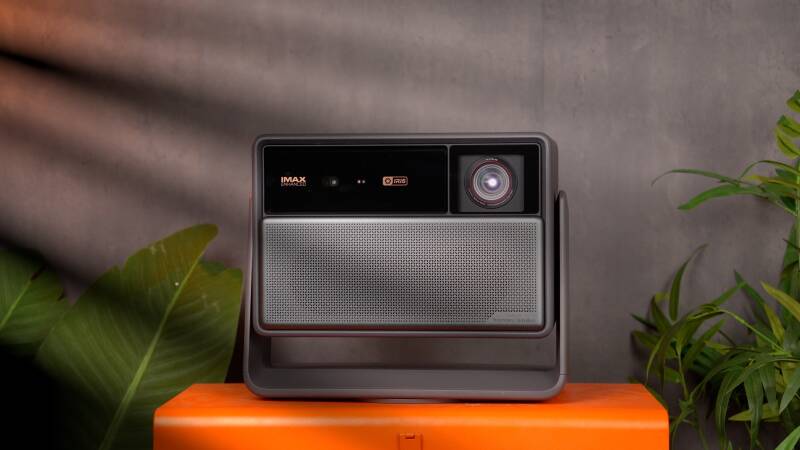
Its design is clean, understated and relatively minimalist, with a premium appearance that should blend comfortably into a modern living room.
There aren’t unnecessary decorative elements or an excessive number of visible controls competing for attention.
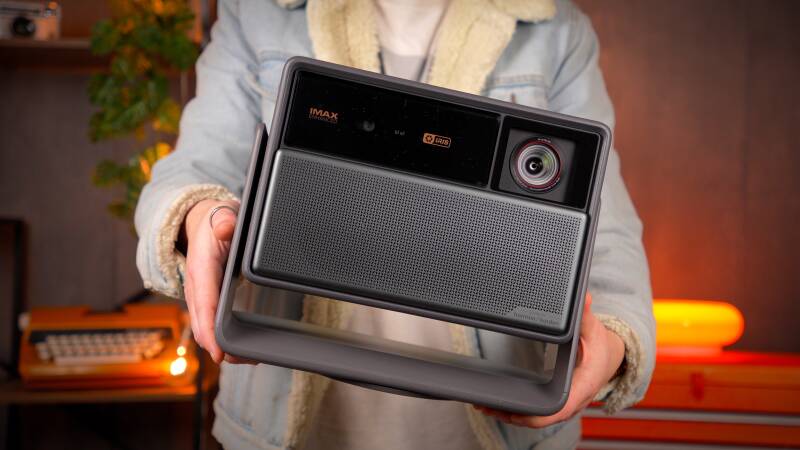
Instead, the focus is on the projector’s substantial optical system and its distinctive integrated stand.
The chassis measures approximately 298mm wide, 249mm high and 190mm deep, with a weight of around 5.4kg.
That makes it reasonably compact considering the technology inside.
It’s certainly substantial when you pick it up, but it doesn’t feel unnecessarily heavy for a projector offering this level of brightness and optical adjustment.
The overall construction feels reassuringly solid, and the finish gives the impression of a carefully designed premium product.
The Integrated Adjustable Stand Is Excellent
Perhaps my favourite aspect of the design is the built-in adjustable stand.
Rather than requiring a separate projector mount, the Ultra Max incorporates a rotating support system that allows you to adjust its position horizontally and vertically.
XGIMI advertises up to 360 degrees of horizontal rotation and 135 degrees of vertical adjustment.
In practical terms, this makes positioning the projector considerably easier.
You can place it on a suitable table, cabinet or dedicated stand, rotate it towards your projection surface and adjust the vertical angle until the image is roughly where you need it.
It’s an elegant solution.
And for anyone who doesn’t particularly fancy drilling holes into their ceiling or installing a complicated mounting system, it’s a major advantage.
The stand also feels reassuringly stable during adjustment, which is important when you’re positioning a relatively expensive projector.
This flexibility makes the Ultra Max especially attractive for living-room installations where furniture placement and room layout may not be ideal.
Connectivity: Good, but Not Exceptional
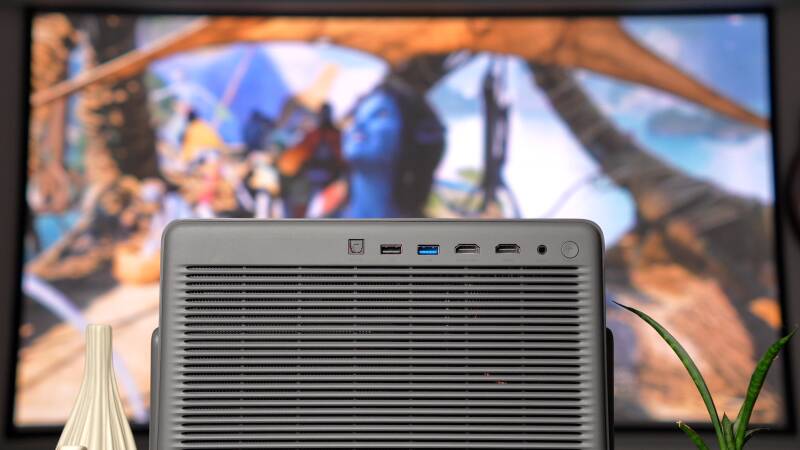
Around the back, XGIMI has included a sensible selection of connections.
You get:
- Two HDMI inputs supporting 4K at 120Hz
- HDMI eARC support on HDMI 1
- One USB 3.0 port
- One USB 2.0 port
- Optical digital audio output
- 3.5mm analogue audio output
- DC power connection
For most straightforward home entertainment setups, this should be sufficient.
Having two HDMI connections capable of accepting 4K 120Hz signals is particularly useful if you own multiple gaming devices.
For example, you could connect an Xbox Series X and a gaming PC without constantly swapping cables.
The inclusion of HDMI eARC is equally welcome, allowing you to connect a compatible soundbar or AV receiver.
However, there is a limitation.
Two HDMI ports aren’t particularly generous for a projector costing this much.
If you’re planning to connect multiple consoles, a gaming PC, a separate streaming device and an external audio system, you’ll quickly run out of connections.
Because HDMI 1 also handles eARC, connecting a soundbar directly can leave just one HDMI input available for video sources.
An AV receiver or HDMI switch can solve the problem, but it’s an additional consideration for buyers building a more complicated setup.
Overall, the connectivity is perfectly adequate, although an additional HDMI input would have made the Ultra Max more versatile.

Setup & First Impressions
One of the Easiest Premium Projectors to Position
A projector can produce the most impressive picture imaginable, but that means very little if getting everything aligned becomes a frustrating experience.
Thankfully, installation is one of the HORIZON 30 Ultra Max’s strongest qualities.
XGIMI has developed a comprehensive automatic setup system that includes:
- Automatic focus
- Automatic keystone correction
- Intelligent screen alignment
- Obstacle avoidance
- Wall colour adaptation
- Intelligent eye protection
These features are designed to simplify the process of getting a properly focused and correctly positioned image.
And in practice, they work together extremely well.
The basic process is straightforward.
Place the projector on a suitable surface, adjust the integrated stand towards your screen or wall, switch it on and allow the automatic adjustments to do their job.
Within a couple of minutes, it’s possible to have a properly focused and neatly aligned image without spending ages navigating through menus.
That’s particularly convenient if you occasionally move the projector between rooms.
However, the automatic features aren’t the only reason installation is so flexible.
Optical Zoom and Lens Shift Make a Real Difference
The Ultra Max includes 1.25× optical zoom, with a throw ratio of approximately 1.2–1.5:1.
It also offers extensive optical lens shift, with XGIMI specifying vertical adjustment of up to ±130% and horizontal adjustment of up to ±50%, subject to the optical system’s positioning limits.
These are particularly useful features.
Unlike digital keystone correction, which electronically reshapes the image, optical zoom and lens shift allow you to adjust the picture through the projector’s optical system.
That means you can reposition the image without relying as heavily on digital manipulation, helping preserve the available image detail.
It’s especially valuable if the projector cannot sit perfectly centred in front of your screen.
Perhaps your cabinet is positioned slightly to one side, or the projector needs to sit higher than the ideal projection position.
Optical lens shift gives you much more freedom to accommodate those situations.
There’s also lens memory, which allows you to save different lens configurations for particular viewing arrangements.
This can be useful for anyone switching between different screen formats.
How Much Space Do You Need?
One important consideration is that the Ultra Max is not an ultra-short-throw projector.
You still need a reasonable amount of distance between the projector and your screen.
Based on its advertised throw ratio, approximate projection distances for a 16:9 image are:

These are calculated lens-to-screen distances, so it’s worth checking your room dimensions carefully before purchasing.
XGIMI advertises support for images up to 300 inches, although that doesn’t necessarily mean everyone should aim for the maximum size.
A smaller screen can provide a more concentrated, brighter-looking image, while larger projections place greater demands on brightness, optical sharpness and room lighting.
For many living rooms, something around 100–150 inches is likely to be a more practical target.
Overall, installation flexibility is a genuine highlight.
The combination of optical adjustment, automatic image correction and the integrated stand makes this one of the most convenient aspects of the Ultra Max experience.
Features & Performance
Picture Quality: Vibrant, Detailed and Impressively Cinematic
Ultimately, picture quality is what matters most.
And this is where the HORIZON 30 Ultra Max starts to justify its premium positioning.
At the heart of the projector is XGIMI’s RGB triple-laser light source.
Rather than relying on a conventional lamp-based illumination system, the Ultra Max uses separate red, green and blue laser light sources.
The result is a particularly vibrant image, with rich colours and an impressive sense of visual impact.
Colourful 4K content looks fantastic.
Bright landscapes, animated films, colourful environments and high-quality HDR footage all benefit from the projector’s ability to produce intense, saturated colours across a very large image.
There’s a sense of scale and visual presence that makes watching the right content genuinely enjoyable.

Wide Colour Gamut and Picture Accuracy
XGIMI advertises colour coverage equivalent to 110% of the BT.2020 colour gamut, alongside a claimed colour accuracy of ΔE below 0.8 under specified conditions.
Those are impressive manufacturer specifications, although they shouldn’t be confused with independent measurements of the projector’s performance in every picture mode.
In everyday use, the most noticeable characteristic is the richness of the colours.
However, there’s an important distinction between vibrant colours and accurate colours.
RGB laser projectors can sometimes produce an overly saturated appearance, particularly when using their more aggressive picture presets.
Thankfully, XGIMI provides several picture modes and adjustment options.
These include Filmmaker Mode and ISF settings, allowing you to prioritise a more natural-looking image.
For watching films, I’d generally lean towards a cinema-oriented preset rather than automatically choosing the most colourful setting.
The Ultra Max also allows you to adjust or disable additional processing features, including AI image enhancements, sharpening and noise reduction.
This flexibility is welcome.
While additional processing can sometimes improve lower-quality streaming content, it can also introduce an artificial appearance when applied too aggressively.
For high-quality 4K films, there’s often something to be said for allowing the original image to speak for itself.
Is It Native 4K?
This is an important technical distinction.
Although the Ultra Max produces a 3840 × 2160 UHD image, it doesn’t use a native 4K imaging chip.
Instead, it incorporates a 0.47-inch DLP DMD chip, using pixel-shifting technology to create the projected 4K image.
That might disappoint buyers specifically looking for native 4K projection hardware.
However, pixel shifting isn’t automatically a disadvantage in real-world viewing.
A well-implemented DLP system can produce an extremely sharp and detailed image, particularly when combined with good optics and effective image processing.
And during viewing, the Ultra Max certainly delivers an impressive 4K appearance.
Fine details remain convincing, textures look well defined and high-resolution content has the clarity you’d expect from a premium modern projector.
For most viewers sitting at a sensible distance from a large screen, the overall picture quality is likely to matter considerably more than the underlying imaging method.
Nevertheless, buyers comparing the Ultra Max with more expensive native-4K home cinema projectors should understand the difference.
Excellent HDR Format Support
Another strength is the range of supported picture formats.
The Ultra Max includes:
- Dolby Vision
- HDR10+
- HDR10
- IMAX Enhanced
- Filmmaker Mode
- ISF picture settings
Support for both Dolby Vision and HDR10+ is particularly welcome.
Different streaming services and films use different HDR formats, so supporting multiple standards provides greater flexibility.
HDR performance is especially challenging for projectors because the available light must be spread across such a large image.
Even a very bright projector cannot reproduce HDR highlights in quite the same way as a premium television.
However, the Ultra Max’s substantial brightness helps give HDR content a pleasing sense of impact, particularly when combined with its rich colour reproduction.
The overall experience is genuinely cinematic, even if the absolute brightness and black-level performance remain different from what you’d experience on a high-end OLED television.
Dual Intelligent Iris: The Most Interesting Upgrade
One of the biggest developments in the HORIZON 30 series is XGIMI’s new Dual Intelligent Iris system.
And arguably, this is more important than simply increasing the projector’s maximum brightness.
Contrast has traditionally been a difficult area for many DLP projectors.
Even models capable of producing extremely bright images can struggle to deliver convincing blacks.
This becomes particularly obvious when watching darker films.
Night-time scenes can appear slightly washed out, dark backgrounds become grey, and shadow detail loses some of its depth.
XGIMI’s solution is to introduce a dual-iris optical system that controls how much light passes through the projector.
By restricting the light output, the projector can improve black levels and increase measured contrast.
The Ultra Max also includes Dynamic Black Level Enhancement, which adjusts light output during darker scenes.
How Much Contrast Does It Deliver?
XGIMI advertises:
Native contrast: Up to 10,000:1
Dynamic contrast: Up to 100,000:1
These are manufacturer-rated figures achieved under particular measurement conditions.
They shouldn’t be interpreted as a guarantee that every scene will display that level of contrast.
The Ultra Max provides several manual iris settings, ranging from f/2.0 to f/7.0.
And this is where things become interesting.
With the iris more open, the projector produces a brighter image.
As you close the iris, black levels improve and contrast increases, but the overall picture becomes darker.
It’s a fundamental optical trade-off.
Preliminary measurementsillustrate the difference:

The highest contrast is achieved with the iris heavily restricted, but that also means sacrificing a considerable amount of brightness.
What Does This Mean in Real Life?
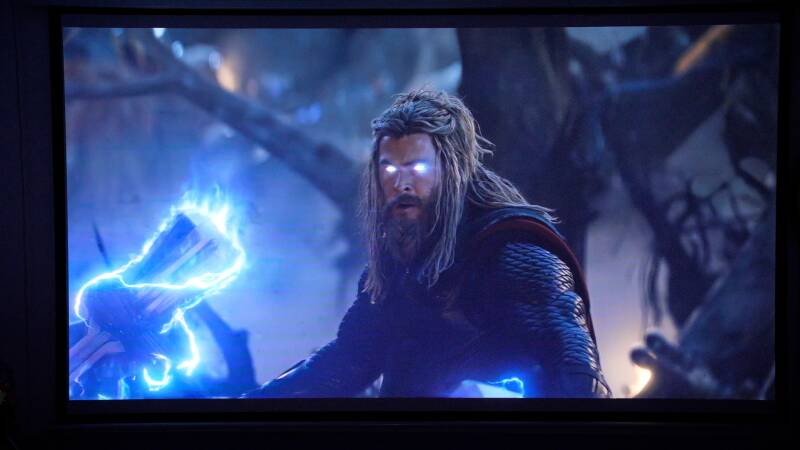
During viewing, the dual-iris system does make a worthwhile difference.
With some adjustment, the Ultra Max can deliver pleasing contrast and a more convincing sense of depth than you might expect from a brightness-focused projector.
However, the black levels still aren’t quite as deep as I’d ideally like.
This is particularly noticeable when watching darker films in a completely dark room.
There’s still some visible greyness in scenes that should appear almost black.
And while the iris system helps, it doesn’t completely eliminate the fundamental limitations of projected black levels.
Personally, I wouldn’t simply select the setting offering the highest possible contrast figure.
Instead, I’d recommend finding a balance between brightness and black-level performance that suits your room.
For a living room with some ambient lighting, maintaining more brightness may be preferable.
For a dedicated dark cinema room, a more restrictive iris setting could make sense.
The dynamic adjustment system is also worth experimenting with, as it aims to balance contrast and light output automatically.
Overall, I think the dual-iris system is a meaningful improvement.
It doesn’t transform the Ultra Max into an OLED-equivalent display, but it gives the projector greater flexibility and helps address one of the traditional weaknesses of bright DLP projection.
Brightness: One of Its Biggest Strengths
If there’s one area where the HORIZON 30 Ultra Max immediately impresses, it’s brightness.
XGIMI advertises a maximum output of 6,000 ISO lumens, making this one of the headline features of the projector.
However, it’s important to understand what that number represents.
Maximum manufacturer-rated brightness is typically achieved under specific high-output conditions.
It doesn’t necessarily reflect the brightness you’ll experience when using a more natural-looking picture mode.
During testing, I measured approximately 3,800 lumens in the normal viewing mode used for the review.
That’s noticeably below the advertised maximum, but it’s still an impressive amount of light for a home entertainment projector.
And importantly, the image remains enjoyable without needing to push the projector into its most aggressive brightness settings.
You can increase the output further, but doing so starts to affect colour reproduction.
Personally, I found the picture became less natural-looking when prioritising maximum brightness.
This is where the difference between specification-sheet performance and real-world picture quality becomes important.
A brighter image isn’t necessarily a better image.
Can You Use It During the Day?
The Ultra Max performs particularly well in environments where you can’t completely eliminate ambient lighting.
With some light entering the room, the image remains bright, colourful and enjoyable.
That makes it an attractive option for daytime television, sports and casual entertainment.
However, there are limits.
Direct sunlight will still wash out darker areas of the image.
And even with 6,000 ISO lumens advertised, you shouldn’t expect the projector to compete with a premium television in a brightly sunlit room.
A suitable projection screen, sensible positioning and some control over ambient light will make a significant difference.
For anyone considering a 120-inch or 150-inch screen, though, the additional brightness is genuinely valuable.
It gives the Ultra Max more flexibility than a lower-output projector, particularly when you want to enjoy a large image without sitting in complete darkness.
Brightness Versus Contrast
Interestingly, the Ultra Max’s greatest strength isn’t necessarily its maximum brightness alone.
It’s the ability to combine substantial light output with adjustable contrast.
You can prioritise brightness for sports, gaming and daytime viewing, then adjust the iris and picture settings when watching films in a darker environment.
That versatility is what makes the projector particularly appealing.
It won’t deliver perfect blacks, but it offers a useful balance between brightness, colour and contrast across different types of content.

4K 120Hz: Smoother Films and Outstanding Gaming
Another major improvement is support for 4K resolution at 120Hz.
This is particularly significant because the previous HORIZON 20 generation was limited to 4K 60Hz.
And while 120Hz is often associated with gaming, it can also benefit film playback.
Why 120Hz Matters for Films
Most films are produced at 24 frames per second.
Because 120 is an exact multiple of 24, a compatible 120Hz display can show each film frame five times.
This creates an even 5:5 frame cadence, avoiding the uneven timing associated with traditional 3:2 pulldown.
The difference isn’t necessarily dramatic, but it can help produce more consistent motion.
It’s worth noting that the projector’s 4K 120Hz capability requires a compatible HDMI source. Built-in streaming playback doesn’t automatically operate at 4K 120Hz.
The Ultra Max also includes MEMC motion interpolation.
This creates additional frames to make movement appear smoother.
For sports, it can be useful.
Football, racing and other fast-moving content can benefit from the additional smoothness.
For films, however, I’d generally prefer to keep motion interpolation disabled or set relatively low.
Aggressive interpolation can introduce that artificial, overly smooth appearance commonly referred to as the soap opera effect.
It’s a matter of preference, but having the option is certainly welcome.
Gaming Performance: A Genuine Highlight
If there’s one area where the Ultra Max surprised me most, it’s gaming.
I’ve always been somewhat sceptical about using projectors for serious gaming.
The enormous screen is undeniably appealing, but historically, the trade-offs have included higher input latency, limited refresh rates and less responsive controls.
The HORIZON 30 Ultra Max addresses many of those concerns.
It supports:
- 4K gaming at 120Hz
- 1080p gaming at 240Hz
- Variable Refresh Rate (VRR)
- Auto Low Latency Mode (ALLM)
- AMD FreeSync
- Dedicated gaming picture modes
- Black Equalizer
- Virtual crosshair options
XGIMI also advertises extremely low input latency.
Its published figures include:

Xbox and PC Gaming Experience
Having tested the Ultra Max with both an Xbox and gaming PC, I was genuinely impressed.
At 4K 120Hz, the experience feels remarkably responsive.
Controls react quickly, movement looks fluid, and the sheer size of the image makes games feel incredibly immersive.
There’s something particularly enjoyable about playing a visually impressive game on a screen measuring well over 100 inches.
Racing games feel more involving, cinematic adventures become more atmospheric, and fast-moving games benefit from the higher refresh rate.
Most importantly, I didn’t feel as though I was making a major responsiveness compromise simply because I was using a projector.
That’s a significant achievement.
Is 1080p 240Hz Worth Using?
The 1080p 240Hz option is particularly interesting for competitive PC gaming.
If you’re playing a fast-paced shooter and prioritise refresh rate over resolution, having that flexibility is useful.
However, for most games, I’d personally stick with 4K 120Hz.
The additional sharpness makes a noticeable difference on a large projected image, while 120Hz already provides an excellent level of fluidity.
VRR and FreeSync are also valuable additions, helping compatible systems maintain smoother motion when frame rates fluctuate.
Can It Replace a Gaming Monitor?
For casual and enthusiast gaming, the Ultra Max is genuinely impressive.
However, I wouldn’t necessarily replace a dedicated high-refresh-rate gaming monitor if competitive performance were my main priority.
A monitor still offers practical advantages, including a smaller field of view, direct desktop positioning and display characteristics designed specifically for competitive play.
There’s also the question of whether every advertised gaming feature works simultaneously in every resolution, HDR format and source configuration.
Those combinations deserve further testing.
Nevertheless, for someone who enjoys both gaming and home cinema, the Ultra Max is an extremely compelling option.
Gaming is arguably one of the strongest reasons to consider this projector over a more traditional cinema-focused alternative.

Smart Features: Google TV Makes Life Easier
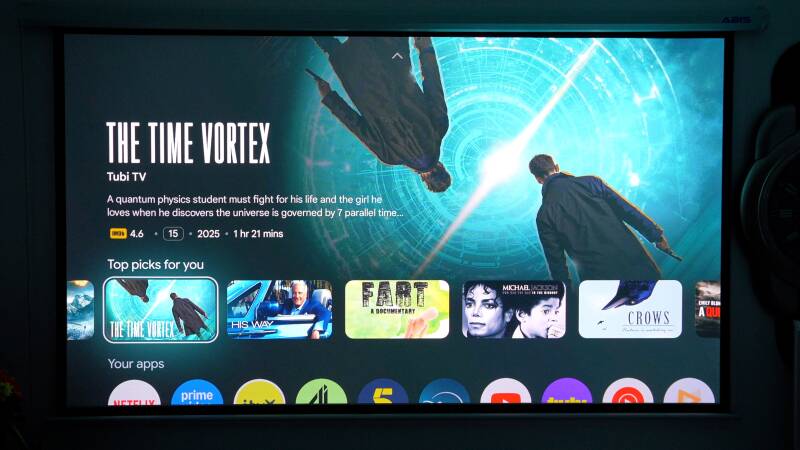
The HORIZON 30 Ultra Max runs Google TV, which is excellent news for anyone wanting a straightforward entertainment experience.
I’ve used plenty of projectors with proprietary operating systems over the years, and some can be frustrating.
App availability can be limited, interfaces sometimes feel dated, and navigating through different streaming services isn’t always particularly enjoyable.
Google TV largely removes that inconvenience.
You get a familiar interface, access to compatible streaming applications and the ability to manage your entertainment directly through the projector.
That means you don’t necessarily need an external streaming stick or media player.
Hardware and Wireless Connectivity
Inside, the Ultra Max includes:
- MediaTek MT9679 processor
- Mali-G52 graphics
- 3GB RAM
- 64GB internal storage
- Wi-Fi 6
- Bluetooth 5.2
- Google Cast
- DLNA support
The 64GB of internal storage is particularly generous for a projector.
It provides useful space for applications and system data, although actual available storage will be lower once the operating system is accounted for.
Google Cast is another welcome addition, making it easy to share compatible content from supported devices.
In everyday use, the Google TV interface feels polished and straightforward.
It’s the sort of system that makes the Ultra Max feel like a complete entertainment product rather than simply a display requiring additional equipment.
However, streaming app availability and supported playback formats can vary, so buyers with particular requirements should check compatibility with their preferred services.
Overall, the smart TV experience is another strong point.
Sound Quality: Good Enough, but Not Quite Cinema-Level
The Ultra Max includes a pair of 12W Harman Kardon speakers, providing a combined rated output of 24W.
It also supports several audio technologies, including Dolby Audio and DTS Virtual:X.
For integrated projector speakers, the system is perfectly reasonable.
Dialogue is clear enough for everyday television, and there’s sufficient output for watching YouTube, streaming programmes and enjoying the occasional film.
This makes the Ultra Max particularly convenient when you don’t want to connect a separate sound system.
For example, if you’re moving the projector into another room for a casual film night, the built-in speakers are more than capable of getting you started.
However, there’s a difference between acceptable integrated audio and a genuinely immersive home cinema sound system.
And with a projector capable of producing such a large, impressive image, I think the audio deserves something more substantial.
A dedicated soundbar or AV receiver with separate speakers would provide greater scale, deeper bass and a more convincing sense of immersion.
Fortunately, the inclusion of HDMI eARC and optical audio output makes connecting external equipment straightforward.
My recommendation would be to use the built-in speakers for casual viewing, but consider a dedicated audio system if you’re building a permanent home cinema setup.
At this price, it’s worth making sure the sound matches the quality of the picture.
Real-World Experience: Where the Ultra Max Really Makes Sense
After spending time with the HORIZON 30 Ultra Max, one of the things I appreciate most is how well it combines features that are often found in very different types of projectors.
Traditionally, buyers have had to make a choice.
You could purchase a cinema-focused projector designed primarily for dark-room movie watching, or choose a brighter, more convenient lifestyle projector that prioritises ease of use.
The Ultra Max attempts to bridge that gap.
And in several important areas, it succeeds.
Everyday Living-Room Entertainment
For a multipurpose living room, the Ultra Max makes a strong case for itself.
The high brightness gives you flexibility when watching television or sports with some ambient light.
Google TV means you can access entertainment without additional devices.
And the integrated speakers make casual viewing straightforward.
It’s a convenient combination.
You don’t necessarily need a dedicated cinema room to enjoy what the projector offers.
However, you will still benefit from controlling room lighting, particularly when watching darker films.
Film Nights
For films, the Ultra Max can look spectacular.
The RGB laser system produces rich colours, the projected image has plenty of detail, and HDR content benefits from the available brightness.
Watching a good-quality 4K film on a properly sized screen is genuinely impressive.
The main limitation remains black-level performance.
Although the dual-iris system improves contrast, darker scenes can still reveal the limitations of the technology.
For someone who primarily watches atmospheric films in a completely dark room, black-level performance may be more important than maximum brightness.
That buyer should carefully consider whether a dedicated cinema projector would be more appropriate.
Gaming on a Huge Screen
Gaming is where the Ultra Max becomes particularly exciting.
The combination of 4K 120Hz, low perceived latency and an enormous projected image creates a fantastic experience.
And unlike some projectors that feel more suited to occasional casual gaming, this is a product I’d genuinely be comfortable using regularly with a console or gaming PC.
It’s one of the strongest aspects of the overall package.
Moving Between Rooms
Another practical advantage is the installation flexibility.
The integrated stand, optical adjustment and automatic image correction make repositioning the projector relatively painless.
You still need to account for projection distance, power and a suitable surface, but you aren’t forced into a complicated permanent installation.
That makes the Ultra Max more adaptable than many traditional home cinema projectors.
How Does It Compare With the Rest of the HORIZON 30 Series?
The Ultra Max sits above two other models in the range: the HORIZON 30 Pro and HORIZON 30 Max.
All three share several important technologies, including RGB triple-laser projection, 4K 120Hz support, Google TV and the dual-iris system.
The main differences concern advertised brightness and contrast.
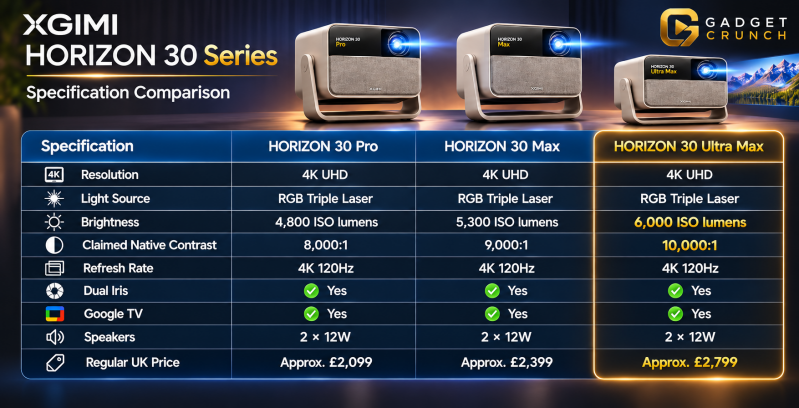
The Ultra Max offers the highest advertised brightness and contrast, but it’s important to recognise that the cheaper models retain many of the same core features.
Compared with the HORIZON 30 Max, you’re paying approximately £400 more for an additional 700 ISO lumens of advertised brightness and a higher claimed contrast ratio.
Whether that difference is worthwhile depends heavily on your setup.
If you’re projecting onto a very large screen in a living room with some ambient light, the extra brightness could be valuable.
However, if you’re using a 100-inch screen in a properly darkened room, the HORIZON 30 Max or Pro may already offer more than enough performance.
The Ultra Max is undoubtedly the flagship, but that doesn’t automatically make it the best-value option for every buyer.
What About the Previous HORIZON 20 Max?
The previous-generation HORIZON 20 Max is another interesting comparison.
It already offered an impressive advertised brightness of 5,700 ISO lumens.
The Ultra Max increases that figure to 6,000 ISO lumens, representing an improvement of approximately 5%.
That’s useful, but hardly revolutionary.
The more meaningful developments are the new dual-iris contrast system and the move from 4K 60Hz to 4K 120Hz.
For gamers, the refresh-rate improvement alone could make the newer model considerably more attractive.
For film enthusiasts, the additional contrast control is potentially more important than the modest increase in maximum brightness.
If you already own a HORIZON 20 Max and mainly watch colourful films or television, upgrading may be difficult to justify.
However, if you want better contrast flexibility and high-refresh-rate gaming, the HORIZON 30 Ultra Max offers some worthwhile improvements.
Pros
What We Like
- Impressive picture quality: Rich RGB laser colours and detailed 4K UHD projection create an excellent cinematic experience.
- Excellent brightness: Substantial light output makes the projector suitable for large screens and rooms with some ambient lighting.
- Improved contrast control: The Dual Intelligent Iris system provides greater flexibility when balancing brightness and black levels.
- Outstanding gaming performance: 4K 120Hz support and responsive real-world gaming make this a particularly attractive projector for console and PC players.
- Flexible installation: Optical zoom, extensive lens shift and automatic image adjustment make positioning considerably easier.
- Excellent integrated stand: Horizontal rotation and vertical adjustment reduce the need for complicated mounting arrangements.
- Strong HDR compatibility: Dolby Vision, HDR10+ and IMAX Enhanced provide useful flexibility for premium film content.
- Google TV built in: A polished entertainment platform with access to compatible streaming applications.
- Good connectivity for gaming: Both HDMI inputs support 4K 120Hz.
- Premium build quality: A clean, substantial design with a useful protective carrying case.
- Useful integrated speakers: The Harman Kardon system is perfectly adequate for everyday viewing.
Cons
What Could Be Better
- Expensive: At approximately £2,799, the Ultra Max represents a substantial investment.
- Black levels aren’t perfect: Despite the improved iris system, dark scenes can still appear grey compared with premium televisions or more specialised cinema displays.
- Contrast comes at the expense of brightness: Restricting the iris improves black levels but noticeably reduces light output.
- Enormous external power adapter: The bulky power brick makes cable management less convenient.
- Only two HDMI inputs: A third HDMI connection would have been welcome, particularly because one port also handles eARC.
- Not native 4K: The projector uses DLP pixel shifting rather than a native 4K imaging panel.
- External audio is preferable: The built-in speakers are reasonable, but they don’t fully match the scale of the projected image.
- Requires projection distance: This isn’t an ultra-short-throw model, so smaller rooms may struggle to accommodate larger screen sizes.
- Maximum brightness affects picture accuracy: Pushing the projector towards its highest output can produce less natural-looking colours.
- Limited long-term reliability evidence: As a relatively new model, there isn’t yet enough established ownership history to assess durability and firmware reliability over several years.
Who Is the XGIMI HORIZON 30 Ultra Max For?
The Ultra Max is a versatile projector, but its premium price means it makes more sense for some buyers than others.
1. Home Cinema Enthusiasts Wanting a Huge Screen
If you’ve always wanted a genuinely cinematic image at home, the Ultra Max is an attractive option.
Its combination of brightness, colour reproduction and HDR support makes it particularly enjoyable with high-quality 4K content.
It’s especially compelling for people who want a large screen without installing a traditional cinema projector.
However, viewers who prioritise the deepest possible blacks above everything else should also consider more specialised dark-room projection alternatives.
2. Console and PC Gamers
This is arguably the strongest target audience.
With 4K 120Hz, VRR, FreeSync and excellent perceived responsiveness, the Ultra Max offers a gaming experience that feels unusually capable for a projector.
If you enjoy cinematic single-player adventures, racing games, sports titles or multiplayer gaming, the enormous screen adds a completely different dimension to the experience.
For gamers who also enjoy films, the combination is particularly appealing.
3. People With Large Living Rooms
The Ultra Max is well suited to larger spaces where a conventional television might feel limiting.
Its brightness helps accommodate some ambient lighting, while the optical adjustments make installation more flexible.
You still need sufficient throw distance, but you don’t necessarily need a dedicated cinema room.
4. Buyers Who Value Convenience
Not everyone wants to spend hours installing and configuring a projector.
The integrated stand, automatic focus, keystone correction and screen alignment make the Ultra Max relatively straightforward to use.
Google TV and integrated speakers also reduce the need for additional equipment.
Who Should Look Elsewhere?
If you’re working with a smaller budget, the HORIZON 30 Pro or Max may offer better value.
If your room is extremely small, an ultra-short-throw projector could be more practical.
And if your priority is watching dark films in a completely light-controlled room, you may want to investigate alternatives that place greater emphasis on black-level performance rather than maximum brightness.
Finally, if you only intend to use a projector occasionally, spending nearly £3,000 may be difficult to justify.
Final Verdict: An Excellent All-Round Projector With a Few Important Compromises
After spending time with the XGIMI HORIZON 30 Ultra Max, I’ve genuinely enjoyed what it brings to the table.
There are several areas where XGIMI has made meaningful improvements, and importantly, those improvements extend beyond simply increasing the brightness specification.
The RGB triple-laser system produces rich, vibrant colours, while the projected 4K image has plenty of sharpness and detail.
High-quality films can look fantastic, particularly when you’re watching colourful HDR content on a genuinely large screen.
The brightness is another major strength.
Although the advertised 6,000 ISO lumens doesn’t represent the output I measured in normal viewing, there’s still an impressive amount of light available.
And having that flexibility makes the Ultra Max particularly useful in living rooms where complete darkness isn’t always practical.
I also really appreciate the installation experience.
The integrated adjustable stand is excellent, and combining it with optical zoom, lens shift and automatic image correction makes the projector remarkably convenient.
It’s the sort of thoughtful design that makes a difference every time you use the product.
But perhaps the biggest surprise has been gaming.
Having tested the Ultra Max with both an Xbox and PC, the responsiveness at 4K 120Hz is genuinely impressive.
It’s one of the few projectors I’ve used where gaming doesn’t feel like a significant compromise compared with a more conventional display.
And when you combine that responsiveness with an enormous projected image, the experience is fantastic.
However, there are still limitations.
Despite the clever dual-iris system, black levels aren’t quite as deep as I’d ideally like.
Achieving the strongest contrast requires sacrificing brightness, and darker films can still reveal some of the inherent weaknesses of projection technology.
The external power adapter is unnecessarily bulky, the two HDMI inputs feel slightly restrictive, and I’d definitely recommend a separate audio system for anyone creating a serious home cinema setup.
Then there’s the price.
At approximately £2,799, this isn’t a projector I’d recommend to everyone.
The HORIZON 30 Max and Pro share many of the same technologies for considerably less money, and depending on your screen size and viewing environment, they may offer better overall value.
But for the right buyer, the Ultra Max makes a compelling case for itself.
If you have the space for a large projected image, enjoy both films and gaming, and want a bright, colourful picture without dealing with a complicated installation, there’s an awful lot to like here.
It isn’t the ultimate dark-room cinema projector, and it isn’t a perfect replacement for a premium OLED television.
But it doesn’t necessarily need to be.
The HORIZON 30 Ultra Max succeeds because it combines impressive home cinema performance, outstanding gaming capabilities and genuine everyday convenience in one carefully designed package.
And for someone who wants all three, that’s a combination worth taking seriously.
Gadget Crunch Rating: 8.5/10
Best Feature: 4K 120Hz gaming performance and flexible installation.
Biggest Improvement: Dual Intelligent Iris contrast control.
Biggest Drawback: Premium pricing and imperfect black levels.
Best For: Enthusiasts wanting a premium, large-screen projector for both gaming and home cinema.
Final Recommendation: Highly recommended for buyers who will take full advantage of its brightness, gaming capabilities and installation flexibility. Those focused purely on film viewing or value for money should also consider the less expensive HORIZON 30 models.
Watch the full cinematic video review on Gadget Crunch’s YouTube channel.
Add comment
Comments